Let’s have some statistics. 95% of text messages are read within the first 3 minutes after it is received. Short text messages open rate is nearly 98%, in comparison with the email – open rate is 22%. Today, almost everyone has a phone. And many have more than one device. This means that you can deliver an offer directly to your customer with a very high hit rate. The most interesting thing is that 90% of entrepreneurs do not use SMS-mailing. Are you one of them?
Here are a few reasons why you should set up your automated text message campaign today:
Automated text messages have high open-rate.
We’d like to mention this unbelievable power again. Yes, 98 out of 100 of your customers who have accepted the subscription to your SMS mailing list will open the message. The reason is that the text of the SMS is very short and it takes several seconds to read it. Convenience and valuable information is your key to success.
Most consumers are willing to receive SMS.
According to the studies, 14% of people consent to receive an automatic text message from the brand for no reason at all. What if you’ll add to the text message some incentive (bonus/coupon/gift)? This rate will grow to 57%. Using games and various activities and notifying your customers about it by SMS, you can grow the number of potential customers who are ready to buy.
The unsubscribe option.
Very few marketing channels do provide you control over the bounced customers. As a result, the company is spending enormous funds on ineffective advertising, and hardly engaged audience. Because of too much information, customers have learned to shield themselves and not perceive advertising. In SMS marketing, a person can always opt-out of a mailing list. We recommend you to give your customers this choice, no matter how hard it is for you to lose several potential customers. As a result, your auto text messages are sent only to those who are interested in it. The channel works more efficiently, the number of conversions raises and less money is spent on promotion campaigns.
Regular SMS campaigns help to retain clients.
Marketing is not just about gaining new customers. Building connections with old customers is an easy way to boost sales. Broadcasting automated text messages to customers is a type of communication with the audience that helps develop loyalty to your brand.
The use of mobile devices.
Now everyone owns a smartphone. This makes it a perfect platform for interacting with a large audience. You can easily present information to even the most remote client.
How To Automate Texts Messages Sending?
Let’s first define SMS marketing automation – it is the capability to automatically send text messages according to the schedule. All you need to do is write the text of SMS, upload the list of recipients, and set the sending date in the text message scheduler.
Reasons to Use Auto SMS Sender
Text message automation sending allows you to schedule text messages broadcasting (notifications, reminders or alerts) automatically for any occasion (birthdays, new year greetings, and other notifications that will be repeated).
This feature is also useful for entrepreneurs and businesses since you can automate notifications about an appointment, for example.
To do this, you just need to set up an SMS campaign once, and then your subscriber will receive a message on the desired dates and at the specified time automatically. You can also automate your campaigns to be sent repeatedly at the same time ones a year, but for this, you need to develop a script that will make the SMS system repeat the campaigns. Usually, this is done by software developers.
Perform short message sending by splitting the entire customer base into small segments and sending each segment the text message that best meets its needs.
Consequently, the client (a stable one) will not consider these automated text messages as spam. In the first step, we determine the entire client base that should be sent out (for example, we have not contacted the client for a long time, or there some events worth notifying). Then we select a small segment of clients from the entire selected client group based on some similar criteria, adapt the text of the message to it and send it, but the clients are excluded from the selection, and we select a new segment. We do this until the selection is complete.
In e-commerce, customer segmentation refers to the use of customer data to divide customers into groups that share the same behavior and characteristics such as gender, taste or shopping patterns, interests, and more.
Segmenting customer base helps in better understanding the customers and thus personalizing marketing and communication for each segment. This is very beneficial because people tend to respond better and be of greater value to your business when they feel their needs and interests are being specifically addressed.
Here are some of the key benefits that customer segmentation brings to online retailers that incorporate it into their marketing strategies:
Benefits of Customer Segmentation in e-commerce
Higher conversion rates
Customers are more likely to buy from you when your marketing messages are relevant to their circumstances and interests.
Long-term revenue from customers
Acquiring new customers is costlier than retaining the ones you already have – focusing on increasing the lifetime value of each customer as much as possible by making your marketing contextual is a key driver of long-term profitability. By knowing products your customers buy over their time, their Customer Lifetime Value (CLV) could be calculated and appropriate retention strategies could be implemented for every segment.
Better insight into your customer base
Examining the performance of certain customer segments provides important insight into the health of your customer base, enables you to spot trends and patterns in what’s working and what isn’t, and can help inform your strategy going forward. Segmenting customers by-products could yield deeper insights into the buying behavior.
Helps in Acquiring Customers
Discover high-value and low-value segments and adjust your acquisition marketing accordingly. Manage limited resources efficiently by focusing efforts on the customers who are more likely to buy your product.
Improve Customer Satisfaction and retention
Make customers feel they are special and that they are always getting a deal.
Tailor and develop existing products and services to meet the particular needs of a certain segment.
Solve and compensate for problems and ensure complete satisfaction.
Understand your customers’ needs and base your recommendations accordingly.
Have more effective targeted and timely marketing messages.
Increase customer retention and loyalty.
Conclusion
So that how the customer segmentation have work and benefited your customer journey from higher conversion rate to help in customer satisfaction.
Many companies are turning to eCommerce automation to save time and money and increase sales. Discover our top 8 benefits of automation in this blog post!
For a small or medium online business, success is based on being able to easily perform a number of functions. To make things easy, many companies are turning to eCommerce automation to save time and money and increase sales.
Automation can be applied to all parts of a business, from marketing and sales to fulfillment and customer services. Since the retail business can be repetitive, managing all these functions automatically can make things run much more smoothly and improve the quality of the service you provide.
Small businesses don’t have the resources that large companies have and working with limited resources means a lot of labor-intensive work. By investing in eCommerce automation, you can streamline your business process.
What is eCommerce Automation?
Simply put, this involves using software applications or tools to complete tasks automatically rather than doing them manually. By using these programs to do most of the heavy lifting for your business, you can focus on more important tasks and decision-making processes. Not only will this complete a lot of work for you, but it will also be done faster and cheaper. You can use an eCommerce automation system to simplify different aspects of your business such as:
Inventory management
Selling on online platforms
Accounting and bookkeeping
Marketing
Order fulfillment
Shipping
Customer service
Returns and refunds
Email marketing for cart abandonment
Analytics and data collection
Workflow management
What Are The Benefits of Automation in eCommerce?
Automation can smooth and solve a lot of issues in eCommerce. Small companies can benefit from automation the most as they often have few financial and human resources. Here are a few ways your business could benefit by using eCommerce automation tools.
It saves a lot of time
It makes your business processes faster and easier
You can easily manage your inventory by linking your ERP and POS systems
You can offer a better customer experience with multiple fulfillment, drop-shipping, easy returns, and improved customer service
It reduces business costs as you’ll need fewer employees and less training
You can focus on more important aspects of your business that involve decision-making and strategy
It helps increase sales
It makes marketing easier with automated emails and scheduled social media
What Are The Best eCommerce Automation Tools?
The online retail process begins the moment your customer goes online to search for a product. Whether your customer becomes interested in buying from you depends largely on how your product is marketed. Luckily, you can automate most parts of this process to make it more efficient and cost-effective. Here are some of the top eCommerce automation tools you could consider using:
Contalog: This powerful tool helps with inventory and order management. It can monitor stock levels and communicate with your sales channels so you always know what your inventory looks like.
InfusionSoft: This all-in-one tool can be used to access some 200 apps and platforms and is particularly useful for eCommerce marketing automation.
OptinMonster: If you want to easily improve conversions, this could be a very powerful tool for your business. Its scroll boxes and exit intent popups can help you get more subscribers and conversions.
MailChimp: A popular email automation program, Mailchimp is great for managing your email campaigns.
ZenDesk: This is a popular CRM tool that can help you integrate different functions of your online store. Plus, it has very powerful customer service and engagement features.
Google Alerts: In the competitive world of eCommerce, it’s important to keep an eye on your competition so you always have a gauge of how your company is doing in the market. That’s why signing up for Google Alerts can be useful – you can keep track of what your competitors are doing by getting an email alert for updates on their internet mentions and stores.
IFTTT: This easy-to-use eCommerce marketing automation tool lets you push out posts to various social media channels and allows you to schedule them so you can simply set and forget.
9 Steps for Automating Your eCommerce Business
Now that you know what eCommerce automation is and how it can help your business – and even what tools you could use – it’s important to understand exactly how to implement automation into your business. Here are a few steps you can take:
1. Reduce cart abandonment
Cart abandonment is a problem for every online business. But eCommerce automation can fix this by identifying when visitors leave your store without adding anything to the cart and then automatically sending out emails or push notifications to encourage conversions. You won’t convert all your abandoned carts into sales, but you can certainly improve your numbers.
2. Automate reviews
Customer reviews can be a very useful marketing tool as they have more power to convince than the average marketing campaign. You can automate the review process by setting up automatic emails requesting reviews as part of the post-purchase process and integrating these into your product pages.
3. Automate inventory management
Managing inventory can be tricky, especially if your stock is stored in different places. By integrating automation tools with your CRM and POS, you can automatically keep an eye on your inventory in real-time.
4. Automated invoicing
There are many payment gateways like PayPal and tools like Due and Quickbooks that allow you to automate invoices. Most of these can also be integrated with eCommerce platforms and are useful for record-keeping. It’s a very efficient way to keep track of your finances.
5. Use AI to automate customer services
Artificial intelligence can be used to automate your business’s interactions with your customers. For example, you can use live chats on your websites. Not only does this make managing your customer service easier, but it also improves the customer experience because they can easily get the answers they need.
6. Marketing automation
This is becoming an increasingly important part of any online business’s marketing strategy. There are numerous tools to help you automate your emails and social media, giving you an easy omnichannel marketing strategy that can help you achieve 90% higher customer retention and 250% higher purchase rate.
7. Automate accounts
This is linked to automating your inventory. Accounts are the part where finances are handled for procurement, investments, and sales. All this data is centralized and linked for better data sharing. Translation: you’ll easily find everything you need come tax time.
8. eCommerce fulfillment automation
Fulfillment is the part of the eCommerce business when you have to pick and pack the order and deliver it on time to the correct address. Using eCommerce fulfillment automation tools can save you a lot of time, money, and effort. You can easily scan and print shipping labels, send tracking information, and streamline returns.
9. Handling refunds and replacements
Returns are an inevitable part of any online business, but how you handle them can make a big difference. If you help your customers handle returns easily, you may find they return to your store for other products. Set your store up so that you can automatically identify what returns are eligible for replacements or refunds, for example.
Marketing automation tool remain a hot topic for marketing teams, and with good reason. According to numbers compiled by Emailmonday, it’s estimated that 49% of companies currently use automation as part of their marketing strategy, with the percentage ticking up to 55% for B2Bs. It’s no wonder, then, that marketing automation adoption continues to grow, expected to top $25 billion by 2023, according to Forrester. To put that in perspective, the spend on marketing automation was just $11.4 billion in 2017.
Impressive statistics, to be sure, but maybe we’re getting ahead of ourselves. Since Google trends data continues to reflect all-time highs in searches for “marketing automation,” there’s clearly a sustained interest in it, but maybe a little mystery, too.
Let’s take a step back and explore just what marketing automation is, and how it can benefit you.
Marketing Automation Definition
The concept of “marketing automation” isn’t necessarily easy to boil down into a few sentences, but Techopedia offers a fairly concise definition:
Marketing automation is the use of software and web-based services to execute, manage and automate marketing tasks and processes. It replaces manual and repetitive marketing processes [emails, social media, certain website actions] with purpose-built software and applications geared toward performance.
The Three Categories of Marketing Automation
There are three basic categories of marketing automation:
Marketing intelligence refers to the use of tracking codes to monitor customers’ online behaviors. Marketers can then analyze and identify patterns they will ultimately use to create behavior-based market segments. Amazon was arguably the first large enterprise to do this well. Today, most Amazon customers admit that Amazon’s knowledge of their past behaviors improves the user experience by recommending additional items of interest, sending reminders, keeping you informed about price adjustments and more.
Business development is focused on moving potential customers from the top of the sales funnel (initial awareness) to the bottom of the funnel (ready to buy). Do this by segmenting and nurturing based on interests expressed, scoring or qualifying leads based on fit and intent, and attempting to close based on a combination of behavioral and attitudinal measures. Automated business development relies on email, social media, search engine optimization and content marketing to make it work. Before you deploy these tactics, however, you need to:
Identify lead qualifications
Develop a lead nurturing strategy
Workflow automation generally refers to internal processes like budgeting, the marketing calendar, digital asset management, and everything else that large enterprises need to run sizable, complex marketing departments.
While the third category has been leveraged by mega-brands like Procter & Gamble, General Mills and other giant marketers, workflow automation technology has become much more accessible to small businesses and midsize organizations. Still, the vast majority of businesses will derive the greatest impact from tools and processes available from marketing intelligence and business development.
Why? Marketing intelligence and business development focus on the top line, which is where most businesses need help today.
The Benefits of Using Marketing Automation Software
There’s a lot of data to prove the benefits of marketing automation and lead generation. For example, companies that use automation to manage their leads can expect a 10% or more bump in revenue within 6-9 months. Likewise, businesses that nurture leads — say, with targeted email campaigns — make 50% more sales at a cost that’s 33% less than non-nurtured prospects.
In addition to the obvious financial impact, marketers say that the biggest benefit of automation is saving time. These benefits will only compound in coming years, since 67% of marketing leaders currently use a marketing automation platform and an additional 21% plan to implement one in the next two years.
In a nutshell, here are some of the most powerful marketing automation benefits that businesses can expect:
Increased qualified leads, at a lower cost per lead
Improved customer retention and relationships
Improved marketing and sales alignment
Demonstrated strength in marketing ROI
Beyond the Data — Automation Improves Relationships
Some indirect benefits of marketing automation that we’ve witnessed with clients extend to the impact on their corporate culture and team attitudes. Sales professionals, for example, discover just how much more rewarding it is to work with warm qualified leads as opposed to cold calling from low quality purchased lists. Plus, those leads can be integrated with customer relationship management (CRM) software and populate a lead’s record with relevant information.
For example, did a lead visit a landing page and download an eBook about the benefits of your product or service? Did they read a blog about how to choose a vendor? Having that kind of customer data is virtual gold to your sales team and can be the fuel that starts a conversation. Another benefit to sales is that they get less pushback on pricing because the leads are of higher quality.
For anyone interested in learning more about the marketing automation tool options available, your research should start with insights found in reviews. For example, G2|Crowd, a third party software reviewer, ranks HubSpot, Omnisend, Marketo, Pardot, RD Station, Act-On, ActiveCampaign and others among the top performers.
As a Platinum HubSpot partner, we can attest to its ease-of-use and ability to get results. If you’re getting started with marketing automation, keep going, it’s worth the effort. And if you haven’t started yet…what are you waiting for? We’re happy to introduce you to the world of inbound marketing and automation. Just reach out.
Marketing has been around for a very long time. Think about it. Since people first started engaging in commercial trade, they’ve learned how to develop unique selling propositions and sales strategies to maximize the perceived value of their offerings.
When we look at marketing technology, we can see that it’s enabled various channels such as print media, radio, and television for marketers to reach their audiences. Back in the day, these technologies were highly innovative and provided huge opportunities for brands to communicate. Fast forward to now, these channels have become common contributors to many, many marketing strategies.
The new technological age has also brought about the inception of the internet. Since the early 90’s the internet has evolved into the most flexible marketing channel we’ve ever seen. As a customer, you’ve seen online ads, search engine rankings, social media, and hundreds of different content marketing formats.
The dynamic nature of the internet has caused a massive shift in media consumption habits. The traditional channels of television, radio, and print media have seen a decline in usage as more users start looking at online platforms as their primary sources of media. This is great for marketers because online channels allow for better targeting, tracking, and analytics. It facilitates the increased adoption of various marketing automation software, allowing brands to grow more cost-effectively.
The birth of marketing technology happened sometime in the 80’s, when computers became powerful enough to store large volumes of customer information. In 1986, ACT!, a customer management company, developed the first ever database marketing software, basically a primitive CRM platform. Since then, a multitude of more sophisticated marketing automation platforms have emerged with better UIs and more useful features.
As a matter of fact, if you’re not making use of a modern marketing automation tool, you’re probably missing out on a huge opportunity to make your internal processes quicker and more efficient.
Below are the different types of marketing automation your brand needs to consider:
Customer Relationship Management Software
It’s always good news when you have a lot of customers, but it can get tiresome to manage them when you don’t have an effective system for collecting, storing, and retrieving customer data. Timely customer service is good customer service, which is why businesses are increasingly looking to CRM marketing automation software to help provide a better customer experience.
This software stores personal information such as names, job titles, company names, and email address. More importantly, information like purchase history and details of interactions between the customer and the business can be collected by a CRM software. This allows the business to personalize the interaction each customer interaction.
More popular CRM software includes Salesforce and Zoho, but the size and nature of your business requirements will determine what type of CRM tool will best fit your needs.
Email Marketing Software
Despite being one of the oldest forms of digital marketing, email marketing still provides the best ROI in the business. So it should be no surprise to learn that it’s also the most widely used digital marketing channel. However, one of the main issues with email marketing is scalability, which is where email marketing software comes in.
Email marketing tools allow you to automate the messages you send to your contacts. Whether it’s trigger-based (initiated by the email receiver) or an email blast (triggered by the email sender), these automation tools facilitate the large-scale distribution of personalized messages along with performance measurement dashboards.
But just because it’s automated, that doesn’t mean that you should let the quality of your emails drop. Most email tools allow for the personalization of subject lines, body text, and appropriate calls-to-action. You should always make the user feel like they’re the sole recipient of your email.
Many marketing automation tools have email marketing platforms built in, but if you’re looking for a standalone email marketing tool, Litmus and MailChimp are very popular choices.
Marketing Automation Software
From managing your day-to-day content to creating landing pages for your website, marketing automation platforms are your all-in-one tool. If you want to drive traffic to your website, set up marketing campaigns, or inbound marketing strategies these kinds of software have the function for you.
For example, HubSpot can set up workflows for you to map out the customer journey. Meanwhile, Marketo promotes the ability of their software to predict ROI and achieve it. And Eloqua capitalizes on their unified system where data across all channels such as paid and SEO can be tracked and analyzed.
Keep in mind that all-in-one marketing automation software can be expensive, so make sure you’ve determined the need for one before going out and making a purchase decision.
Social Media Marketing Software
Social media is one of the best channels for businesses so reach and engage with their audiences. Social media is mostly used to give quick updates about the business, blog, and sometimes, product and services. But lately, businesses have been seeing more success when keeping promotional messaging to a minimum and just using social media as a channel to promote engagement and display brand personality.
This “non-promotional” social media strategy makes it difficult to automate because the nature of being personable means not sounding like a robot, which is what automation can result in. But social media marketing tools can still be used to help with scheduling, network management, and measuring the performance of your social media efforts.
Some of the most popular tools out there right now are Buffer, Clout, and Crowdfire. All of which offer a horde of different features that you can use to optimize your social marketing efforts.
Marketing Analytics Software
Measuring the performance of marketing strategies is usually the step that marketers tend to neglect, which should be a big no-no. You should always look back at your efforts to figure out what worked and what didn’t so you can focus on the best strategies and maximize ROI.
Marketing Analytics software allows you to get usable data such as visitor behavior and activity. Further, it can combine data from different channels for easier comparison of effective channels.
Google Analytics is probably the most used analytics tool. Other popular tools being utilized in the industry now are Ahrefs, SEMRush, and Buzzsumo.
Conclusion
These types of marketing automation software are the answers to your marketing efficiency and scalability dilemmas. They’re here to assist you in efficiently launching your marketing strategies.
Don’t forget that not every tool works for all types of business. You should study each tool and identify the strengths that would best align with your marketing goals.
Once you’ve set up your marketing automation, you’re going to want to know how to create a lead generation machine.
For many marketers, marketing automation is no longer a luxury but a necessity. Stats say that 67% of marketing leaders currently automate processes. The numbers don’t come as a surprise. After all, there are countless benefits to adding automation software to your marketing efforts.
For B2B marketers, in particular, this allows you to take the guesswork out of lead nurturing. Additionally, with marketing automation, you can centralize marketing and sales, as well as personalizing user experiences at scale.
That all adds up to one thing – marketing automation allows you to make more money for less effort by increasing productivity. Considering that most of your competitors already take advantage of this, you can’t afford to ignore automation.
Having said all of this, which is the best marketing automation tool?
The answer will actually vary depending on your business needs. In this article, we’ll look at five things you should consider when picking your marketing automation software.
But first, let’s get our terms in order.Table of Content
According to Techopedia, marketing automation is the “use of software and web-based services to execute, manage, and automate marketing tasks and processes.”
In other words, software and web-based services basically replace manual processes that are considered repetitive. As a result, the functions of marketing automation are:
Marketing intelligence
Web-based archive and real-time traffic analysis
Workflow management
Built-in or integrated CRM
Marketing campaign monitoring
Lead management, scoring and nurturing
Data orchestration
Based on this definition, there is no truth to the belief of some that marketing automation is only relevant to email or social media scheduling.
Marketing automation tools can make it easier for you to deal with many aspects of your business. The key is to pick the right one and optimize it.
This brings us back to our original question. What should you consider when picking a marketing automation tool?
Here are the five most important things.
1. Nature of Your Business
You need to have a good understanding of what your business is first before picking your marketing automation tool. This is because if you understand the nature of your business, it’s easy to determine what your goals are.
So, for example, are you a small business seeking to convert more leads? Are you an e-commerce site that wants to promote products directly and increase your sales?
Once you have the answers to those business questions, you can determine which is the best marketing automation tool that can help you reach those goals.
Of course, this presupposes that you do your research on the tools that have caught your eye. Just go to the product’s website, and you’ll see those listed for you. You can translate these into strengths and weaknesses of each.
Crosscheck your goals with the list of strengths and weaknesses of each tool. If a product will not help you meet your business goals, then remove it from your list. Repeat the process until you’re left with your top marketing automation tools.
Once you have that, you can again start the process of elimination by taking into consideration these four other remaining items.
2. Your Business Software
You can optimize the benefits of your marketing integration tool if you have a full understanding of how your business software works. For example, you need to know how your customer relationship management software works if you want to pick a marketing automation tool.
This is because most tools combine both marketing efforts.
It’s also crucial to check out the list of integrations of any automation tools you’re considering. After all, you’re trying to save time and effort. You don’t want to have to find a new project management tool because your new automation platform isn’t compatible with what you use now.
Most marketing automation software also integrates with a CRM tool, assuming they do not have a built-in CRM at no extra cost. Remember that while automating each of your operations makes them more efficient as a unit, automating how they interact with each other can help you get powerful insights.
3. Budget
This is a no-brainer. Your overall budget for acquiring that marketing automation tool will determine the kind of tool you will pick in the first place. Providers typically have several plans. Some are free for a specific period, others have limited features.
And then there are those “entrepreneur” plans that include many features such as enhanced security and a dedicated customer service representative. For example, a sophisticated time clock app will be pricier than a basic one.
The prices of these paid tools can vary a lot. Some are under $10 per month, while others cost over $2,000 per month. Some are billed annually. The cost depends on the integrations, features the tool has, and the number of users.
The point is this, you have to make sure about the amount of money you’re comfortable shelling out when picking that marketing automation tool.
Obviously, you can’t go beyond that (unless you make a subsequent successful appeal to management for a stretch in the budget). The key is to get that marketing automation tool that is within your budget but also has the features you need.
4. Tool Social Media Capability
Nowadays, social media is a fact of life. Just look at the stats. According to the latest stats, there are 3.5 billion social media users in the world. Just to give you an idea, that’s about 45% of the population of humans on earth.
The same study found that an average of three hours per day is spent on social media platforms.
But how is all this relevant to your business? Well, those 3.5 billion users are all your potential customers. That average of three hours of social media usage per day can also be more than enough to make conversions if you just implement the right strategy.
Having said that, this means that when making any business decision, you have to factor in social media.
It doesn’t matter if you’re running an e-commerce store or a brick-and-mortar flower shop. The fact remains that you should have social media campaigns to reach potential customers on Instagram, Facebook, LinkedIn, you name it.
Therefore, when picking a marketing automation tool, you should ensure that it allows you to check on these social media campaigns on those multiple platforms.
Other tools have advanced features that allow you to monitor your competitors’ performance on social media. Some also give you updates on relevant threads.
Choose the marketing automation tool that also allows you to schedule and send your posts. An ideal tool is also one that allows you to analyze your potential customers’ social media activity.
When you analyze their shares, likes, and clicks, you can make the necessary adjustments to different aspects of your business.
5. Reviews
The best people to listen to when considering any tool are people who’ve actually used it.
This is why reviews are so critical. Reviews can reveal features you may not see on a product’s website or in their marketing copy.
These are people who have had first-hand experience with the tool so you can also find out from them what other benefits. You can learn from them so you can make an informed decision.
You should pay more particular attention to the reviews of businesses that are similar to yours. This is because your business is more likely to respond to the same tool in the same way. If your competitor gushes about a product, you can take advantage of the free demos some offer and test it yourself.
Reviews can still only provide you with the supplementary information you need. Always remember that bet information about a marketing automation tool you’re considering should be derived from your personal circumstances.
Many businesses may be similar to yours, but they are still not your business.
Conclusion
By makeking theses points in mind while choosing marketing automation tool can brought lot difference and protect you from wasting money and time.
It’s funny. I think that for every step forward we make in bridging the physical gaps that separate us from one another, we take one step backward in terms of actual human-to-human contact.
I’m not saying I object to any of it. As a millennial, I’m much more comfortable with emailing and Facebook messaging than I am with meeting clients in person or talking to friends on the phone.
Maybe you have a large base of millennial customers who would rather get a refund than talk to someone about switching to a better-suited plan. Or maybe your site caters to an older audience who needs more convenient and accessible communication options. Regardless of who your site ultimately serves, your goal should be to provide them with channels through which they are more comfortable engaging with you.
So, what I’d like to discuss today is why SMS (i.e. text messaging) communications make sense for WordPress sites as well as how you can go about equipping your site with that functionality.
Is SMS the New Marketing Gateway for WordPress?
I recently saw an article that talked about the rise of Facebook Messenger as a business communications platform. While it’s not my favorite idea in the world—since I prefer Facebook to be the channel through which I maintain personal relationships; not professional ones—I have to admit that it’s actually a pretty brilliant idea.
Here’s what the Facebook Messenger chatbot looks like on the Food Network’s business page.
Facebook has had messaging capabilities for a couple years now and the data they’ve collected on their users’ engagements with businesses through Messenger is interesting, to say the least:
Every month, there are 2 billion messages exchanged between businesses and consumers through Messenger.
53% of their users said they are more likely to buy from a brand that they have a direct line of communication with.
56% said that they prefer those communications to be done via message instead of a phone call.
Other studies have shown a similar gravitation of the consumer to “instant” messaging with businesses; specifically, in the form of SMS. In the report “The High Demand for Customer Service via Text Message”, Harris Interactive and OneReach found that 64% of consumers who have the option to text a business would prefer to do that instead of call.
And if you’re still not sold on the idea of integrating SMS within your WordPress site or marketing strategy, think about it like this:
A Dynmark report says that SMS have a 98% open rate. Just stop and think about that for a moment. What is the average open rate of your newsletter? And what does Buffer tell you about the percentage of people who actually see your social media posts and then click on them? With a text message, you’d not only have a nearly 100% open rate, but Dynmark also showed that 90% of messages received are read within three seconds.
It’s clear that SMS is a viable marketing channel for businesses. There’s the speed with which your marketing messages are not only seen, but read. There are higher open rates. And then we have the conversion rate to think about, too:
Mark Tack of Vibes, a mobile marketing solution in Chicago, explained, “Both email and SMS are important channels. Looking at data between December 2013 and March 2014, we’ve discovered that mobile users are more loyal based on a higher redemption percentage of 16.6 compared to 3.3 for email.”
With SMS, you don’t have to worry about on-site popup blockers, instant email deletion, or ad blindness. Business SMS communications get more views and, if your CTA is appealing enough, more engagement.
What Can You Do with SMS on Your WordPress Site?
You already know how to integrate your other marketing channels into WordPress—social, video, email. But with SMS getting so little airtime when compared to the rest, you might not be aware of the full range of its capabilities.
I was actually surprised by one of these use cases recently when I found out that my favorite local food truck sends out text messages when they’re parked nearby (since their schedule can be erratic). It ended up being a huge timesaver for me as I was getting tired of having to stalk their site (both physical and digital) whenever I had a jonesing for their tacos. It’s also just a really nice touch for a small business to offer a notification service like this—something I was able to sign up for through their WordPress site.
So, if you’re thinking that SMS is only for super-sized ecommerce sites, think again. SMS would be great for:
Instant verification or confirmation of a signup
eCommerce notifications as a purchase is confirmed, order is processed, package is shipped, etc.
Customer feedback surveys
Event announcements or reminders—especially if it can help you generate a higher head count at the last minute (the Viking Cooking School generated hundreds of extra dollars in revenue by doing this)
A heads-up about special, insider deals
Sending discount codes and coupons that could drive traffic instantly back to the site as Julep did
Notification about new blog posts, video content, etc. published to the site
Alerts related to exceeding account limits, password verifications, recent transactions, and so on
Confirmation for upcoming appointments
Reminders that products need to be refilled or reordered
“Did you see our email?” follow-ups after sending out important information you don’t want them to miss
SMS-only contests like the one Tide ran to get new mobile subscribers and generate greater brand awareness
Here’s an example of how American Airlines handles their flight notifications. This is what it looks like on their site:
An example of how American Airlines has added SMS functionality to their site.
And here is the SMS notification I received:
The resulting SMS notification from American Airlines. Simple and to the point. Just what I needed.
As you can see, there’s a lot that can be accomplished by sending a simple text message to your visitors. And, even better, you can use these messages to complement your other marketing efforts, driving them back to the site or turning their attention to your other marketing channels.
Just keep in mind the general “rules” you’ll want to abide by:
Only send text messages if your visitors have expressly given you permission to opt them in.
Always give them an easy out if they decide to change their mind. Include a STOP or OPT OUT option in the message.
Keep your messages under 160 characters.
Include a clear call-to-action. SMS should always be sent with a purpose: read this, fill out this survey, use this coupon code, etc.
If you do include a link, make sure the landing page is optimized for mobile and removes any unnecessary steps so your visitors can get right to what they need, just like Silverstone did.
And, of course, don’t forget to schedule them for an optimal time and date. A text on a Monday at midnight is not likely to go over well with your audience.
7 WordPress Plugins and Tools for SMS Integration
Unsurprisingly, SMS plugins were kind of difficult to track down for WordPress. It’s not that they don’t exist, it’s more that many of them don’t have very good reviews or haven’t been updated in a long time. With SMS receiving so little fanfare and probably not being the simplest thing to integrate into WordPress, it makes sense.
Plus, there’s the additional cost of signing up with an SMS service provider. Most plugins work with Twilio, but you’ll find others (like Clickatell and Plivo) that work just as well. Before you jump into any of the recommended plugins below, be sure to do your research on which SMS provider services are actually compatible with the one you want, so you don’t get stuck with a plugin you can’t use.
Easy Appointments Plugin and Extension
This plugin could come in handy for anything from a restaurant website to a local hair salon or even a financial advisor. Including appointment scheduling on your site can do wonders for streamlining the conversion process since you’re essentially removing the middle man. If you use the Easy Appointments plugin and want to give visitors the option to sign up for SMS notifications at the time of scheduling, you’ll need the paid extension.Interested in 1. Easy Appointments Plugin and Extension?
Gravity Forms SMS Pro Plugin
No good contact form plugin roundup would be complete without a mention of Gravity Forms. But what you might not know about this contact form builder tool is that it has a powerful SMS counterpart. This SMS Pro plugin gives you the ability to add SMS confirmations and messaging to all your contact forms, even at the payment gateway.Interested in Gravity Forms SMS Pro Plugin?
Joy of Text Lite and Pro Plugin
The free “Lite” version of this plugin will give you the power to send quick confirmation notifications to new subscribers. If you’re interested in SMS, but aren’t quite sure if it’s worth too much of an investment at this time, this is a good one to start with—especially if you have a blog, newsletter, membership, or some other subscription service they can sign up to. Pro extensions for this plugin will open you up to more possibilities for ecommerce, scheduling, and BuddyPress forums.Interested in Joy of Text Lite and Pro Plugin?
WooCommerce Order SMS Notification Plugin
This woocommerce SMS integration is probably the one form of SMS marketing that most people are aware of as many e-retailers already make use of this. Although it doesn’t require much explanation, this plugin basically acts as a text messaging notification system for customers when they order something through your WooCommerce site.Interested in WooCommerce Order SMS Notification Plugin?
WordPress SMS Marketing Plugin
Alright, so we’ve covered scheduling, ecommerce, and subscriptions. Now, let’s take a look at this marketing plugin specifically meant to work with SMS. Like with most automated marketing tools, this one empowers you to streamline your marketing efforts through bulk scheduling, automated messages, trigger actions, and more. This one also comes with built-in analytics so you can review the results of your SMS marketing campaign to see how well they’re performing.Interested in WordPress SMS Marketing Plugin?
vCita App
vCita AppvCita isn’t actually a WordPress plugin, but I still think it’s worth including on this list since it’s an incredibly powerful business management tool that comes with SMS capabilities. This is the sort of thing that I think you as a WordPress developer might find valuable for your own business. With the “Business” plan, you can add scheduling, payment, and subscription functionality to your site and then send SMS text messages and even marketing campaigns to customers who opt in when they use those tools.Interested in vCita App?
BYOP with Twilio
BYOP with TwilioAs I mentioned above, Twilio is the primary provider of SMS services for businesses aiming to integrate this capability into their WordPress sites. That said, they know what they’re talking about when it comes to SMS functionality and WordPress. So, if you find that the plugin options above just aren’t doing it for you and you’re feeling adventurous, why not build your own plugin?Twilio has provided a number of guides on how to do this. There’s this one that shows you how to create an SMS plugin from-scratch and there’s this one that will give you the ability to automate SMS notifications to subscribers every time a new blog post publishes. Then, once you’re comfortable using PHP to build your own, you can get crazy and try your hand at something new.Interested in BYOP with Twilio?
Wrapping Up
As we move more and more into omni-channel marketing, it’s essential that our WordPress sites keep up. If you know that your target audience is using their smartphones to engage with your site, social media, email messages, and more, then SMS is likely a smart move for you right now. And if you should find that your visitors aren’t receptive to or just don’t need SMS integration, that’s fine, too. But you’ll never know unless you give it a shot.
If you want your WooCommerce store to benefit from text marketing’s 45% conversion rates, read this guide.
If you think about it, e-commerce marketing is like playing, “Where’s Wally?”
Wally is your ideal customer—someone who needs what you’re selling. Everyone else surrounding him is not your target market. Your job is to convince Wally to purchase from you.
Most brands acknowledge this—and then apply a spray and pray approach to reaching their version of Wally anyway. They run Instagram ads with special offers to broad audiences and send a bunch of emails to a barely-engaged list.
They cross their fingers and their toes. Meanwhile, everyone not named Wally feels like this:
For years, e-commerce stores got away with this. Sure, it was inefficient, but the economics still worked.
Now there are too many well-funded direct-to-consumer (DTC) brands playing fast and loose with their marketing budgets. As a result, customer acquisition costs have reached a point where they’ve outpaced customer lifetime value (LTV).
You read that right, the total amount a customer spends with a brand is now less than the cost it takes to acquire them. It’s never been more necessary for your marketing to filter out the noise.
You’re likely reading this because you’re searching for a WooCommerce SMS marketing solution. So, you already have an inkling that text marketing is a great way to reach an engaged audience. You’re also probably well aware of the challenges facing e-commerce marketers.
While you should be dubious of money-making silver bullets, with SMS conversions rates as high as 45%, texting is a cost-effective way to acquire customers.
In this guide, we cover in detail how you can send SMS messages from your WooCommerce store. We also guide you on the kind of messages you should send.
Why Is Text Marketing So Effective?
We wrote an entire article on why text marketing is so effective. It’s worth reading in full if you’re still on the fence about whether you should send messages.
One reason that speaks to DTC brands is that people want to receive your texts. As our “Where’s Wally?” analogy highlights, most advertisements are ignored because people simply aren’t interested in your product. It explains why cold audiences are so difficult to convert.
But since people subscribe to receive your texts, your message is guaranteed to reach an audience genuinely interested in what you have to offer. It goes a long way to explain the high engagement and conversion rates businesses see when they send SMS campaigns.
The Different Types of SMS Plugins for WooCommerce
First things first, SimpleTexting is one of many WooCommerce SMS marketing solutions. We encourage you to do your research on what’s available.
We recommend you read reviews on third-party sites, start a free trial, and ensure that whatever platform you go with has all the necessary features.
It’s worth pointing out that the majority of options outside of SimpleTexting are WordPress SMS plugins. These plugins operate in two ways:
A) They integrate contact form builders like Gravity Forms and Formidable Forms with an SMS gateway like Twilio.
B) They integrate an SMS gateway with WooCommerce to send transactional SMS to customers, i.e. the customer is notified via SMS when their payment is processed.
The problem with option A is that you can’t send transactional SMS as most e-commerce stores don’t use these form builders for their checkout page. The issue with option B is that you’re limited to just transactional SMS.
Plus, if you’re not a developer—or don’t have access to one—SMS gateways might not be a good fit for you. For example, if you want to create an auto-response to a keyword using Twilio, you’ll need to use the programming language PHP.
With SimpleTexting, it takes less than five minutes to set up a keyword and an auto response—no PHP required. Today 8:25 AMILOVESHIRTSThanks for signing up! You’ll be the first to hear about new products and sales. Use code SMS10 for 10% off your order.
Finally, the problem with installing too many WordPress plugins is that they can slow down your site. This may seem like a minor concern, but if your page takes 10 seconds to load, the likelihood of someone leaving your site increases by more than 120%.
We offer an affordable, user-friendly, and versatile SMS marketing woocommerce platform that can send both promotional and transactional messages. You can connect it to your WooCommerce store through Zapier, build an SMS subscriber list with our free tools, or do both.
Regardless of the platform you choose, you’ll need to follow a few steps to send your first SMS. Each platform works a little differently, but here’s what’s involved with SimpleTexting.
How to Get Started with WooCommerce SMS Marketing
In just three easy steps, you can start sending text messages.
1. Choose a Phone Number for Your WooCommerce SMS Marketing Efforts
The first thing you need to do once you sign up for an account is decide what number you want to use. By default, we set up every account with a toll-free number that can send and receive messages.
If you’d prefer, we also have a memorable short code specifically for e-commerce customers: 900900.
You can apply for access to this number under your account settings. Our team will ask you a few questions about your use case, then switch your account over at no extra charge.
2. Integrate WooCommerce Directly with SimpleTexting Using Zapier
This step is optional. You can collect numbers at checkout and trigger SMS messages based on specific WooCommerce actions using Zapier.
If you do want to set up the integration, you’ll need a Zapier account. Zapier is the glue that holds WooCommerce and SimpleTexting together.
To use WooCommerce within Zapier, you need to purchase the Zapier store extension. (It costs $59 for the entire year.) For Zapier, there is a free plan that allows you to send 100 SMS. Their next paid plan starts at $20.
From there, you can create individual Zaps based upon product, customer, or order triggers. For example, when a new order is created, you can trigger an order status SMS notification.
Of course, to send messages for any of these events, you need to ask customers for their phone numbers and permission to text them.
SMS marketing is opt-in only, meaning you cannot message people without their express written consent. Leave it up to your customers whether or not they want to sign up for messages.
Otherwise, you’ll have to deal with high unsubscribe rates and possibly fall afoul of TCPA regulations.
In addition to keeping the phone number field optional, you should add the following disclaimer next to the field:
Reply STOP to unsubscribe or HELP for help. Estim. 4 msgs/month. Msg&Data rates may apply.
If you use the WooCommerce checkout page, you can go to Appearance in the WordPress menu → click Customize → choose WooCommerce (at the bottom of the menu) → select Checkout. You can now edit the checkout form. We recommend that you move the phone field to “Optional.”
From here, you can also add terms and conditions where you outline your text marketing program.
Alternatively, you can use the WooCommerce Checkout Fields Manager and add in the disclaimer and optional field in one go. The benefit is that if you’re not a CSS wizard, it’s easier to style these changes to your form.
The ultimate aim here is to reduce any customers receiving unwanted texts.
3. Start Collecting Numbers from Customers
If you already have an email form on your site, you can add a phone number field to it then pass that info to SimpleTexting. We have a native integration with Mailchimp that lets you seamlessly sync your contacts between the two platforms.
With Zapier, you can also pass phone numbers that you collect with:
Justuno
Opt-in monster
Klaviyo
Privy
That said, there are two other effective ways to turn visitors into subscribers:
Announcement bars
Sign-up widgets
Both require what’s known as a keyword. You may have heard this referred to as text-to-join.
Here’s how a keyword works: text PAWPRINT to 900900.
With SimpleTexting, you get a free keyword with your trial and unlimited keywords with any of our paid plans.
You can add a keyword to an announcement bar about your site:
We’ve also seen customers add their keywords to product packing, inserts, and social media posts.
An announcement bar with a keyword is probably the quickest way to get started if you’re eager to try texting.
However, if you’re after 670% list growth, then our mobile sign-up widget is for you.
When someone clicks on it, their phone’s native messaging app opens with your phone number and keyword prefilled:
All they have to do is click send and boom—they’re subscribed to your messages.
What SMS Messages Should You Send to Your WooCommerce Customers?
Here are some further examples of how your WooCommerce store can use texting.
1. Offer SMS Customer Service
Many e-commerce stores use texting to answer more complicated customer questions that require a human response.
Text messages have a reputation for being more instant and personal than emails or webchat, so companies usually make themselves only available to answer questions for a select number of hours a week.
Take a look at this example from Versed, a leading skincare retailer. They offer an hotline that customers can text in for questions:
2. Send SMS Order Notifications
We already mentioned how you can send SMS notifications by connecting SimpleTexting to WooCommerce with Zapier. It’s also one of the top reasons customers want to receive texts.
The reason why people like SMS over any other source of communication is that it requires no extra effort and doesn’t disturb their daily routine. Today 8:00 AMThanks for your order! Your items will be delivered by 4/10. You can also track your shipment here:http://txt.tl/mJPLPM
3. Launch Products
You can also use SMS to launch products. If you have a VIP program, consider giving them early access and/or allowing them to pre-order the product.
This can also be an organic way for you to spread the word, as VIPs may naturally share how much they like the product with others in your customer base. Today 8:00 AMWill, as thanks for being a member of our Everlane VIP club, we want to give you first dibs on our new funky shirt collection. Shop the collection here: http://txt.tl/mJPLPM
4. Collect Reviews
E-commerce customers are a clever lot: they know that all the shiny adjectives you’ve put into your product descriptions are there to provoke a sale.
That’s why adding customer reviews and feedback to your product pages can help you increase sales. And you can grab your customers’ attention by sending feedback requests directly to their mobile device. Today 8:00 AMWe’d love to hear about your recent experience with your Donut Swim Buoy, you can leave a review here: http://txt.tl/mJPLPM
5. Send Promotions
Promotional texts are the bread and butter of most WooCommerce store’s text marketing strategy.
With SMS marketing, you can create a unique SMS keyword that your subscribers can text in to receive a discount code. When your subscribers text this keyword, they’ll immediately receive an exclusive discount code that they can apply to their next purchase: Today 8:25 AMCHEESEHEADThanks for becoming part of the Curd Herd. Get 10% off your first order by using the promo code CHEDDAR :http://txt.tl/mJPLPM
The Wrap on SMS for WooCommerce Stores
When starting with texting, it can feel awkward or even scary because you keep telling yourself, “Do my customers really want to receive texts from me?!
We’ve worked with thousands of e-commerce retailers, and the results they see from their SMS campaigns are impressive. Here’s a small sample:
And remember, if you don’t engage with your SMS subscriber list, it is useless. You want people to be able to depend on you through consistency in your text marketing, build trust by always offering value, and increase the front-of-mind factor.
As you can see, texting your list doesn’t have to be difficult, and involves very little extra work.
Sign up for a free trial, follow the tips above, and let us know how it goes. If you have any questions, feel free to reach out to us using the chat bubble in the corner of the screen. We’d love to hear from you.
With new technology and the evolution of strategies in today’s marketing landscape comes a new wave of terminology with which marketers need to become acquainted. Two new-age definitions that immediately come to mind are multichannel marketing and omnichannel marketing.
Omnichannel and multichannel marketing are two very distinct and separate marketing strategies, even though both focus on the use of multiple channels to reach consumers and potential consumers.
What’s the Difference Between Multichannel and Omnichannel?
The lines are so blurred here, and the debate so frequent, that we want to help draw a distinction between the two. At their core, there does not appear to be much of a difference. Take their definitions for instance:
Multichannel Marketing
Multichannel marketing refers to the ability to interact with potential customers on various platforms. A channel might be a print ad, a retail location, a website, a promotional event, a product’s package, or word-of-mouth.
Omnichannel Marketing
Omnichannel or omnichannel marketing automation refers to the multichannel sales approach that provides the customer with an integrated shopping experience. The customer can be shopping online from a desktop or mobile device, via phone, or in a brick-and-mortar store, and the experience will be seamless.
Upon first glance, it seems as though the aim of each approach is to interact with consumers via an assortment of different channels, but although the terms may appear to be only subtly different, the true meanings and resulting strategies lead companies down two distinctly different paths.
3 Important Differences Between Multichannel & Omnichannel Marketing
Multi- and omnichannel approaches differ in that omnichannel marketing really puts the customer at the core to ensure a completely consistent, unified experience at every touch point as opposed to simply enabling that touch point. You can think of it this way, too: multichannel means many, omnichannel means all (the customer is literally at the center).
To better explain the uniqueness of multichannel and omnichannel marketing strategies, we can hone in on four key differences.
1. Channel vs. Customer
The multichannel approach merely aims to get the word out via the maximum possible number of channels. Multichannel marketing is about casting the widest net to get the most customer engagements; the more the merrier. Companies utilizing the multichannel strategy are adopting two or more channels to engage their consumers; most popular are social media and email.
Conversely, the omnichannel approach inter-relates every channel to engage with customers as a holistic whole, to ensure they are having a wonderful overall experience with the brand throughout each and every channel. The focus is on building a stronger relationship between consumers and the brand.
In fact, companies with well-defined omnichannel customer experience strategies in place achieve a 91% higher year-over-year increase in customer retention rate on average, compared to organizations without omnichannel programs in place.
2. Consistency vs. Engagement
Omnichannel’s focus on the customer’s experience brings about the second key difference between the strategies: consistency. Omnichannel businesses are diligent in ensuring their customers receive the same experience and messaging through each and every channel.
A consistent brand image and message ensure a heightened sense of familiarity and relationship with the brand. Marketers implementing an omnichannel marketing strategy must ensure that all internal departments are on board and in-tune with the messaging. For example, PR, customer success, social media and sales teams, must all be portraying this consistent message to ensure the strategy implementation is successful.
3. Effort vs. Effortless
Another priority of omnichannel marketing, as told by Misia Tramp, the EVP of Insights and Innovations for Tahzoois, in “understanding how to eliminate effort from the customer experience”.
Tramp goes on to explain: “There is a tendency to consider the many channels available to connect with consumers today as simply more options to be used. That’s more of a multichannel approach. Omnichannel involves using data to understand where effort exists in the customer experience and how to remove, rather than add, effort.”
Omnichannel marketing wants to foster an effortless buying experience for consumers.
Omnichannel in Action: City Beach’s Story
Mike Doyle and Mike Cheng at City Beach were looking to improve omnichannel efforts and increase customer lifetime value. Check out their story, including how they were able to automate completely personalized campaigns, populate unique emails for each individual contact in their email database, and drive more repeat purchases:
Pros and Cons of Multi- vs. Omnichannel
There are no cons to either approach, per se. The perception across the industry is generally that “omnichannel” is that north star — the top of the mountain. While having and enabling multiple channels certainly isn’t bad, connecting them together should be the goal.
Source: PostFunnel
The only “pro” of a multi-channel approach might be minimally superior performance (since the channel would likely stand alone) or measurement (and therefore attribution) to single touch points. But the disconnect will still exist, making cross-channel data exchange difficult. In short, channels won’t “talk to each other” as easily. These cons are while mostly every brand is pushing strongly for omnichannel, where each interaction the customer has is reflective of their exact stage in the journey.
Conclusion
The bottom line is that omnichannel and multichannel marketing are two unique strategies that both aim to reach consumers and potential consumers by leveraging multiple channels. Marketers must make the shift to focus on omnichannel efforts in order to increase customer retention and in turn, revenue.
t’s funny. I think that for every step forward we make in bridging the physical gaps that separate us from one another, we take one step backward in terms of actual human-to-human contact.
I’m not saying I object to any of it. As a millennial, I’m much more comfortable with emailing and Facebook messaging than I am with meeting clients in person or talking to friends on the phone.
Maybe you have a large base of millennial customers who would rather get a refund than talk to someone about switching to a better-suited plan. Or maybe your site caters to an older audience who needs more convenient and accessible communication options. Regardless of who your site ultimately serves, your goal should be to provide them with channels through which they are more comfortable engaging with you.
So, what I’d like to discuss today is why SMS (i.e. text messaging) communications make sense for WordPress sites as well as how you can go about equipping your site with that functionality.
Is SMS the New Marketing Gateway for WordPress?
I recently saw an article that talked about the rise of Facebook Messenger as a business communications platform. While it’s not my favorite idea in the world—since I prefer Facebook to be the channel through which I maintain personal relationships; not professional ones—I have to admit that it’s actually a pretty brilliant idea.
Here’s what the Facebook Messenger chatbot looks like on the Food Network’s business page.
Facebook has had messaging capabilities for a couple years now and the data they’ve collected on their users’ engagements with businesses through Messenger is interesting, to say the least:
Every month, there are 2 billion messages exchanged between businesses and consumers through Messenger.
53% of their users said they are more likely to buy from a brand that they have a direct line of communication with.
56% said that they prefer those communications to be done via message instead of a phone call.
Other studies have shown a similar gravitation of the consumer to “instant” messaging with businesses; specifically, in the form of SMS. In the report “The High Demand for Customer Service via Text Message”, Harris Interactive and OneReach found that 64% of consumers who have the option to text a business would prefer to do that instead of call.
And if you’re still not sold on the idea of integrating SMS within your WordPress site or marketing strategy, think about it like this:
A Dynmark report says that SMS have a 98% open rate. Just stop and think about that for a moment. What is the average open rate of your newsletter? And what does Buffer tell you about the percentage of people who actually see your social media posts and then click on them? With a text message, you’d not only have a nearly 100% open rate, but Dynmark also showed that 90% of messages received are read within three seconds.
It’s clear that SMS is a viable marketing channel for businesses. There’s the speed with which your marketing messages are not only seen, but read. There are higher open rates. And then we have the conversion rate to think about, too:
Mark Tack of Vibes, a mobile marketing solution in Chicago, explained, “Both email and SMS are important channels. Looking at data between December 2013 and March 2014, we’ve discovered that mobile users are more loyal based on a higher redemption percentage of 16.6 compared to 3.3 for email.”
With SMS, you don’t have to worry about on-site popup blockers, instant email deletion, or ad blindness. Business SMS communications get more views and, if your CTA is appealing enough, more engagement.
What Can You Do with SMS on Your WordPress Site?
You already know how to integrate your other marketing channels into WordPress—social, video, email. But with SMS getting so little airtime when compared to the rest, you might not be aware of the full range of its capabilities.
I was actually surprised by one of these use cases recently when I found out that my favorite local food truck sends out text messages when they’re parked nearby (since their schedule can be erratic). It ended up being a huge timesaver for me as I was getting tired of having to stalk their site (both physical and digital) whenever I had a jonesing for their tacos. It’s also just a really nice touch for a small business to offer a notification service like this—something I was able to sign up for through their WordPress site.
So, if you’re thinking that SMS is only for super-sized ecommerce sites, think again. SMS would be great for:
Instant verification or confirmation of a signup
eCommerce notifications as a purchase is confirmed, order is processed, package is shipped, etc.
Customer feedback surveys
Event announcements or reminders—especially if it can help you generate a higher head count at the last minute (the Viking Cooking School generated hundreds of extra dollars in revenue by doing this)
A heads-up about special, insider deals
Sending discount codes and coupons that could drive traffic instantly back to the site as Julep did
Notification about new blog posts, video content, etc. published to the site
Alerts related to exceeding account limits, password verifications, recent transactions, and so on
Confirmation for upcoming appointments
Reminders that products need to be refilled or reordered
“Did you see our email?” follow-ups after sending out important information you don’t want them to miss
SMS-only contests like the one Tide ran to get new mobile subscribers and generate greater brand awareness
Here’s an example of how American Airlines handles their flight notifications. This is what it looks like on their site:
An example of how American Airlines has added SMS functionality to their site.
And here is the SMS notification I received:
The resulting SMS notification from American Airlines. Simple and to the point. Just what I needed.
As you can see, there’s a lot that can be accomplished by sending a simple text message to your visitors. And, even better, you can use these messages to complement your other marketing efforts, driving them back to the site or turning their attention to your other marketing channels.
Just keep in mind the general “rules” you’ll want to abide by:
Only send text messages if your visitors have expressly given you permission to opt them in.
Always give them an easy out if they decide to change their mind. Include a STOP or OPT OUT option in the message.
Keep your messages under 160 characters.
Include a clear call-to-action. SMS should always be sent with a purpose: read this, fill out this survey, use this coupon code, etc.
If you do include a link, make sure the landing page is optimized for mobile and removes any unnecessary steps so your visitors can get right to what they need, just like Silverstone did.
And, of course, don’t forget to schedule them for an optimal time and date. A text on a Monday at midnight is not likely to go over well with your audience.
7 WordPress Plugins and Tools for SMS Integration
Unsurprisingly, SMS plugins were kind of difficult to track down for WordPress. It’s not that they don’t exist, it’s more that many of them don’t have very good reviews or haven’t been updated in a long time. With SMS receiving so little fanfare and probably not being the simplest thing to integrate into WordPress, it makes sense.
Plus, there’s the additional cost of signing up with an SMS service provider. Most plugins work with Twilio, but you’ll find others (like Clickatell and Plivo) that work just as well. Before you jump into any of the recommended plugins below, be sure to do your research on which SMS provider services are actually compatible with the one you want, so you don’t get stuck with a plugin you can’t use.
Easy Appointments Plugin and Extension
This plugin could come in handy for anything from a restaurant website to a local hair salon or even a financial advisor. Including appointment scheduling on your site can do wonders for streamlining the conversion process since you’re essentially removing the middle man. If you use the Easy Appointments plugin and want to give visitors the option to sign up for SMS notifications at the time of scheduling, you’ll need the paid extension.
Gravity Forms SMS Pro Plugin
No good contact form plugin roundup would be complete without a mention of Gravity Forms. But what you might not know about this contact form builder tool is that it has a powerful SMS counterpart. This SMS Pro plugin gives you the ability to add SMS confirmations and messaging to all your contact forms, even at the payment gateway.
Joy of Text Lite and Pro Plugin
The free “Lite” version of this plugin will give you the power to send quick confirmation notifications to new subscribers. If you’re interested in SMS, but aren’t quite sure if it’s worth too much of an investment at this time, this is a good one to start with—especially if you have a blog, newsletter, membership, or some other subscription service they can sign up to. Pro extensions for this plugin will open you up to more possibilities for ecommerce, scheduling, and BuddyPress forums.
WooCommerce Order SMS Notification Plugin
woocommerce sms plugin is probably the one form of SMS marketing that most people are aware of as many e-retailers already make use of this. Although it doesn’t require much explanation, this plugin basically acts as a text messaging notification system for customers when they order something through your WooCommerce site.
WordPress SMS Marketing Plugin
Alright, so we’ve covered scheduling, ecommerce, and subscriptions. Now, let’s take a look at this marketing plugin specifically meant to work with SMS. Like with most automated marketing tools, this one empowers you to streamline your marketing efforts through bulk scheduling, automated messages, trigger actions, and more. This one also comes with built-in analytics so you can review the results of your SMS marketing campaigns to see how well they’re performing.
vCita Appv
Cita isn’t actually a WordPress plugin, but I still think it’s worth including on this list since it’s an incredibly powerful business management tool that comes with SMS capabilities. This is the sort of thing that I think you as a WordPress developer might find valuable for your own business. With the “Business” plan, you can add scheduling, payment, and subscription functionality to your site and then send SMS text messages and even SMS marketing campaign to customers who opt in when they use those tools.
BYOP with Twilio
As I mentioned above, Twilio is the primary provider of SMS services for businesses aiming to integrate this capability into their WordPress sites. That said, they know what they’re talking about when it comes to SMS functionality and WordPress. So, if you find that the plugin options above just aren’t doing it for you and you’re feeling adventurous, why not build your own plugin?Twilio has provided a number of guides on how to do this. There’s this one that shows you how to create an SMS plugin from-scratch and there’s this one that will give you the ability to automate SMS notifications to subscribers every time a new blog post publishes. Then, once you’re comfortable using PHP to build your own, you can get crazy and try your hand at something new.
Wrapping Up
As we move more and more into omni-channel marketing, it’s essential that our WordPress sites keep up. If you know that your target audience is using their smartphones to engage with your site, social media, email messages, and more, then SMS is likely a smart move for you right now. And if you should find that your visitors aren’t receptive to or just don’t need SMS integration, that’s fine, too. But you’ll never know unless you give it a shot.



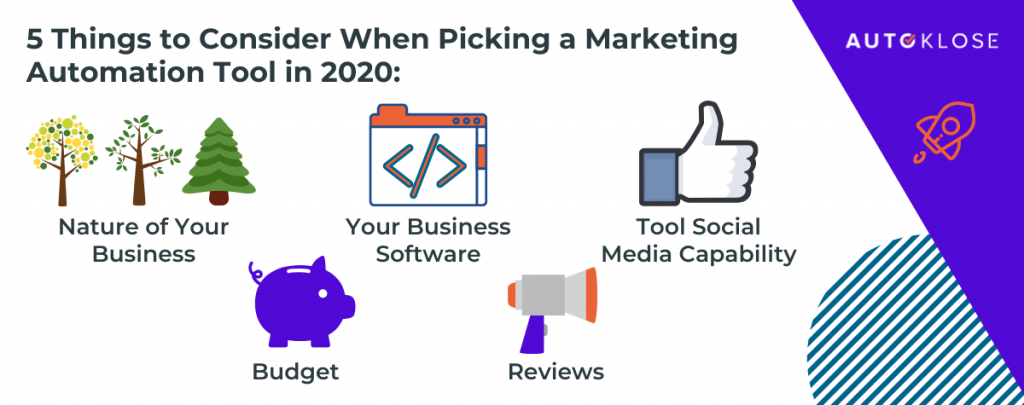
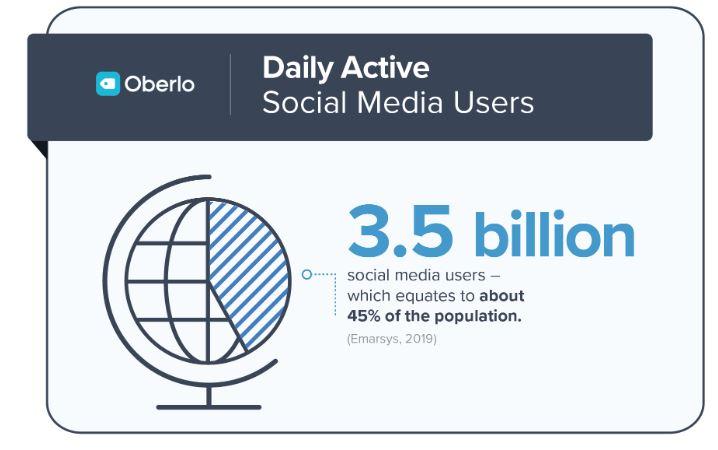
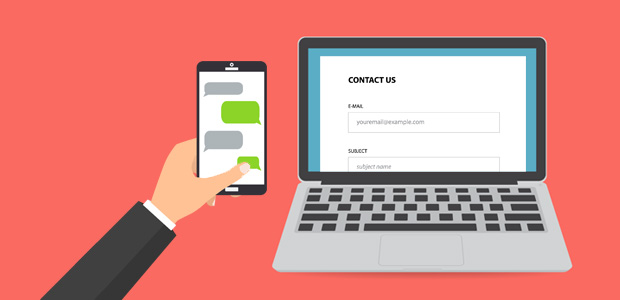




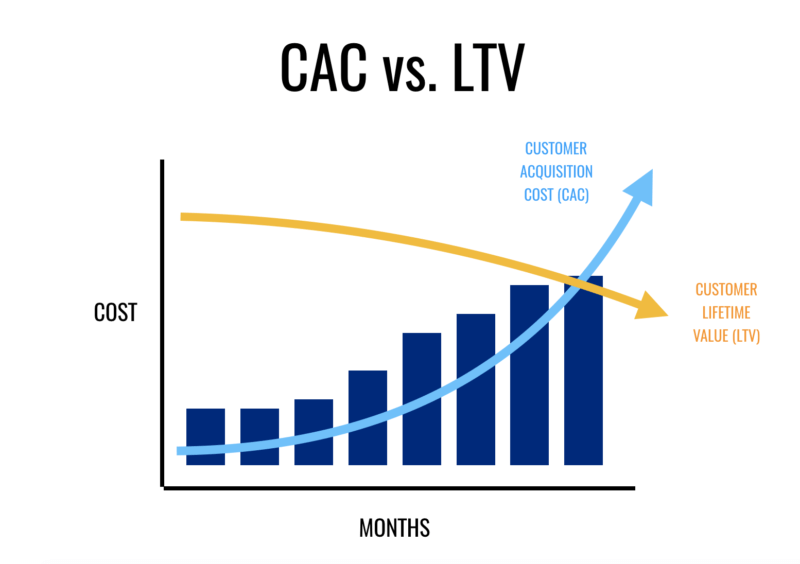
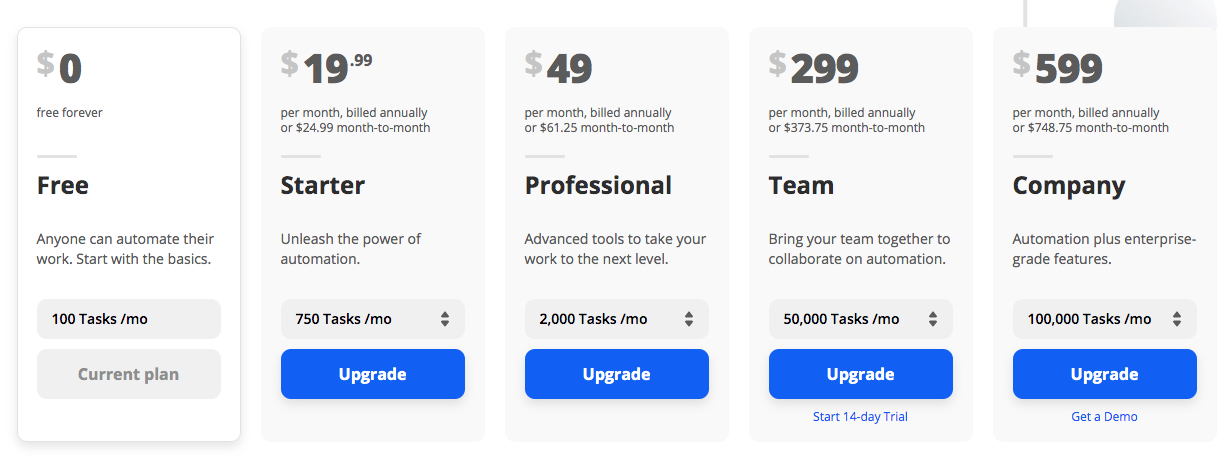
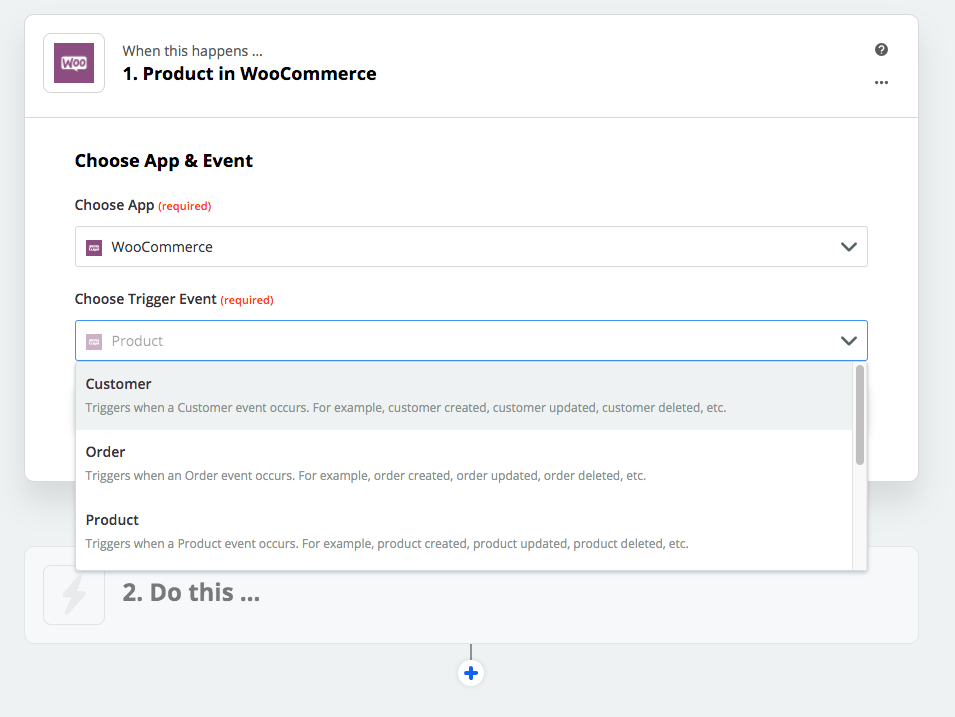


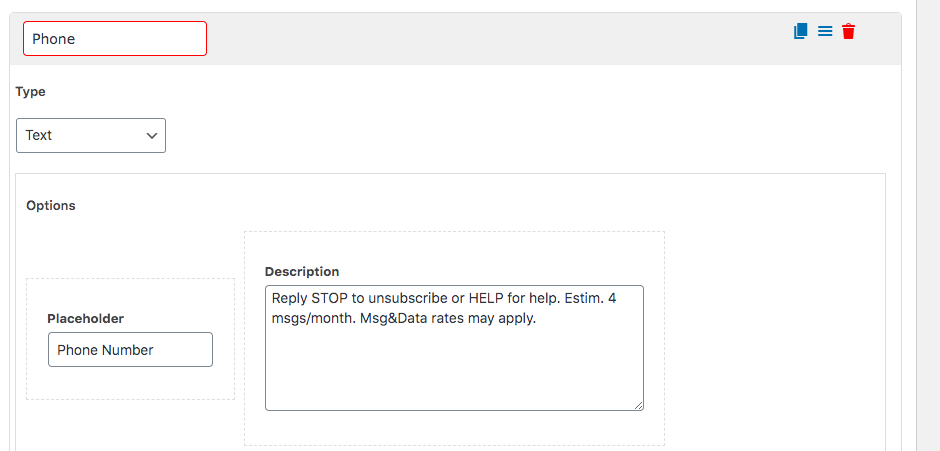
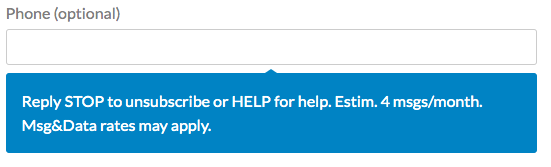
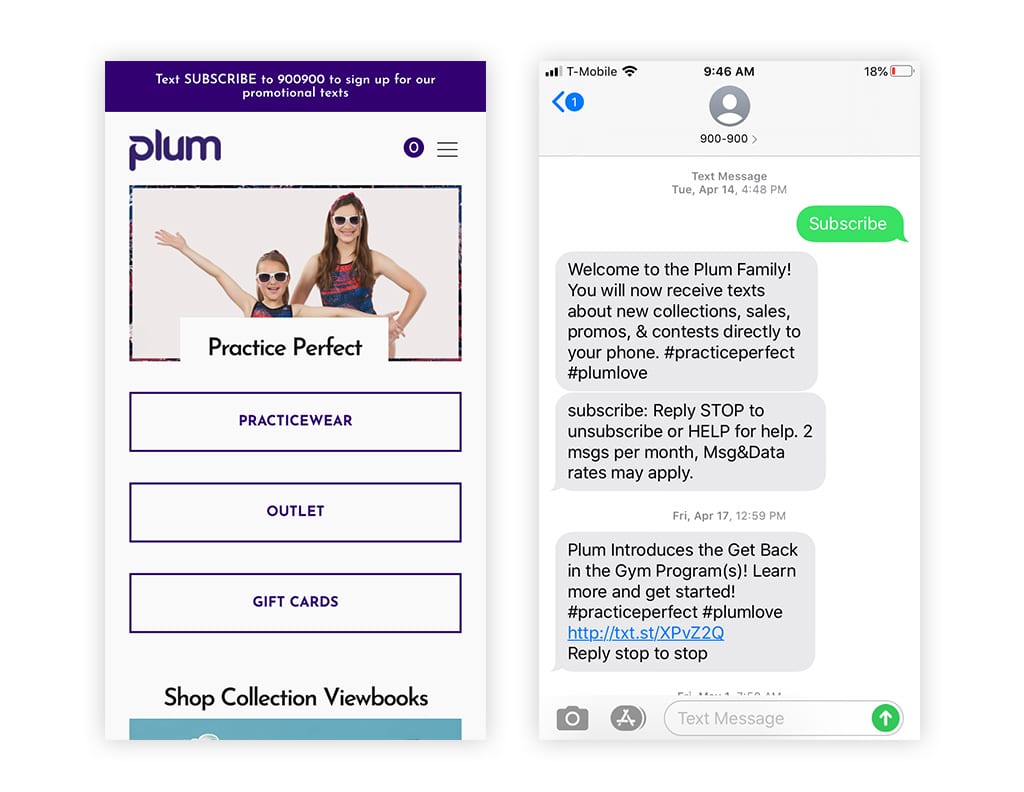
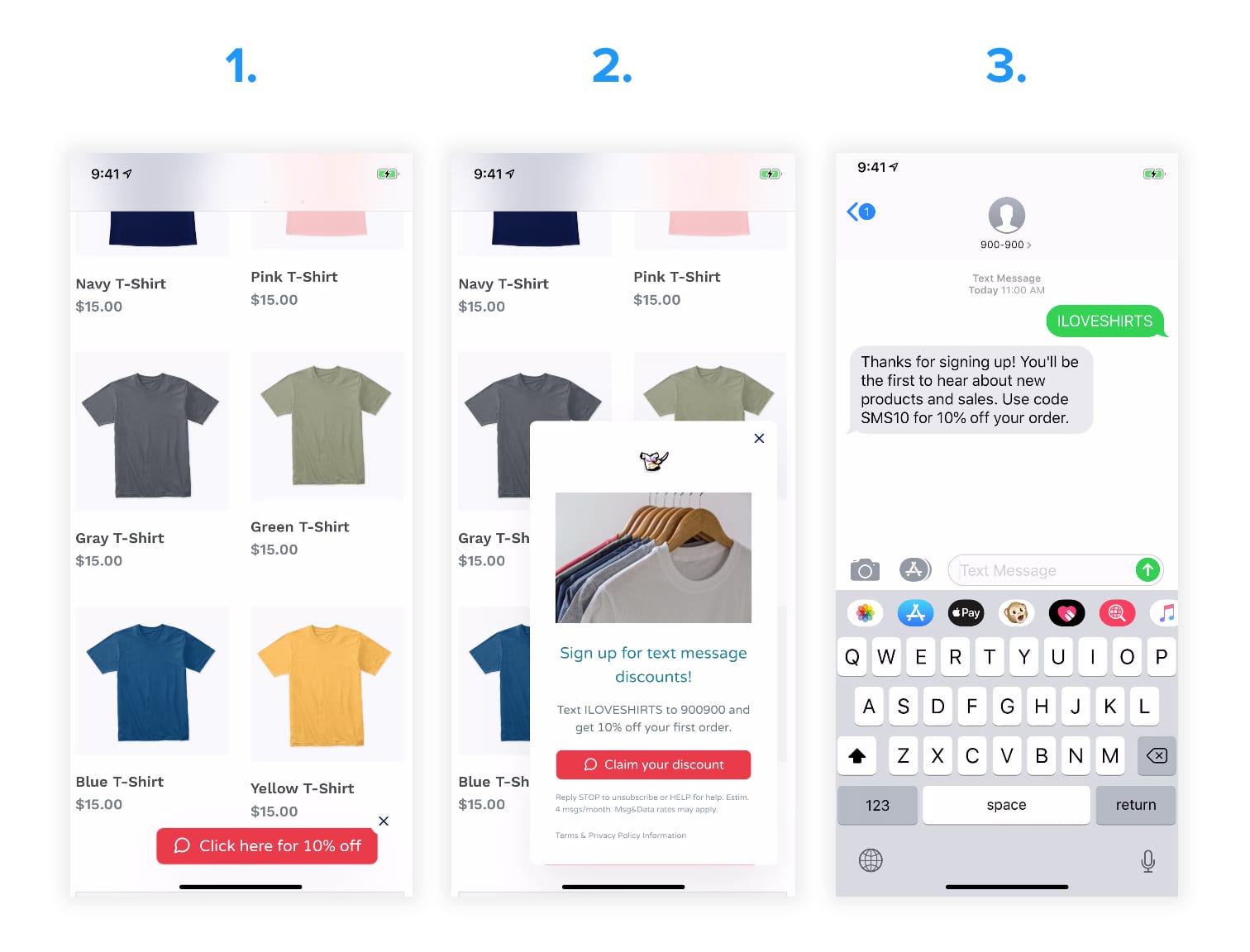
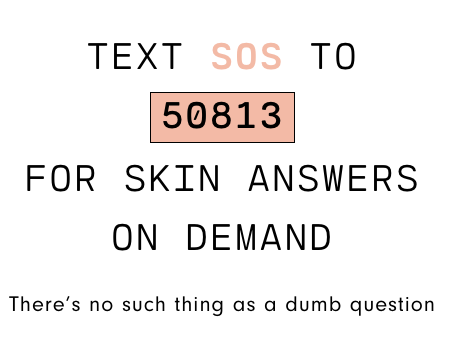
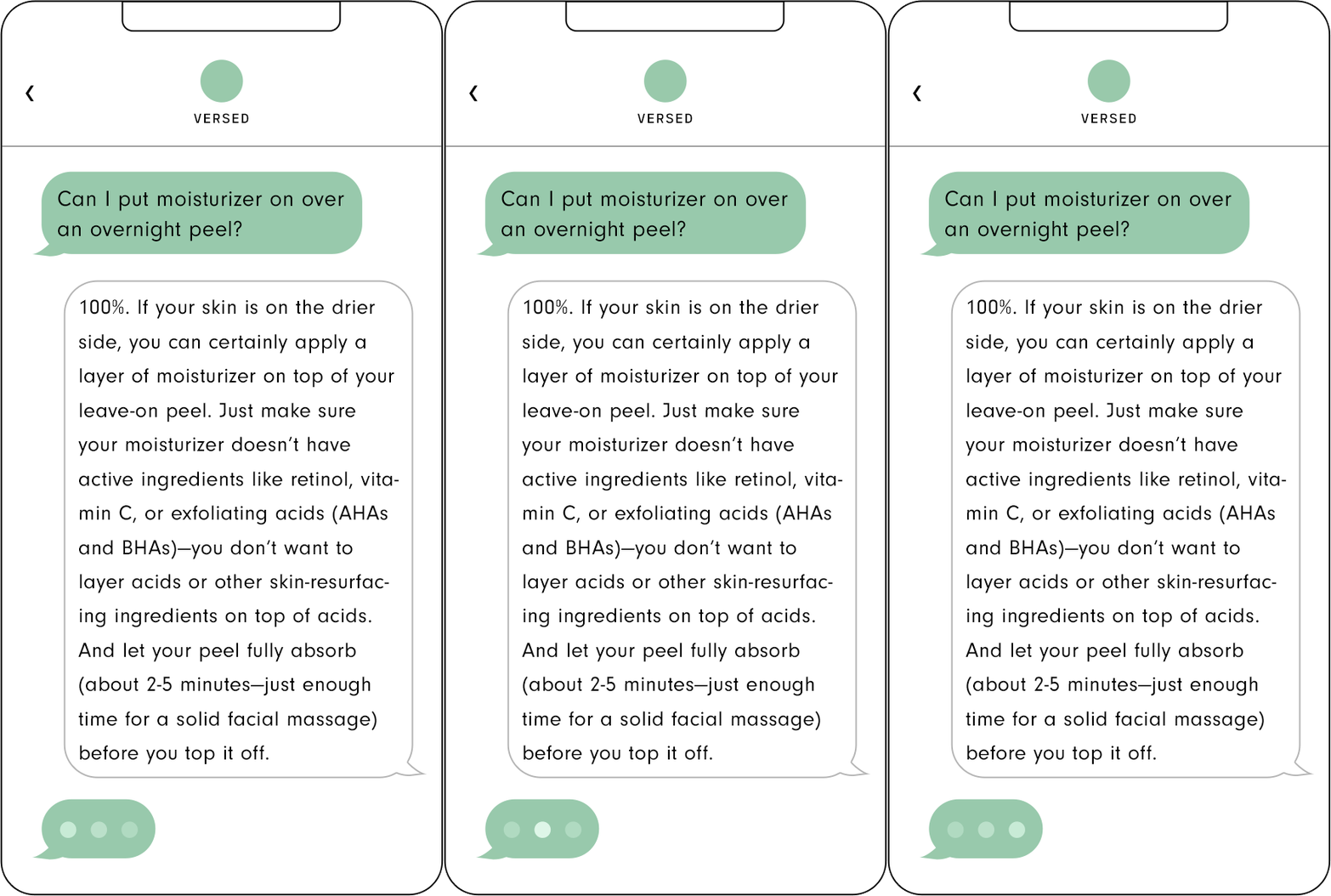
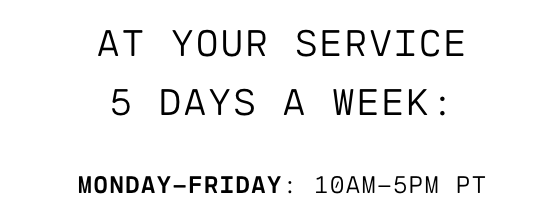
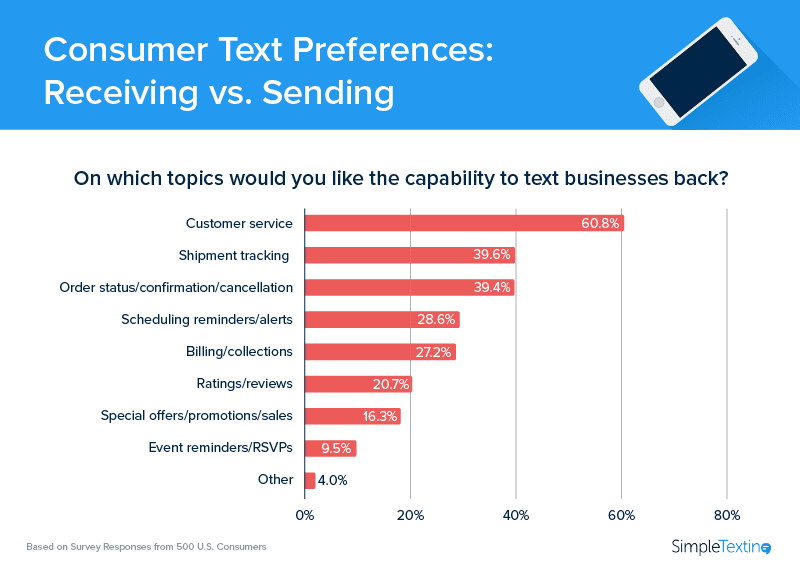
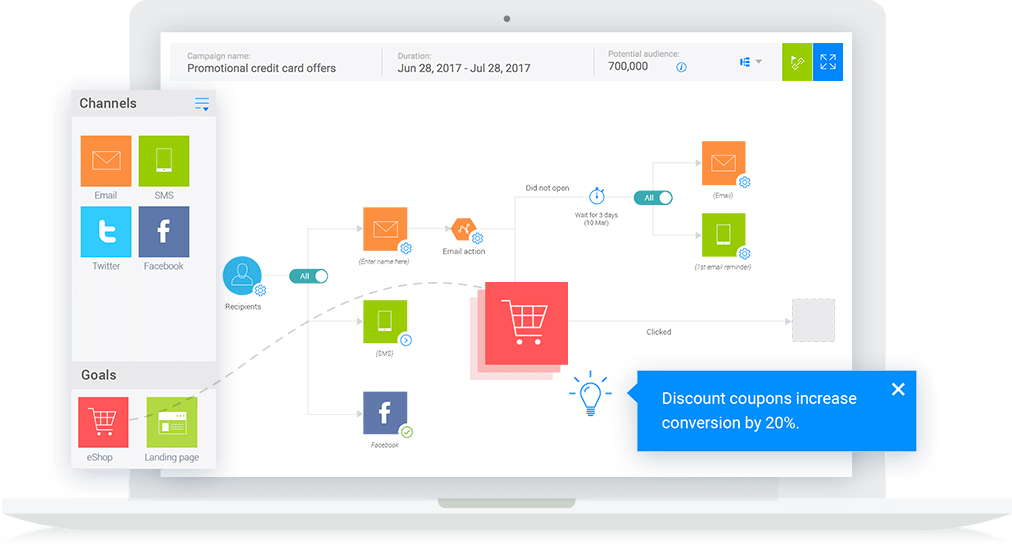


 Marketing Tech