Be yourself; Everyone else is already taken.
— Oscar Wilde.
This is the first post on my new blog. I’m just getting this new blog going, so stay tuned for more. Subscribe below to get notified when I post new updates.
Be yourself; Everyone else is already taken.
— Oscar Wilde.
This is the first post on my new blog. I’m just getting this new blog going, so stay tuned for more. Subscribe below to get notified when I post new updates.

Chatbots are the growing ecommerce trend.
Everyone is talking about them and every business wants to figure out how to use one.
As much as we want to believe we live in a world full of intelligent automation the likes of Google Assistant and Amazon Alexa, there are limits to what today’s chatbots can actually offer.
That said, chatbots are here to stay – and to make our lives as ecommerce marketers easier.
Of course, that comes with a few caveats.
“Bots and chat make it easier for people to buy the way they want to, when they want to–and that should be the goal of any business.” – David Cancel, CEO of Drift
Chatbots are tiny programs that help simulate interactions with customers automatically based on a set of predefined conditions, triggers, and/or events.
There are several advantages to using chatbots:
The concept of a chatbot itself is nothing new. In fact, they’ve been around since the 1960s.
However, applying chatbots to help businesses grow is only a recent phenomenon.
Applying chatbots to business use cases is the result of democratized technology in recent years.
As customers become more demanding not just in the way they choose to buy, but also in the ways they wish to communicate with businesses, many traditional online experiences simply aren’t capable enough.
In many ways, website chatbots are some of the most popular types of chatbots around.
Because so many businesses now leverage the convenience and speed of on-site live chat to help customers, adding a chatbot to enhance that personalized experience is often a no-brainer.
Website chatbots can carry out a lot of different functions:
Assisting in guiding customers to the next steps.
Chatbots are great not only for customer service but especially for eCommerce.
But because no customer conversation is truly 100% like another, chatbots that replace or augment human conversations shouldn’t be a one size fits all ordeal either. – David Feng, Co-Founder at Re:amaze
The most common use case for chatbots is simply engagement.
Giving customers a burdenless experience to start a conversation can help maximize your website visitors’ potential value.
Imagine a 24/7 customer service agent that is ready to greet and answer basic questions, and it’s highly scalable and an easy way to educate customers and foster new relationships through conversational marketing.
On the business side, however, having a website chatbot will also mean you’ll have somewhat less access to full automation than with social media chatbots (which we’ll discuss later).
This is because a majority of website chatbot conversations should eventually lead to a human contact.
Even if the chatbot is able to solve simple problems for customers or schedule appointments, it’s crucial that a human agent gets in touch with the customer as soon as possible.
Implementing a website chatbot is about flexibility than semi-full automated engagement.
Chatbots typically live within the designated “live chat” experience, therefore customers still expect the ability to reach a human agent when they are ready.
Some of the best examples of website chatbots are found at Drift.
Drift is a thought leader in the field of conversational marketing.
Drift’s chatbots can help engage new prospects and reduce the friction commonly seen during the sales process.
Drift chatbots can also seamlessly connect a sales team’s efforts to converse with a customer through automated triggers!
Drift chatbots can even help route important conversations to the right staff using advanced routing rules.

You can try Drift chatbots by signing up for an account with Drift.
Re:amaze, a helpdesk and customer messaging platform, is also working on a revolutionary new way for eCommerce businesses to introduce chatbots to their storefronts’ live chat experience using microbots.
Microbots are limited in scope but very good at specific tasks.
Some microbots can be helpers for getting order info, getting shipping info, getting product reviews and other conversational commerce topics; while other microbots specialize in suggesting FAQ articles based on customer queries.
These microbots can be deployed by store owners in sequence and in context, offering customized and automated conversations that happen in phases.
Re:amaze FAQ chatbots are currently in Beta and is available for BigCommerce customers to test drive today.

Facebook’s chatbot platform through Messenger is another crucial piece of technology to follow.
If your brand isn’t already on Facebook, you’re seriously missing out.
Facebook Messenger chatbots or facebook chat auto reply not only provide automated messaging to help answer or provide information, it also serves as the central hub for a lot of social media-based marketing for some of the largest brands in the industry.
Facebook Messenger bots can currently:
According to Forbes,
“There are currently more than 300,000 active chatbots on Facebook’s Messenger and more than 150,000 registered accounts on wit.ai, a natural language platform for developers.”
And, as more conversational bots continue to be developed, more businesses are sure to see an increase in sales and productivity.
With more than 1.2 billion active monthly users on Facebook Messenger, businesses who are on Facebook can immediately see the value of adding a chatbot to its Messenger presence.
However, diving into Facebook Messenger chatbots requires you to have a good understand of your existing customer base.
If not, implementing a Facebook Messenger chatbot might not have much effect as it is centered around engagement on the Messenger platform.
Or, if your marketing team plans to make Facebook Messenger a more pivotal part of your efforts, then a chatbot might be worthy of the investment.
Keep in mind chatbots are supposed to enhance your customers’ experience, do you already have a use case in mind?
Maybe it’s designed tell them about new products? Or to assist them in checking out?
The value it provides your customers should dictate how you design and implement a Facebook Messenger chatbot.
If you anticipate most interactions with the chatbot will happen on mobile, do you have a mobile presence good enough to augment what the chatbot can offer?
These are important questions to ask before investing in a chatbot.
Your team will need to work with your Facebook Messenger chatbot to round off the customer experience.
Are you using a 3rd party like ManyChat to design and deploy the chatbot?
If so, do you have the necessary resources to maintain and keep the chatbot up to date?
ManyChat is one of the most popular bot builder platforms for Facebook Messenger.

You can check out some of their case studies on their website.
Social media chatbots are some of the fastest-growing bots in the marketplace.
When you add chatbots from platforms like Twitter or Facebook to your marketing strategies, it’s important to focus on implementing them in a way that not only adds value and improves the user experience but also lead customers to a rewarding purchasing experience.
Twitter’s access to real-time data, customer insights, traffic patterns, and powerful private messaging platform makes it an ideal candidate for chatbot interactions.
Twitter’s chatbot platform is uniquely suited for businesses looking to:
With advanced API access for developers, Twitter chatbots can become a critical part of your brand’s customer service and sales strategy.
Twitter chatbots can automatically, and intelligently, perform actions such as:
Automation is controlled by a set of rules that builders must follow in order to successfully broadcast helpful information, generate engagement through creative content, and automatically reply to users via direct messages.
According to Chatbots Magazine,
“Twitter averaged 330 million monthly active users in Q4. Analysts had anticipated 2 million MAU net adds in the period.
In Q4 2016, Twitter gained an average 1 million monthly users. During Q4, Twitter live-streamed around 1,140 events, with 60% of those reaching a global audience.
In addition, 28 million live user-generated streams were broadcast in the quarter across Twitter and Periscope.”
These metrics have far-reaching implications if you’re looking for a chatbot platform that goes beyond just customer service.
In addition, Twitter recently announced a new enterprise-focused API to improve upon the chatbot experience so that developers can build more “conclusive and engaging experiences via chatbots”.
According to TechCrunch, the new API is designed “to help developers build apps that can power customer service, chatbots and brand engagement on Twitter”.
One thing that separates Twitter apart from Facebook is the fact that Facebook (and webchat) bots tend to support rich formatting (carousels, images, descriptions, etc) that make it good for commerce applications. However, Twitter does not currently support this.
This means Twitter chatbots tend to be more NLP based.
Therefore, the applications are less driven by things like Quick Replies and decision trees and more by Neural Network driven bots.
There’s more experimentation in this area but it might not be as suitable for an eCommerce store trying to get a chatbot running for sales purposes.

How will you react if I say there is a feature in which you have an option to integrate all your different chats at one place. Yes it is possible with conversational ai chatbot which will do all your tasks and put your information at one place and do lot more for you.
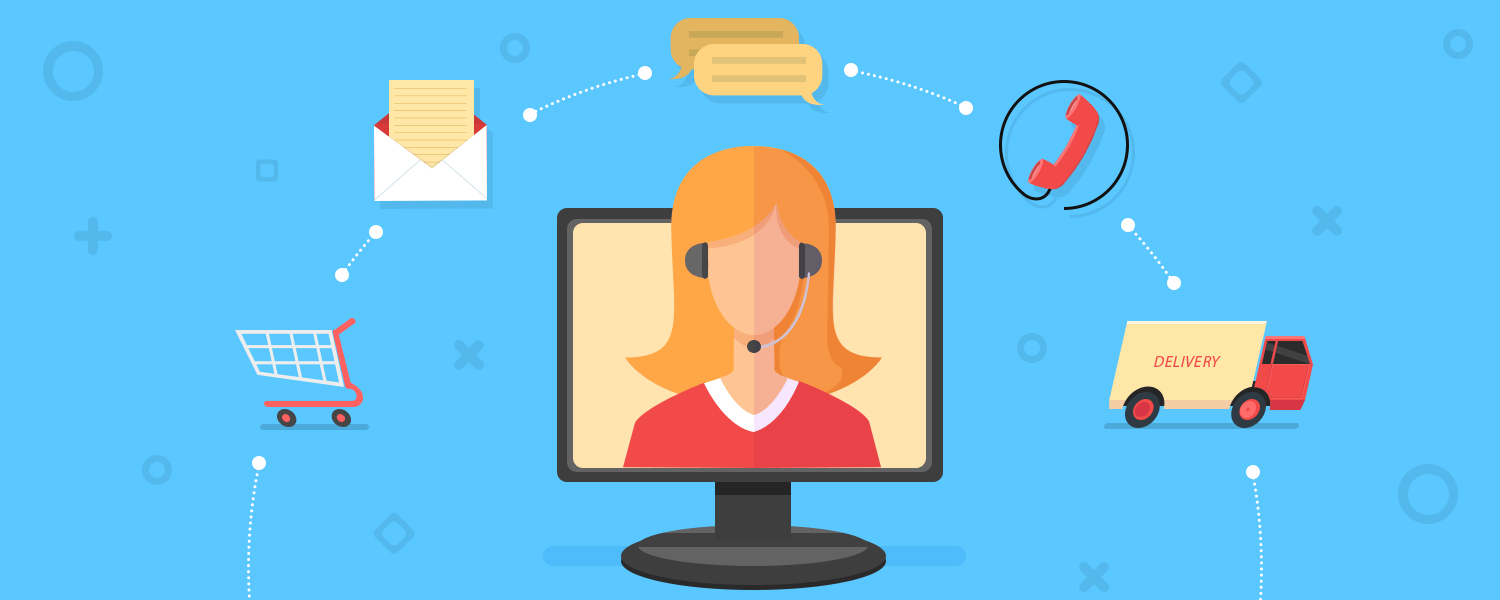
For any e-commerce organization, having swift customer support is crucial. However, a strict dependency on manual customer service can rarely deliver real-time support due to the time it takes. This is the main reason why e-commerce support requires automation.
Even with all of the pre-defined FAQs present on an e-commerce site (where any customer can self-learn about basic policies and procedures), there needs to be another way to communicate with the customer. Other aspects, like delays in shipping, refunds not being processed, abandoned shopping carts, and other individualized concerns need to be addressed.
To improve the response time on queries like these or uncommon queries, it becomes necessary to have real-time replies.
Sending canned emails when the customer makes the purchase is not our current concern. However, sending triggered emails based on keywords such as “wrong package/delivery,” “delivery hasn’t arrived,” “payment not processing” or similar issues can be beneficial to an e-commerce support team.
These types of emails can be triggered easily using a CRM. The only requirement will be to create emails with relevant content to the keyword tag. So, whenever your system receives an email from a customer carrying a tag like “delivery hasn’t arrived,” a canned email with relevant tag should be sent to the customer automatically. This is called keyword auto reply.
Generally, customer support receives queries that not only fall under their expertise but also under the specialization of other teams. This usually delays the response time as the queries need to be sent to the relevant teams. So routing queries based on team expertise and relevancy can also be automated using keyword tags. You can add tags such as “password,” “delivery,” “broken,” “never arrived,” “not working,” etc. to differentiate the query type, as well as to route emails that carry keywords like “password” to IT support and “never arrived” to customer support.
Again, a CRM can help you differentiate between queries that require customer support or IT support using the email tags system. Based on the tags, it can route the relevant emails to relevant teams without any delay. Whether the reply needs to be automated or not is completely dependent on the nature of the query.
Times when the customer abandons the cart or has issues with payment, he/she can be contacted to using a quick, scheduled call. Representatives can trigger an automated call to solve the customer issue instead of waiting for the customer to send an email.
Through this automated call, the customer can choose his or her grievance from the recorded options using the dial pad and opt for the most relevant one. The customer might find an answer in one of those recorded options or can opt for a support rep’s help. This type of automated solution will help you get the customer back on the correct page and help him or her to continue shopping.
Any customer who is having issues with your site will first look for a chat option to get a quick solution to his or her grievance. For this reason, it is important to have live chat on your site with canned responses. In the instance that the reps on duty are missing, the canned responses can be useful and keep the customer busy. The missed responses can be directed to the support rep’s inbox for quick response if necessary.
These are few of the very important forms of support automation that need to be adopted. Using a CRM that is integrated with your helpdesk can be the best solution. You can also have forums on your site where customers can ask questions to each other and provide free support. However, if any question goes unanswered, then any support rep can answer those queries. In such cases, it is important to control these forums on regular basis.
Having complete support automation might not be possible for e-commerce companies, but streamlining workflows using automation can be the best way to optimize this process. The aim for this automation should be to have complete customer satisfaction. At the same time, it should be cost-effective and the automation needs to be carefully implemented and monitored.
You can use these ways or else there is other conversation intelligence options which I think is the best because that will help you to reduce the wastage of your time by providing all the customer queries and chat of different channel at one place.

As of 2018, there were 3.7 billion people who accessed the internet through a mobile device, according to Statista. That’s more than half the world’s population.
Aside from the astounding growth of mobile, many countries are witnessing people purchase smartphones first, bypassing PC ownership as their first means of internet connectivity. And marketers need to adapt.
How do inbound marketers leverage the power of the mobile device to provide a personalized experience for the user while not intruding in their day-to-day lives? The answer lies in not thinking of the mobile device as another PC, but rather another limb for your busy, active customers and prospects.
Here’s a comprehensive list of tips and tricks every marketer should know to master mobile marketing.
Mobile marketing uses any and all digital, social, and related content marketing channels to reach an audience via their mobile devices. In a sense, it takes a marketing strategy — its messaging, design, and target audience — and optimizes it for delivery through a smartphone or tablet.
While mobile marketing limits the use of some marketing channels you might focus more on outside of mobile, it also presents several new ones. The following is a list of marketing channels you can include in a mobile marketing strategy — we’ll go over each of them in more detail in this guide.
A mobile marketing strategy uses a combination of marketing channels to connect with an audience through a mobile device, and generates leads through these channels. Which channels you use depends on where your buyers spend their time and what type of content they’re consuming on their smartphone.
A responsive website is one that might’ve been developed originally for PC, but has been optimized for navigating to and from on a mobile device. This “responsive design” allows users to reveal buttons, text, and webpages within the website they might not be able to see on a mobile screen had it not been optimized correctly.
Making your website responsive allows it to remain a critical marketing channel when your audience switches from computer to mobile.
More than 60% of Google searches take place on a mobile device, as opposed to a computer. With such a high percentage of searches done over a smartphone, search engine optimization (SEO) should be just as a big a part of a mobile marketing strategy as it would in a broader digital marketing strategy. Learn about some of the most important Google ranking factors here.
Did you know mobile users check their email three times more often than non-mobile users? Not only that, but mobile is responsible for at least 50% of all email opens, according to data we collected from Campaign Monitor. Make sure the email newsletters you deliver to your subscribers are optimized for viewing on most mobile email platforms — we’ll go over how to do this in a few minutes.
Not only is social media enjoyed on mobile at least as much as it is on PC, but some social networks are designed for mobile. Instagram, the mobile photo-sharing platform, has more than 1 billion monthly active users — and all of them are required to upload photos via their mobile device. Implementing an Instagram presence — in addition to social networks like Twitter and Facebook — into your mobile marketing strategy is a no-brainer (if your audience is on Instagram, that is).
SMS marketing is another term for text marketing, which uses text messages to reach an audience with messaging related to their business. Texts aren’t often associated with brands, and therefore texts from anyone other than a person’s known contacts can be dicey. Nonetheless, there are types of SMS messages that are appropriate coming from a business. I’ll elaborate later in this blog post.
It sounds like a big undertaking, but with just a few engineering resources, you can attract your audience through app marketplaces native to various smartphones. What sorts of apps should you create, you ask? That depends on what your goal is. Got an event coming up? Deliver the event schedule to attendees through a mobile app. Are you in the software business? Your customers might crave a mobile version of your product — you just don’t know it yet.
Virtual and augmented reality are two of the newest opportunities in digital marketing, and in some cases, all a user needs is a smartphone to enjoy it.
Whereas virtual reality (VR) simulates entire environments through a smartphone, augmented reality (AR) literally “augments” the appearance of what’s in front of a user when they look through their mobile screen. Numerous companies have already taken advantage of this technology to offer branded experiences to their customers and even help them make better purchase decisions. Home decor vendor, Wayfair, for example, recently created an AR feature as part of its mobile shopping app that lets its customers see what an item might look like in a certain spot in their home.
Best Shopify SMS Apps from hundreds of the SMS reviews in the market (Shopify Apps Store, Shopify Apps) as derived from Avada Commerce Ranking which is using Avada Commerce scores, rating reviews, search results, social metrics. The bellow reviews were picked manually by Avada Commerce experts, if your app about SMS does not include in the list, feel free to contact us. The best SMS app collection is ranked and result in May 2020, the price from $0. You find free, paid SMS apps or alternatives to SMS also. The Top 50+ Shopify Free Apps for Every Store.
SMS + FREE Web Push messages designed by Firepush is believed to be a must-have app in your online store. It not only sends your clients the SMS to inform them about the orders they’ve made but also encourage them to make more purchases. Moreover, it drives many traffics to your shop so that your store seems to be hustle and bustle all the time. You still gain profit when you are sleeping. This app displays automated push notifications and SMS messages to attract clients. They can be wanderers, your customers, or prospects. When they catch sight of these charming things, they will click on it to view and probably to buy your products right away. It reduces abandoned cart made by your clients hesitate to fulfill their orders thanks to sending them price drop and back in stock messages to encourage them to complete these orders. In addition, your customers well aware of what’s news in your store by the notifications from this app. If you do interested in this app, get it now.
Price: Start from $0/month
Rating: 1004 – 4.9 / 5
Firepush SMS, Web Push & Email Campaigns by Firepush helps Shopify stores drive sales through automated retargeting and remarketing campaigns. The app covers three major communication channels – mail, web push notifications and SMS – in one single dashboard, helping you to adopt an omnichannel approach to marketing with ease.
Using Firepush, you can send out abandoned cart recovery campaigns, review requests, customer service updates and a whole host of promotional campaigns. When sending out special offers or discount promotions, it’s easy to add a countdown timer to evoke a sense of urgency. Customers can ‘grab discount codes’ and apply them automatically at checkout, without having to navigate to a different screen or remember the code.
Firepush is trusted by many Shopify Plus stores, some of which have seen impressive campaign results, with more than $1 million in revenue generated from the app.
Price: Starts from $0/month
Rating: 741 – 4.8 / 5
To provide the best solution for the Shopify store owners, the SMS + FREE Facebook Messenger was invented with the most useful features. With totally Free and user-friendly tool, this app allows the users to download and use with very simple steps. Moreover, it is an fully automated and customizable app, so the store owners can design their own stores with the best themes. Besides, the SMS + FREE Facebook Messenger app also integrates with multiple tools such as Facebook messenger and SMS notifications on Shopify. Therefore, it can empower your store and attract more customers in different countries. In addition, by recovering abandoned carts, this app is so helpful to increase your sales as well as remind your customers. Finally, it is totally useful for you when you want to send promotions to your customers.
Price: Start from $0/month
Rating: 584 – 4.8 / 5
SMSBump SMS Marketing + More, which is provided by the iSense Ltd. team, is an excellent assistant tool for all Shopify e-commerce store administrators to recover carts and effectively boost sales with SMS messages. With SMS Bump SMS Marketing + More, you are allowed to configure text automation which is based on specific events in your store. Also, you can create various marketing campaigns in a few seconds and get results tracked, schedule the campaigns, and many more. Furthermore, you are able to customize its look by adding your own subscription form to gather a ton of clients’ contacts. Moreover, this application supports you to track your Shopify discount codes, restrict specific countries to send the messages. Especially, you can optimize the costs by saving money from not sending SMS messages if they cost more than a preset value. It is easier to build your Text Marketing registration list now by using our in-built subscription from our generator, writing a special keyword to our US shortcode. The app is available to install now without no any charges!
Price: Start from $0/month
Rating: 214 – 4.9 / 5
Superhuman Checkout Recovery developed by SaveMySales, Inc can aid in recovering the lost sales with one of the most professional teams. In fact, SaveMySales is known as an effective solution to help save the abandoned carts from stopping being sales. The app uses SMS messages to all of the abandoned cart customers to begin the conversions and close sales. In addition, you can watch your SMS conversation in your real time and you can track some key metrics such as sales, reach, and order value. Moreover, the app can provide users with phone or text account supports. Now, you can get the app started with free trial days. The app can offer you from USD50 to USD2,000 in your sales credits, which is based on the store’s volume. Also, SaveMySales app is able to analyze the sales numbers and configure the optimization with users’ account managers.
Price: Start from $0/month
Rating: 135 – 5.0 / 5
SMS Notifications, which is created by Onjection Labs, is one of the best apps helps you send SMS to your clients. As they make a purchase, there will be some important information to notify them such as the delivery status or the order cancellation. With this app, you don’t have to waste too much money on undelivered shipments. It provides you with the fastest way to inform your clients via SMS. Every information will be transfer simply and immediately. Furthermore, this app informs the customers know about their abandoned cart and inspire them to recover it by offering recover SMS. Your abandoned products will be decreased dramatically. This app also shows your sincerity by sending messages to thank your customers for purchasing your items. If there come new orders, it will let your store admins know instantly. Especially, SMS Notifications is completely free for you to install. Experience it as soon as possible.
Price: Free
Rating: 116 – 4.5 / 5
SMS Alerts India by Mobikasa is a Shopify app designed to help you send SMS alerts with order information or promotional content instantly to Indian customers. You could choose to use the app’s ready-made SMS templates for orders confirmation or cancellation, and shipment creation, or create your own fully customized messages. The app provides smart message search with the aid of various filters like order number or phone number, as well as the option to schedule messages to be sent on a particular time.
Price: From $5/month. 14-day free trial.
Rating: 11 – 3.6 / 5
With ProWebSms SMS Notifications powered by Technovergence, you can take care of all of your customers by automatically sent SMS. When a customer do any action such as checkout or register, they will receive a SMS notification prepared by ProWebSms SMS Notifications immediately. Every inconvenience about SMS gateways difference will be eliminated as ProWebSms SMS Notifications accepts every of the SMS gateways available. When sending SMS notifications to your customers, you will not only allowed to communicate with them by importing them to your dashboard, but can also send customized SMS instead of automated SMS as well so as to treat specific situations. In order to control your communications with your customers, ProWebSms SMS Notifications also provides the customers filtering function to filter your customers based on their information such as their number of orders or the checkout date. Get yourself the effective ProWebSms SMS Notifications right now for a 7-day free trial!
Price: $3/month. 7-day free trial. Additional charges may apply.
Rating: 11 – 3.8 / 5
SMS Notifications by Maestrooo is a Shopify app designed to help you send real-time notifications straight to customers’ phones without the need for an Internet connection. With its leading SMS partners, the app is confident in ensuring the high deliverability to over 200 countries across the globe. With easily customizable messages content, you could quickly inform customers about their order status or a lately issued refund. Plus, you could always keep track of the deliverability of each SMS with the app’s real-time reports.
Price: Free plan available. Additional charges may apply.
Rating: 10 – 4.4 / 5
Postscript SMS & MMS Marketing, which is created and published by Stodge LLC, is a wonderful marketing channel for all Shopify e-commerce store to send text campaigns, create marketing automation, and drive new revenue. With only one click using personalized SMS marketing campaigns, text messages based off of customers’ actions like product announcements, sales and discounts, abandoned cart reminders are sent to them. On top of that, your text engagement can be increased by adding interesting GIFs and colorful photos to each automation to attract customers’ attention; therefore, you can increase ROI and drive new purchases. Also, all customer requests to “Opt-Out” of SMS communication are automatically handled, Shopify customers who reply “STOP” will no longer receive your SMS campaigns or automations. With Postscript SMS & MMS Marketing, users can not only review the performance of all of the messages, campaigns, and automations but also go beyond click and open metrics and analyze the revenue which your messages are bringing in. All things considered, Postscript SMS & MMS Marketing is a must-have app for any Shopify eCommerce store. Get your sales boosted by installing Postscript SMS & MMS Marketing now!
Price: Free plan available. Additional charges may apply.
Rating: 9 – 5.0 / 5
As of August 2017, 77.3% of all online retail orders — e.g., shopping carts — were abandoned instead of purchased. That’s according to cumulative data gathered by independent research firm Statista. And it’s a nearly 10% increase from that same firm’s January 2017 data.
The pain of online shopping cart abandonment affects both small and large business alike. But it’s only at scale that the pain truly intensifies …
Let’s say your site brings in 125,000 visitors per month, your average order value is $100, and your visitor-to-sale conversion rate is 0.92%.
If you increased your conversion rate by a mere 0.5%, you’d add an extra $62,500 of revenue every month. Cumulatively, that’s an extra $690,000 every year.
Numbers like that are exactly why conversion-rate optimization is big business. The question is: where should you start?

This is the advice my mentor Peep Laja of CXL Institute drilled into my head.
Think about the people who visit your site. Some are random, some are window shopping, some will never buy. But those people who add something to their cart and reach the checkout… they’re motivated.
Look at the flow above. There we see 192 people reached the checkout but only 47 people actually checked out. What happened?
In this article on optimizing the checkout flow, Peep Laja shares professor B. J. Fogg’s Behavior model which basically states that the actions we’re highly motivated to take and easy to do are more likely to be executed on.
So the question is, “If the checkout is easy enough to do, what made them lose their motivation?”
Conversion expert, Bryan Eisenberg, suggests that the three primary form design problems are:
“Web forms are a transaction. You need to look at them as an exchange of information and value in exchange for something of value you promise in your offer. When you don’t look at it as an exchange you fail.”
You could make assumptions and speculate as to how you might make improvements in each of these areas, but if you want to really understand your visitor’s hesitations, I’d recommend conducting qualitative research and get real feedback.
Think about the last time you bought something online. Did you feel 100% comfortable handing over your personal details?
In a 2012 study of checkout forms by Baymard Institute, users reported that 61 of the top 100 ecommerce sites were asking for “seemingly unnecessary” information.
“The seemingly unnecessary part is noteworthy because the issue is largely one of perception.
“The e-commerce site may have a valid reason to ask for this information, but that reason must then either be: (1) self-evident to the customer, or (2) explicitly communicated (the site must state why this seemingly unnecessary information is in fact necessary).”
One person in the study complained loudly at Apple.com’s checkout saying “Look, why do they need my phone number? What do they need that for? They don’t need it!” but silently filled out a form later when the phone number field stated, “(for shipping-related questions)”.
“Fear” may seem like an exaggeration, but you have to understand the visitor’s internal dialog during those final moments before checkout:
It doesn’t matter that you’re one of the good guys. Each of these questions have strong roots in a very real anxiety for consumers. It’s not uncommon to hear horror stories about companies taking money for products they never deliver or worse.
A report from England’s Office of Fair Trading found that 1 in 7 people experienced a problem with shopping online. Another two-thirds of shoppers were worried about unauthorized access to their personal information.
In total 50% of all consumers who engaged in ecommerce were worried about being conned online.
Of course, none of this is your fault, but it’s important you understand the foundational concerns with buying online before addressing the concerns specific to your market or business.
This is why you’ll frequently hear stories about how adding SSL Certificates and trust seals have increased conversion rates, like when the Central Reservation Service increased conversions by 30% after adding Versign.
Conversely, a survey by Actual Insights found that around 61% of people did not buy because a trust logo was not present, and over 75% said they didn’t buy because they didn’t recognize the logo used.
Getting into more specific objections, let’s look at how Shopify Plus customer Automatic, handles theirs right in the header of the checkout.
In case you’re unfamiliar, Automatic creates an adapter that plugs right into your car’s diagnostics port and communicates with your smartphone and tells you what’s happening in your car’s onboard computer.
It translates error codes, gives you your gas mileage, and helps you to locate your vehicle when you can’t find it in a parking lot. The newest release contains integrations with over 20 apps that allow you to split gas money, seamlessly expense your miles, and open your garage door as soon as you arrive home.
Given how “new” this technology is, an interested customer may have a few concerns about buying. But look at the questions they’re answering right in the header:
Even though all of these questions are addressed multiple times throughout the site, they’re reiterated here to reassure potential customers they’re getting exactly what they want.
On the bottom of their checkout, they also use a live chat integration, so hesitant prospects can ask a real person the questions that would prevent them from buying.
Another common fear that you may want to address is the “fear of missing out.”
It’s human nature that when you see this …
…you want to make sure you’re getting the best deal.
There are a few ways this could be addressed on-site to minimize any abandonment issues.
Shopify Plus customer DODOcase, for example, uses BounceExchange to trigger a 3-step popup that both captures a visitor’s email and provides a unique discount code that can be entered once you reach the checkout.
Step 1. A first-time visitor sees a pop-up
Step 2. Visitor enters email address to receive offer
Bonus: once they have the email address, they can use ad and email remarketing to follow up, even if you abandon the cart.
Step 3. Give exclusive discount to be used at checkout
Now the customer knows that a discount code has been made available to them, and aren’t feeling surprised or left out once they reach the checkout.
Keysmart, another Shopify customer, uses a floating bar at the top of the site to display a discount that can be applied in the checkout later.
Overall, when it comes to reducing fear, is to understand what might be causing someone at the checkout page to hesitate about finally completing their order.
To really discover this for your specific checkout process, I would highly recommend using a session tracking and heatmap tool like Inspectlet so you can watch how people interact with the checkout, along with a tool like Qualaroo to collect qualitative feedback as they’re leaving.
User testing sessions following the “Think-aloud protocol” will also reveal plenty of trust issues.
This builds on everything from the last section.
Brian Eisenberg asks, “Do you leverage your trust messages at the point of action?”
Trust messages, in this case, aren’t limited to security logos and privacy policies near the “Complete order” button, but in some cases, just bringing a little extra clarity where you’re asking the visitor to make a decision.
Take this “Shipping Details” section for example:
Looking at this, I have no idea how long it will take to receive my order. “Standard shipping” doesn’t give me an estimate on how long it could take, and the copy above practically prompts me to abandon the checkout to see how long it will take to make my product.
When I do go to the product page, the text “please factor 1-2 weeks for production time prior to shipping service” is in small copy outside of an intuitive eye-path.
However, by altering the copy to add just a little more clarity in the “Shipping Method” section, the visitor has all of the information necessary at the point of decision and therefore can trust themselves to make the right choice given their circumstances.
In addition, most third-party logistics (3PL) providers — particularly those that integrate directly with Shopify Plus — can automate estimated delivery dates.
Another common “trust & credibility” thing that can be done at the checkout is adding reassurances around the final checkout button.
For example, this is what ThinkGeek does at the moment of final moment of truth – The “Place Order” button.
But I would also argue that “Trust & Credibility” is more than what happens on the checkout page alone, and is more about every point of interaction with the entire brand experience.
Consider the header of ThinkGeek for a moment, and look at just how much information it conveys.
In just the upper right-hand section alone, you see that their customer service options, shipping policies, and a friendly looking mascot.
Being this up-front about these things, coupled with intuitive navigation, and a bevy of familiar brands creates a foundation of trust that only gets built on as you go deeper into the site.
Because “Trust in Web Design” is far too broad to cover in a single section of this article, for the sake of brevity, here is a short checklist of items to consider when it comes to the trust factor of a website.
There are many additional things to consider, of course, but the point is you should constantly building trust through the entire site experience, then reinforce your trustworthiness at the points where a visitor has to make a decision in order to progress.
Does your checkout page continually reinforce the reasons why it’s great doing business with you?
In my opinion, this well is about paying attention to the minor details on the page.
Best Made Company, for example, doesn’t just use the standard “Order Summary” language at the checkout, but instead says, “You’re purchasing this…” above the product image. Though the language is subtle, it reinforces my decision to buy and subtly impacts my perception of ownership.
Underneath the final price, Best Made also tells you just how much of the cost is attributed to shipping.
Later, instead of using the default “Subscribe to our newsletter” language, they spell out why subscribing would be beneficial to you.
Another checkout I really like is Hunter Boots.
One reason is that, in the header of the checkout, there is a reminder that shipping is free.
The “free shipping” message is reiterated when you select your shipping method…
…and again when you get to the payment details page…
Even better, on the UK version of the site, they also make it easy to call or live chat with their customer service right in the footer of the page.
The benefit this reinforces, even if it isn’t immediately apparent, is that Hunter’s customer service is ready and available at all times.
While this might feel reassuring as a customer, there is potential for a pretty decent lift in conversions as a result.
According to a 2013 study by customer service software Groove, which asked 1,500+ companies what channel they’re investing the most in, of the 7% of respondents who answered “Customer Service” their conversions were an average of 11% higher than everyone else in the study.
It’s easy to forget that customers scrutinize every move they make once they reach the checkout. Just like how to be successful in any area of life … it comes down to tried and true principles.
Every field, every bit of copy, every logo, is scrutinized and processed, even if only on a subconscious level, especially if they’ve never bought from you before.
Understanding this, if you’re proactive in finding ways to reduce fears, increase trust, and reiterating the reasons people decided to buy from you, you just may be able to get more people moving from the checkout to becoming an actual customer.
Ahealth drink ecommerce brand has developed a cult-like following and opened a staffless store in Manhattan’s trendy Tribeca. How has a scrappy start-up managed to break through the noise in the saturated wellness beverage market? It’s because of an SMS marketing strategy, and with the right tools and a bit of planning, any small business can implement a similarly powerful text marketing strategy.
Dirty Lemon has about 100,000 customers and sells mainly online. It’s now grown to the point where it has opened unstaffed stores: in this case, all customers browse and purchase digitally and engagement is carried out via text messaging. Dirty Lemon’s business model shows us that SMS marketing is enduringly popular. Automated marketing with SMS offers an affordable way to reach your customers.
SMS marketing is a source of significant business exposure because it:
When you couple this reliability with the shifts in the mobile buyer’s journey, you’re presented with a golden opportunity for marketing your small business.

Mobile growth is charging ahead. By 2019, the number of mobile phone users is expected to pass the 5 billion mark. Over the past four years, the share of online traffic from mobile devices has almost doubled.
On top of that, shopping from mobile devices is expected to continue to climb; it’s estimated that smartphones were used in more than $1 trillion U.S retail sales. And the rise of this retail omnichannel experience sees buyers moving across devices as they research, compare, and purchase goods.
The combination of ecommerce and SMS marketing also provides the ideal foundation for your business to expand into the burgeoning chat commerce space.
Brands like UBA Bank in Nigeria and telecommunications provider MTN in South Africa are already using WhatsApp to allow their customers to make purchases quickly via their favorite chat app — consider that WhatsApp has 1.5 billion active users globally.
Ideally, the most satisfying customer experience is one in which SMS, WhatsApp, and any other messaging channel that the customer prefers are available to them, so ensure you select a provider which offers the ability to scale your business across multiple channels.

SMS marketing is a powerful and affordable way to crack the exciting mobile market. But there are a few things you need to consider if you want to take full advantage of automated marketing with SMS.
There are a few key aspects to take into account when choosing an SMS provider for marketing your small business.
Get the numbers on the operational costs and price per SMS. A provider like Clickatell will give you a detailed breakdown of the costs of your automated marketing service.
Your SMS provider should provide stats on the number of messages delivered. Yes, SMS has a high return on investment but bounced and undelivered messages are a waste of your time and money.
When you’re running an ecommerce business, you might serve customers in different states and even different countries.
Your SMS provider should also integrate easily with your existing applications. And, it’s also key to get access to analytics to help inform your SMS marketing efforts. For instance, a certain offer might perform better with your target audience.

It’s a good idea to start small and simple. Don’t try to chase too many objectives at the start of your SMS marketing campaign.
You might want to focus on driving sales for a specific product, or you may be more concerned with growing a VIP list for your SMS marketing campaigns. Whatever your goal, be sure to keep it focused.
The path to higher engagement on any marketing channel isn’t always a straight one. But there are effective tactics that connect with ecommerce customers.
Consider setting up an opt-in on your site at checkout. A mobile number is a coveted resource; give your customers a compelling reason to share theirs — opt-in forms with incentives can attract 600 percent more subscribers than ones without.
If you have a vibrant email list or social media presence, place your keywords on those platforms — along with your incentive — and watch your list grow.
Now that you’ve done the groundwork for a successful SMS marketing campaign, it’s time to focus on optimizing your messaging. Here are a few proven tactics for marketing your small business with SMS.
Has a new product just arrived in your online store? Keep your customers informed with an SMS update.
Allowing your subscribers to sign up for general alerts and updates is an easy way to get started with SMS marketing.
Virtual Designs, a mobile marketing agency, uses SMS marketing to update customers on promotions. Virtual Designs ranks Clickatell’s SMS platform highly for ease of use, reliability, and affordability.

Brick and mortar stores know SMS marketing is an effective way to reach customers about discounts. Exclusive deals and coupons have pulling power for ecommerce consumers, too. Julep, an e-commerce beauty retailer, offered a nail polish coupon via SMS, ending with a 17.4 percent purchase conversion rate for customers who clicked on the link.
Just because you’re using automated marketing to send your messages doesn’t mean you can’t make the experience personal. A Salesforce study found customers were willing to share more personal data in exchange for personalized marketing offers. One simple way to achieve this with automated marketing technology is to send subscribers birthday wishes with a special reward.

Because SMS is a personal channel, it’s a great way to build meaningful customer relationships.
The beverage company Snapple sends random facts directly to your phone.
When you sign up for Snapple’s Real Facts, you’ll get information like:
These messages may not convert customers on the spot, but they can create meaningful moments between your customer and your brand.
A benefit of automated marketing is that you can quickly share real-time promotions. Get creative and draw from special events like holidays and special shopping days like Black Friday and Cyber Monday.
Marketing your small business can be hard in the competitive ecommerce world, but automated marketing with bulk SMS continues to beat other channels. Learn more about how to effectively use bulk SMS to set your small business up for success.
SMSBump is a Shopify app that serves as an SMS platform to boost your store revenue through a combination of several marketing automation flows. From abandoned cart reminders, to A/B testing and dynamic segmentation of customers by behavior, you can rest assured that your killer SMS marketing automation strategy
This post covers how to install the SMSBump app in 7 easy steps. In order to use SMSBump’s features, you first need to have a Shopify store account.
1. Head over to the Shopify App Store page and type in “SMSBump” in the search bar.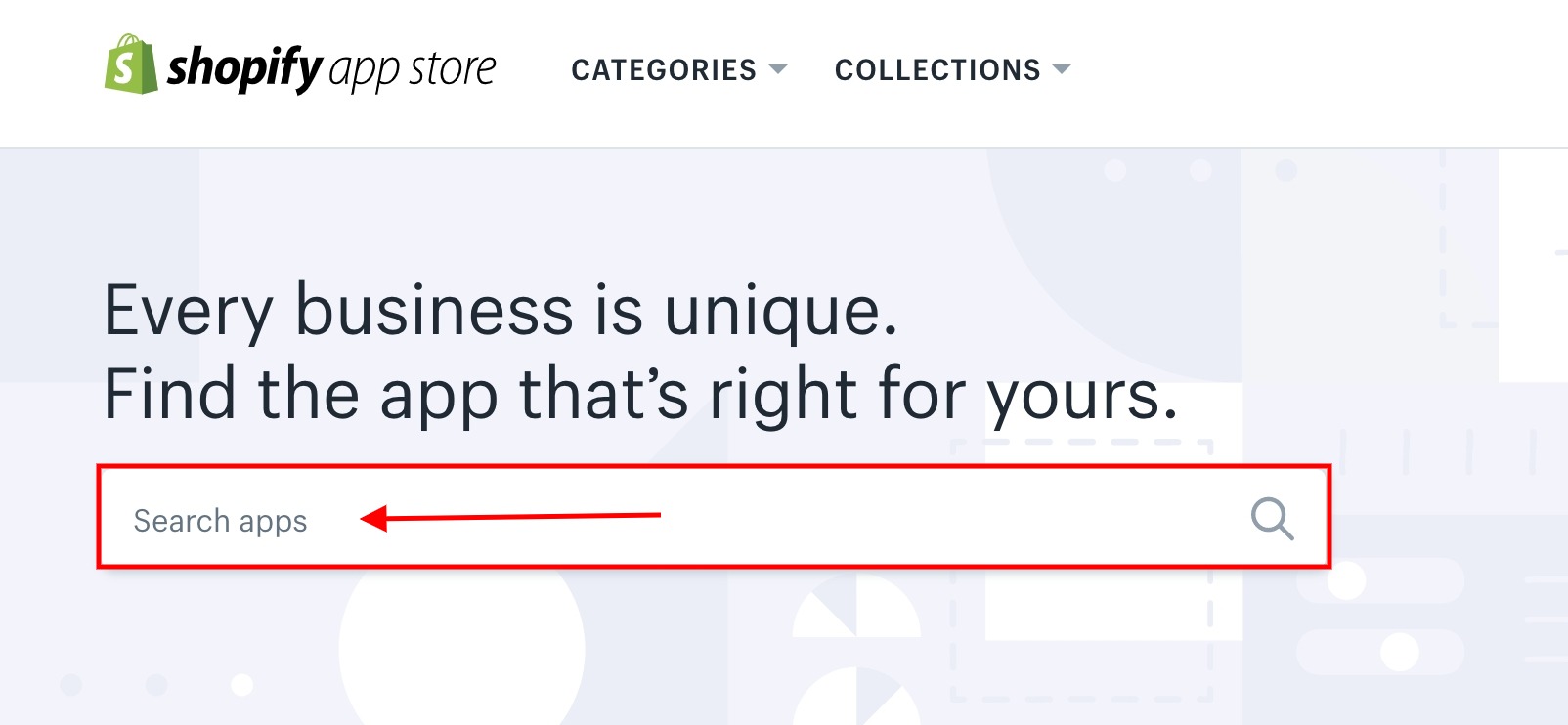
2. From the list of search results click on SMSBump shopify SMS Marketing + More.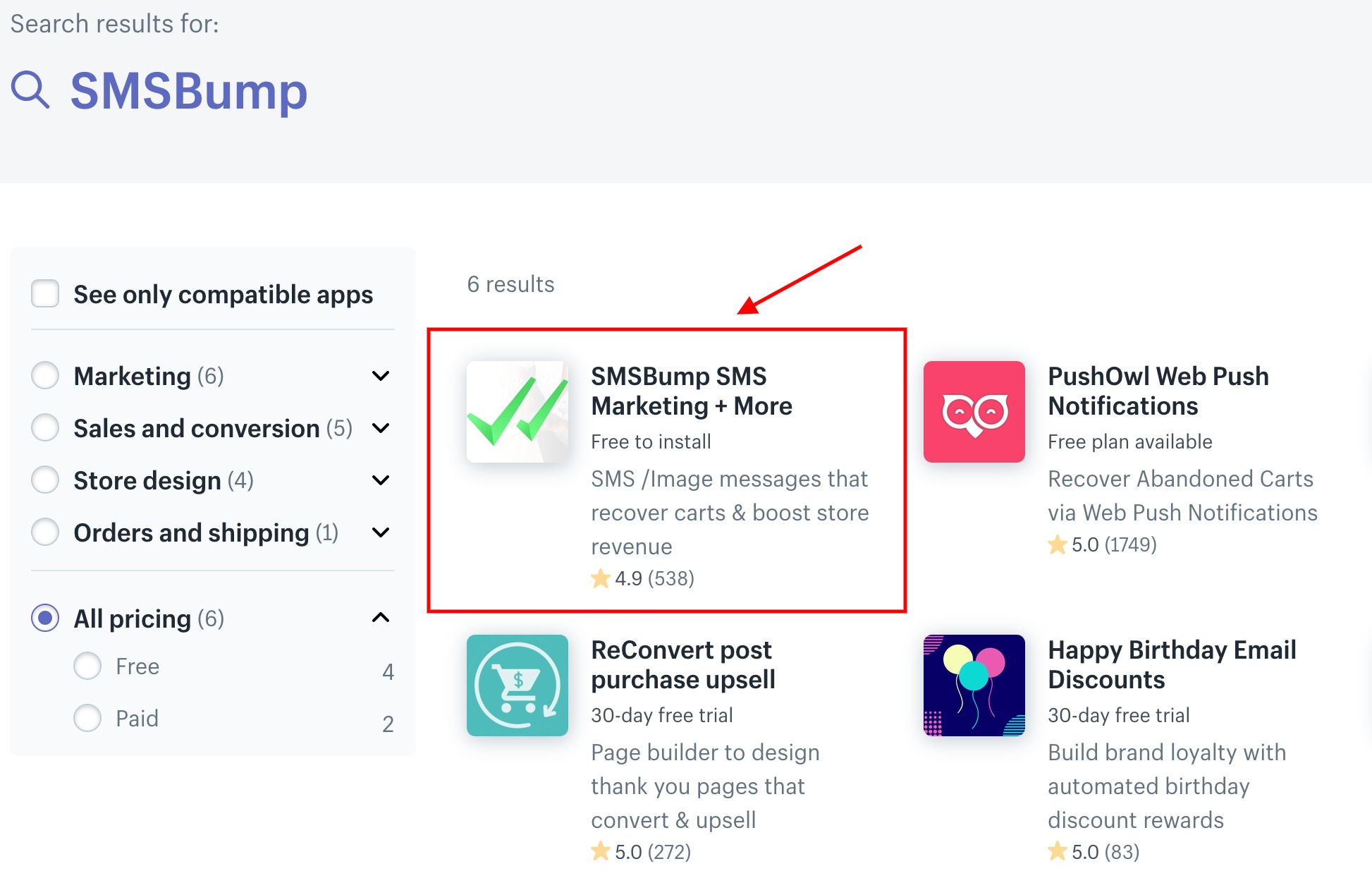
3. Log into your Shopify store account by writing your store URL and clicking on log in.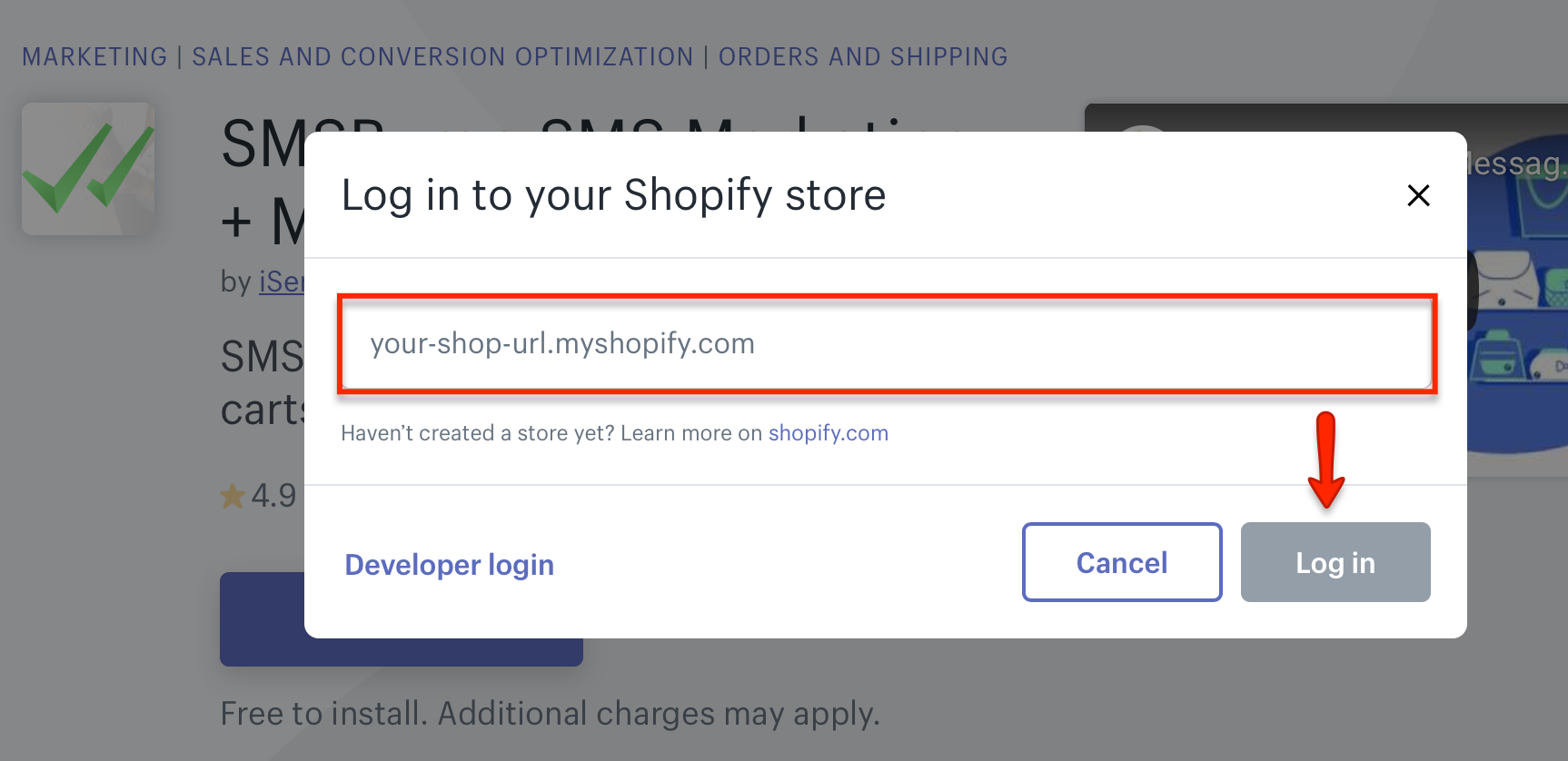
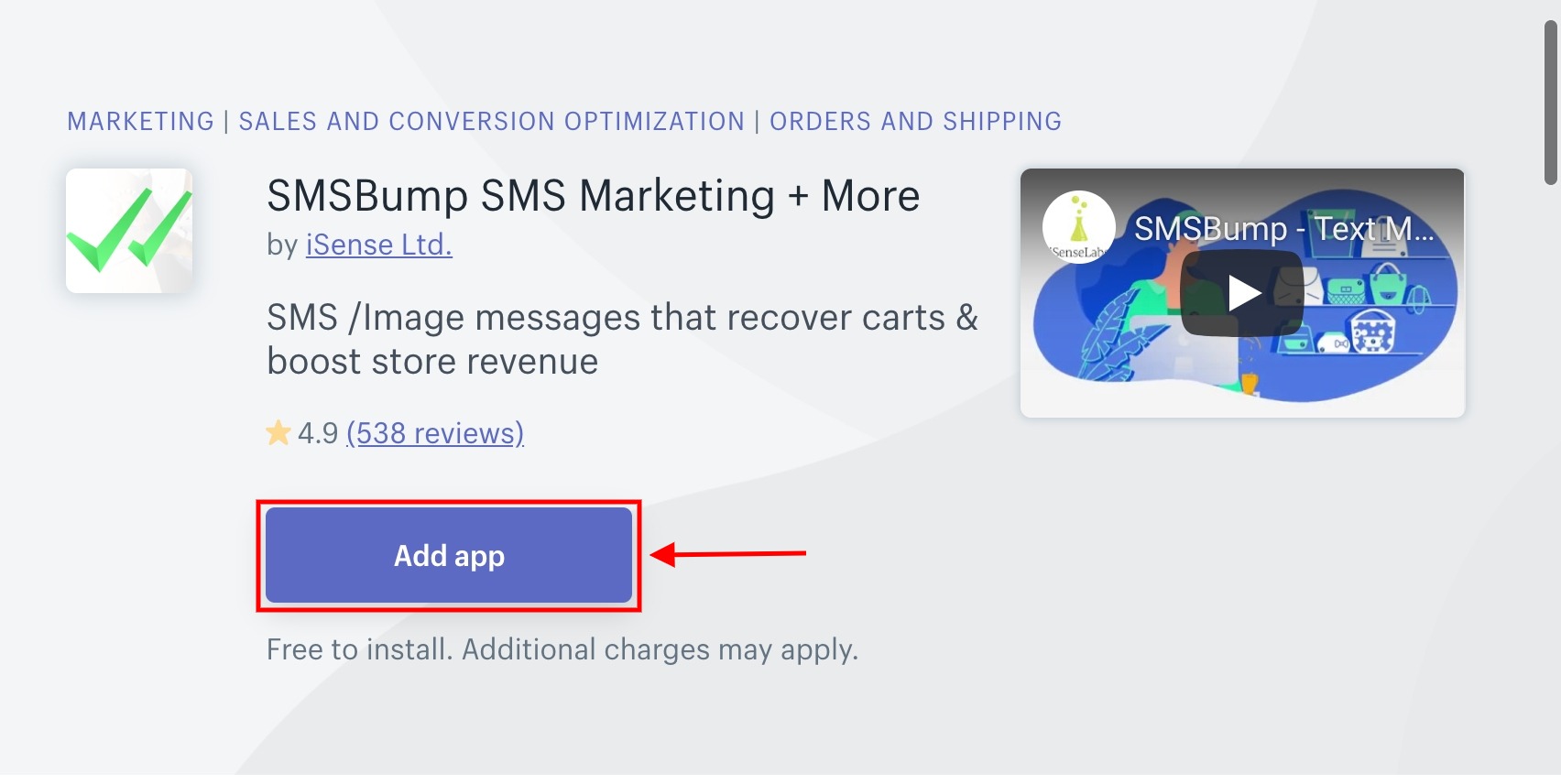
4. Click on Add app to integrate the app with Shopify.
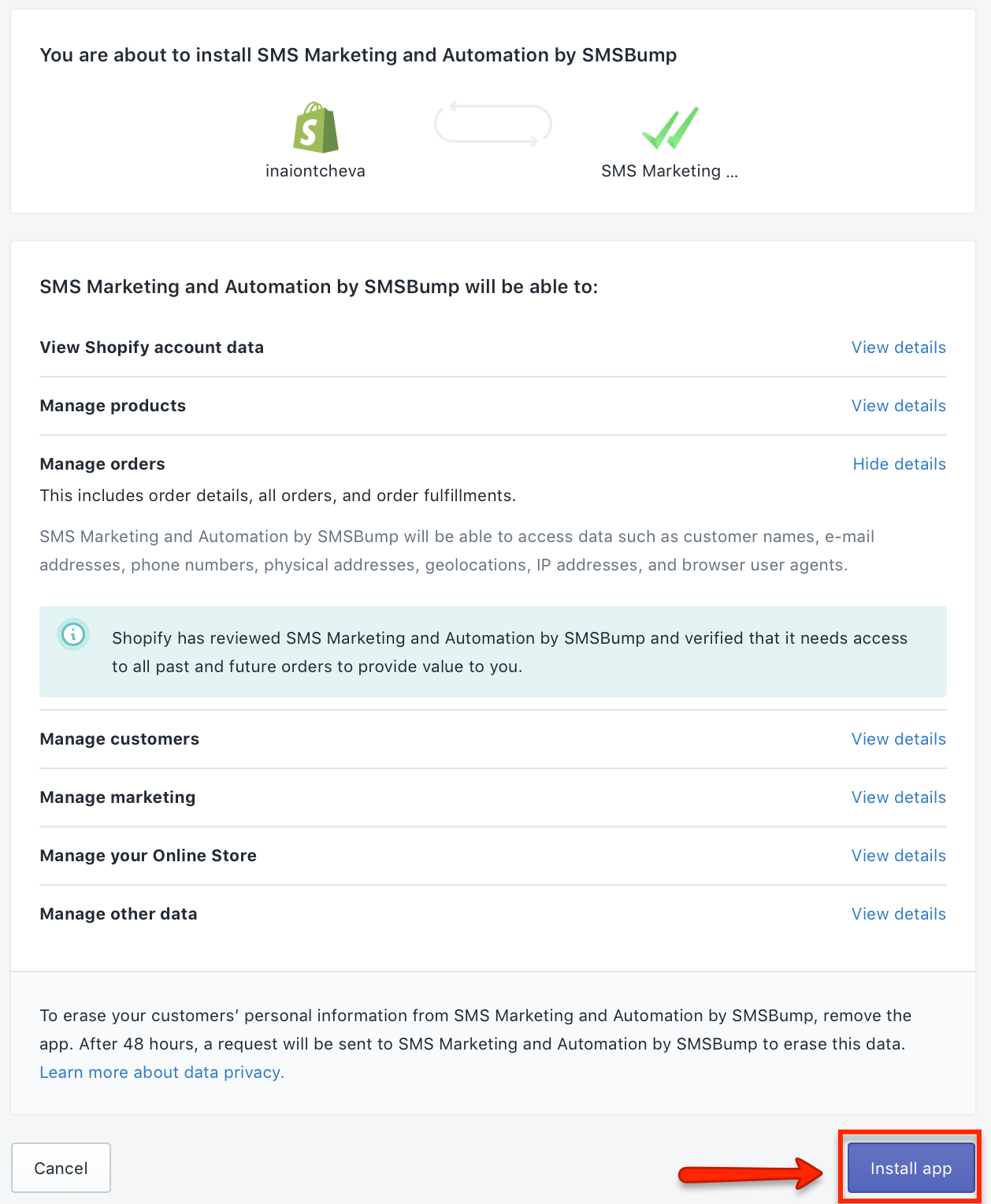
5. View details on what you can manage in the SMSBump app, and then click on Install app to finalize the installation.
6. Next, you need to provide your business email address, country location, and phone number (it will be used for bookkeeping purposes and will remain hidden to customers). Don’t forget to read over the ToS and Privacy Policy and check the box that you agree with them. Finally, click on Connect.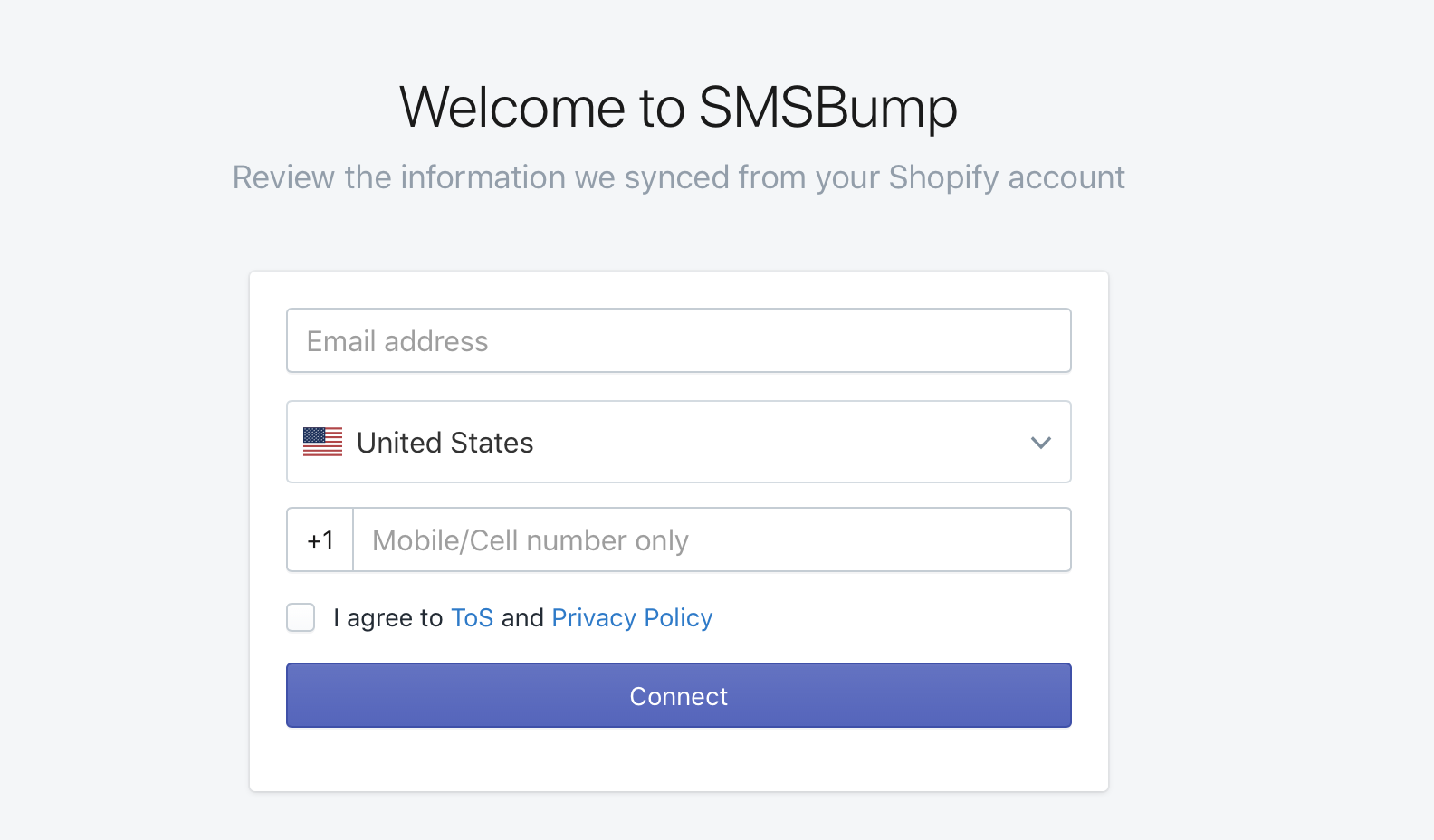
7. Great job! You have now successfully installed SMSBump in your Shopify account. Click on get started to begin using the app.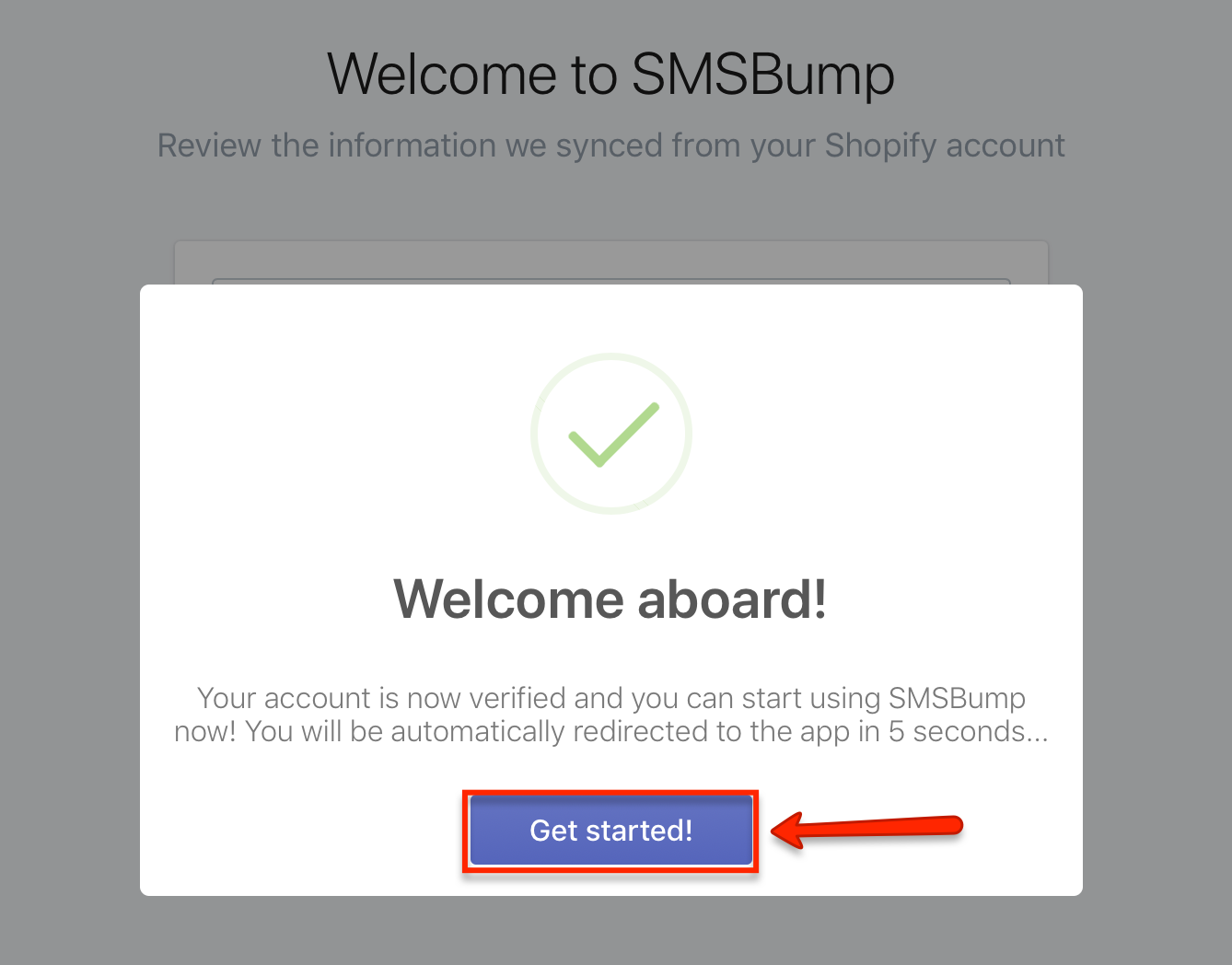
Magento, being the leading e-commerce platforms used today has made things considerably easy for both-sellers and buyers. Lots of feature-rich community extensions are available in Magento that can be made to work as per the requirements. E-commerce business is all about convenience of customer service, which is only possible with implementation of successful operations on the e-store. Extensions grant complete control of the store to online merchants with no glitches in the process flow. The smooth SMS magento integration with Magento SMS Extension built by us, makes it look and feel like SMS was always an integral part of Magento.
Feature Rich SMS integration with Magento SMS Extension
This new extension is built to integrate and send SMS from e-commerce store. It has been entirely built from the scratch to render ultimate solutions to e-store owners. It brings the comfort and convenience to the customers, and helps them to market their stores. It allows you to send notifications to your customers about their orders, credit memo, invoice and shipping events. The allows you to extend mobile services to your customers.
The extension was created for SMS integration to send it through magento e-commerce platform. The notification is sent at different events in the website:
The extension was integrated with the existing API to send notifications during various events on the main website. Our Magento developers implemented different technologies to make the process-flow easy. We fetched various events on the website and used them to send notifications at the time of a particular event, say, order placement. Certain SMS templates were created with various variables like order-ID, shipping-ID etc, so that a personalized message can be added to the template.The templates were linked to order state changes through which store owner can notify the customers when required.Also, a notification template was created which was sent to customers when old status changes to new status. To send message to mobile devices all round the world, functionality was integrated into the system by implementing communication with CM Direct API. This supports sending notification via HTTP. This notification functionality was integrated, through which store owner was able to enter and edit his CM Direct API details and get identified.
According to the research, mobile SMS have “98% Open Rate” as compared to email marketing which has only 22% open rate.
So, why don’t you also adopt the same SMS marketing strategy and create your own successful campaigns with the help of these WordPress SMS marketing plugins?
But first, let me tell you what these plugins actually gonna do for you?
These WordPress SMS marketing plugins let you send promotional text and voice SMS in bulk. Additionally, you can schedule campaigns and you can also send SMS via autoresponder. Sending SMS through these plugins won’t cost any extra bucks!
They also provide an approach to managing your subscribers by segmenting in groups. So, that you can send messages to the desired member.
SMS marketing is so impactful! Hence, this strategy can be beneficial for all types of business niche. Whether you own an E-Commerce store or you have a blogging website.
Notifying your subscribers and customers via WordPress SMS plugins can be fruitful for you.
If you want more different plugins. Then, go and check out these blogs.
So, stop envisaging and look forward to the WordPress SMS marketing plugins to boost up your business with SMS marketing.
Same as SMS marketing, you can also promote your business with the help of email marketing software like MailGet Bolt.
This software has everything that you need from an email marketing solution. You can design multiple professional-looking emails and send them in a flash. It provides you with more than 500 pre-design email templates to choose from, you can further customize them according to your needs and requirements.
Moreover, this emailing service offers a free trial for a month through which you can send 300 emails per day using all the essential features and facilities.
You can purchase this plan at $49/M and enjoy all the advanced features like custom tags, live chat, automatic follow-ups, list cleaner and more. Plus, there are more plans available for this service which comes with varied pricing and features.
This email marketing service supports real-time email tracking through which you can track users actions on email like open rate, clicks on links in just a couple of minutes.
With the help of list segmentation, you can create the subgroup for contacts on the basis of user likes, dislike, and similarities. This will help you to target the audience in a better and profitable way.
It has a list cleaning feature which helps you to clean out the bad and inactive email addresses from your mailing list. This helps you to get rid of bounce and spam complaints.
Further, the most important part of this service is there is no need to connect external SMTP as it comes with an inbuilt SMTP which helps in the better delivery of your emails.
WordPress SMS Marketing plugin makes sending messages so easy and convenient to any network whether it is local or international. It enables you to send unlimited SMS without any extra charges.
This plugin is incorporated with all the rich functionalities like Bulk SMS/MMS, campaign scheduling, autoresponders and so on. With the help of this plugin, you can send automated information about your products. It also allows you to send promotional SMS, offers, and discounts in bulk.
Buy this plugin from codecanyon.net at a cost of $20. To operate this plugin you must have an account on Twilio platform.
The two-way chat feature is also available in the plugin. Through this admin and subscribers can easily communicate with each other via chat.
It also supports up to 10 Images in MMS. Further, you can also see the images logs via this plugin.
You can also shuffle the subscriber list to send SMS to the desired contacts. It gives you an option to send a message to new subscribers or to all the subscribers.
Complete insights of your marketing campaigns are also provided. It also gives you the detailed reports about messages (sent, scheduled, queued, delivered).
WooCommerce SMS Customer Notification helps you to send bulk SMS to your customers. For example, if you have an online e-commerce store and you want to send messages about products, offers and discounts etc then, this plugin is perfect for that.
It is integrated with four popular SMS gateways APIs such as ClickSend, Nexmo, Twilio, and MessageBird. Before getting started, you have to create an account on the desired SMS gateway and get your API keys and then you are ready to send SMS. SMS marketing woocommerce can bring a lot change to your business.
It is available on the codecanyon.net at a minimal price of $5.
An automatic and Manual way of sending SMS. In automatic mode customer will get a message after placing an order. But in manual mode, manual actional of sending a message will be done by an admin or shop manager.
Flexibility to send one or bulk SMS to the WooCommerce customers.
It also offers sample messages that you can edit or use the predefined template.
The kit comes with a detailed documentation and a complete setup guide.
Gravity Forms SMS Pro is one of the best SMS plugins for WordPress. The plugin is specifically crafted for the Gravity Forms form builder. In this tool, WordPress SMS integration enables you to add subscribers to the groups after filling the form.
This plugin supports numerous SMS gateways some of them are Twilio.com, BulkSMS.com, ClickSend.com, Nexmo.com, OneWaySms.sg and the list goes on.
You can buy this plugin at $28 which includes 6 months support.
The plugin verifies the mobile number of the user before submitting the form.
Compatible with all mobile number’s input mask. (Consisting area code)
Possibility to send group messages or to a particular number.
It records all the sent SMS in a specific table.
Supports all the popular SMS gateways.
With the help of this plugin, you can connect with your subscribers, customers via SMS. It allows you to send text as well as voice messages to an individual or to a group.
This plugin is totally based on Twilio platform. So, to access it you’ll need the following things-
You’ll have to enter these details in the plugin’s settings.
This plugin is available free of cost.
Facility to create default groups into which you can add subscriber name and phone number.
Automatically checks the phone number is valid or not.
Integration of WooCommerce, message scheduling, BuddyPress is also available.
It also provides an option to automatically send messages to new subscribers.
It is an all in one marketing plugin. The plugin has three main integrations of Form Builder, Page Builder, Popup Builder by AZEXO. Moreover, it has few add-ons through which your marketing campaign can be boosted such as WooCommerce Dynamic Pricing and Discounts, Facebook Live chat and so on.
It has the functionality to send SMS notification and an autoresponder to send automatic replies. Consequently, you’ll achieve successful SMS marketing strategy.
Freely available on the official WordPress website.
The plugin arranges your site visitors in segments.
Double verification via phone and email.
Compatible with many popular SMTP services.
Facility to send newsletters via email or SMS.
Functionality to set up polls and surveys.
Well, above are the top WordPress SMS marketing plugins. We’ve hand-picked freemium as well as premium plugins. So, you can pick the one which offers your required functionalities.
Hopefully, our list helps you in finding the best SMS marketing plugin for your website.

For product marketers and ecommerce managers, SMS is an increasingly essential part of multi-channel marketing — especially with a mobile-first online retail market.
In this article, we’ll summarize 6 benefits you may not know about SMS marketing. We’ll also outline how to use SMS effectively for better lead acquisition, closing rates and customer loyalty for your Shopify or Shopify Plus store.
By the end, we hope you’re ready to integrate SMS marketing right away!
SMS (a.k.a. text message marketing) is perhaps the most direct route to customers when it comes to D2C marketing. With a 98% open rate and a 5x click rate compared to other channels (such as email marketing), SMS is a more casual and less threatening channel for customers.
Not only do standalone SMS campaigns have a high success rate and proven ROI for Shopify merchants, but they also enhance and support other marketing channels like email and social marketing. As mobile shopping activity continues to rise, shoppers expect to receive offers, discounts, consultations and other promos through mobile messaging.
Merchants not utilizing SMS as part of a mobile marketing strategy are missing out on building direct relationships with customers. As a result, this could mean sacrificing sales.
Littledata found that, on average, nearly 60% of mobile shoppers abandon their carts before completing checkout.
Many of these incomplete checkouts may be due to unanswered questions. And while automated messaging may not solve these barriers to purchase, it can certainly reengage shoppers through incentives or simple reminders to complete their checkout.
You can learn more about the purchasing behavior of your customers by studying back-and-forth conversations.
For example, SaveMySales is a performance SMS marketing app that offers a dashboard showing customer conversions from which merchants can track trends, like commonly asked questions or concerns preventing them from purchasing.
This type of insight helps merchants understand the customer journey (and blockers) their customers face, which can lead to better Shopify text message conversion rates.
SMS marketing can help you directly build 1:1 relationships and trust with your customers.
Shoppers appreciate messages that make them feel valued or special, especially when messages include personalized responses from real humans that solves their barrier to purchase.
Whether shoppers are casually browsing before a first-time purchase or they are returning for a repeat purchase, shoppers are more likely to buy when they experience a level of brand trust.
SaveMySales is the only human SMS marketing solution that acquires subscribers, sends messages, and replies back to shoppers.
By combining AI with the world’s best live agents, the company has created the most personal marketing channel ever. The platform drives up to 20% increases sales for Shopify stores by answering questions, providing suggestions, offering deals, and up-selling.
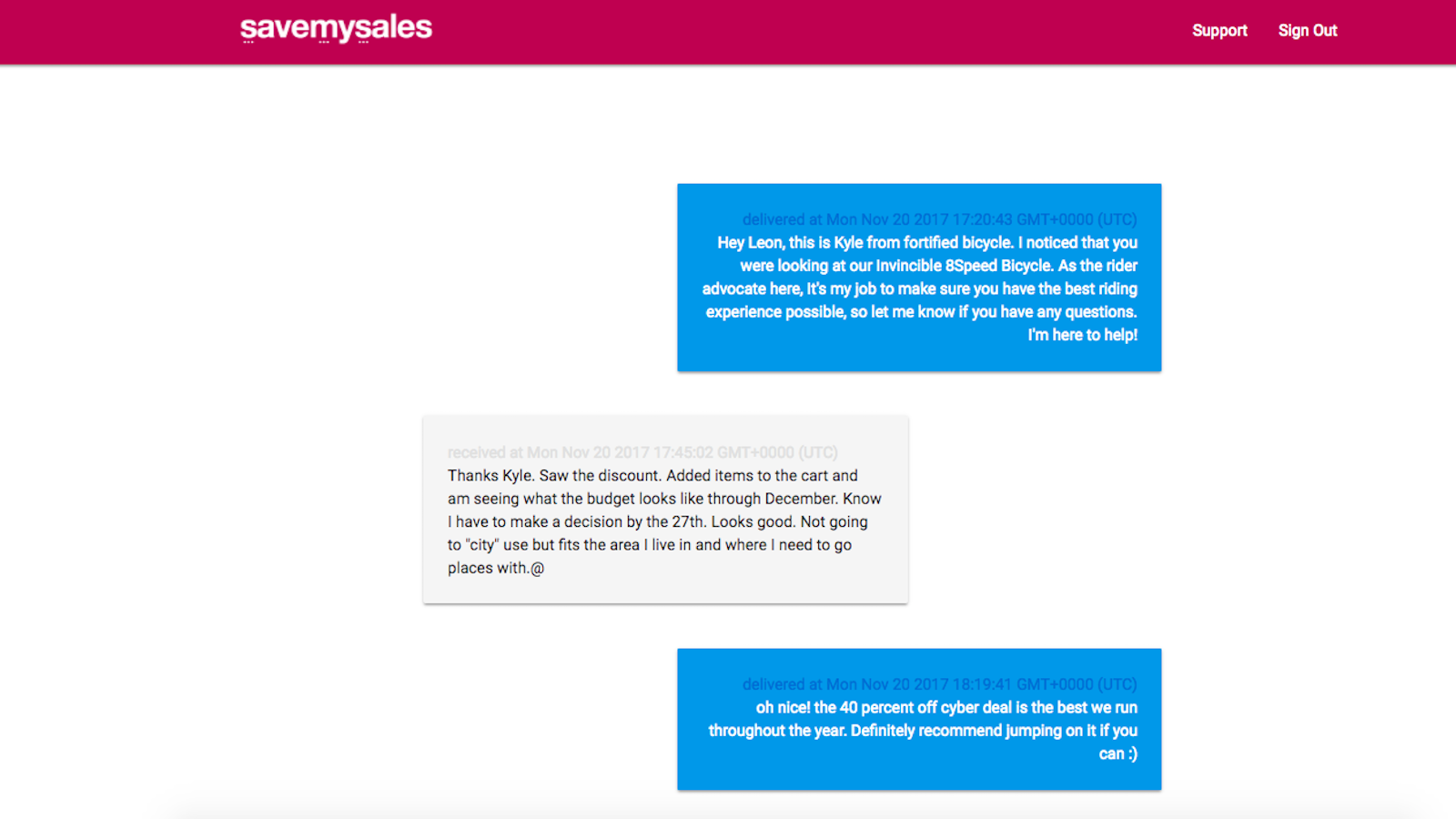
Some of the best features include but are not limited to:
We recommend Shopify stores use SaveMySales as part of their ecommerce multichannel strategy for engaging with shoppers at every stage of the purchasing funnel — not only because it’s a proven method, but also because it offers the peace of mind shoppers want.
While you’re building this high-converting engagement channel for your brand, for Shopify and Shopify Plus merchants, one thing matters just as much as engagement — tracking each step of the customer journey.
Luckily, Littledata’s smart analytics app for Shopify connects your store data to Google Analytics or Segment, and tracks every event, from casual product page clicks to final purchase. It’s automatic tracking our merchants can trust.
If you’re on Shopify Plus, check out an enterprise plan to get a dedicated account manager to help with data setup, reporting and optimization.
SMS marketing is becoming an increasingly essential channel as a direct line of communication to get in front of shoppers, recover lost sales, understand customers, and increase customer engagement.
SMS can be used as part of a multi-channel strategy for engaging with customers at each stage of the customer funnel to help increase conversions and ROI for your Shopify store.
We recommend using SaveMySales to build the most personalized SMS marketing strategy that will impress your customers and help them build a relationship with your brand.

 Marketing Tech