SMS Marketing for Shopify

Converting visitors into loyal customers sometimes requires a little push from your side. No matter how good your product is, or how well your online platforms function, you have to turn every marketing channel to your advantage.

Short message service marketing – or SMS marketing as we call it, is exactly the kind of marketing channel that will help you absorb your users’ attention in this bustling online world.

The Oldest Trick in the Book is New Again: Two Important Points

The first is a misnomer we want to clear up: SMS marketing is no longer restricted to mobile text messages. You can apply SMS marketing to any platform with messaging capabilities, like Facebook, or to any device that allows push notifications like mobile or desktop.

The second is a critical rule that you must always keep in mind when building an SMS marketing campaign: send your messages with extreme strategic intent.

This seems like the obvious answer for anything you do in marketing, but in this case it’s of prevailing importance that you do not flood, interrupt or annoy your users. Keep your message short, powerful and tactical.
Now we can dive into the tips and tricks that make SMS Marketing actually work. Whichever forms of SMS marketing you start getting involved in, your three core goals will be:

  • Increase brand awareness
  • Boost engagement
  • Generate sales

You may ask – aren’t those the same standard goals you apply to any marketing strategy? Of course they are. But SMS marketing is unique because the goal acquisition is instant, the effort you put in is minimal and the cost is highly effective for ROI.

There are dozens of reasons for you to send out an SMS campaign (and creativity will always be rewarded) but here are a few of the most common reasons for short messages:

  • Coupon offers
  • Abandoned cart reminders
  • Sales and promotions
  • Festive season updates
  • New product or inventory update announcements
  • Notifications (for example delivery progress)
  • Customer feedback

Plenty of strategists are incorporating these same messages into their email campaigns already and might think that’s good enough. It’s not.

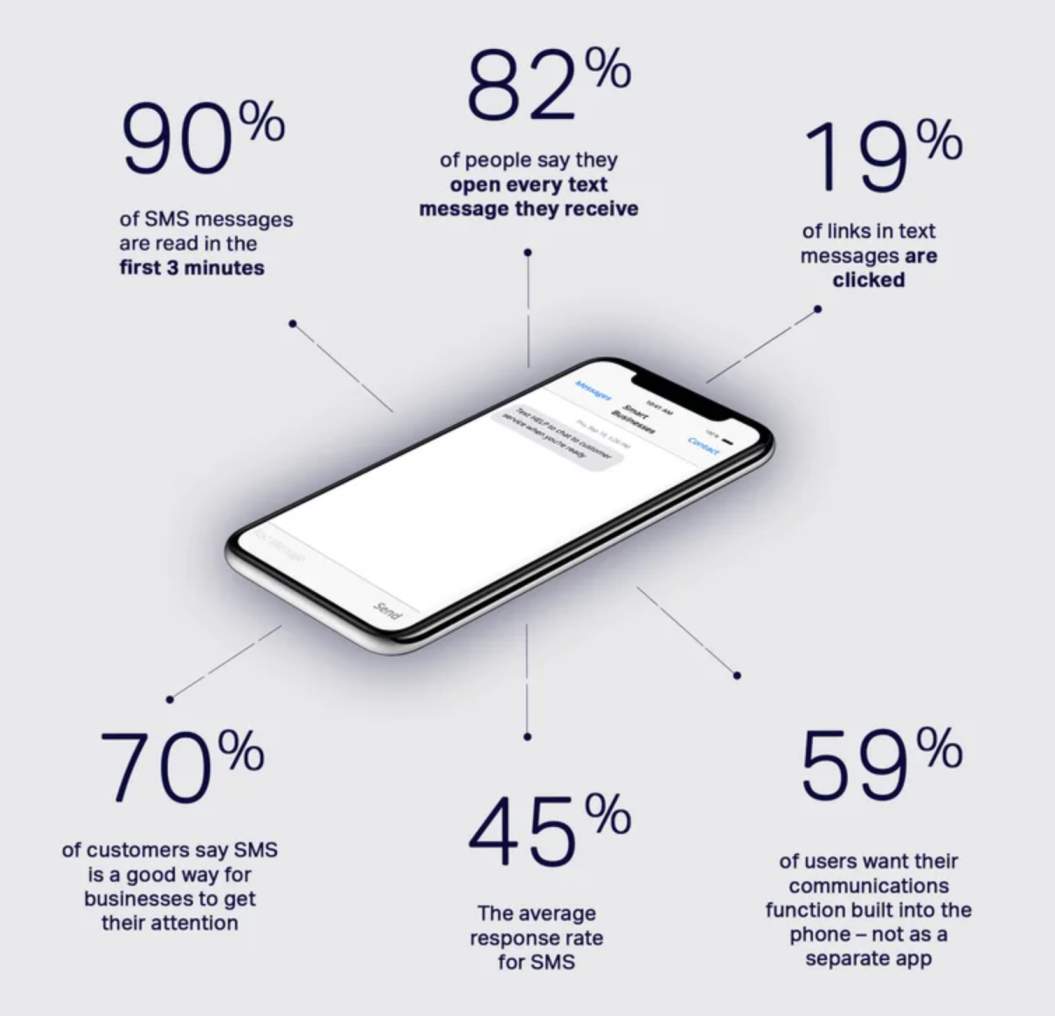
The average open-rate for email is 20%. The average open-rate for SMS is 98%. If reading that wasn’t enough to convince you, then we can add that only about 2% of links within emails actually get clicked, whereas almost 20% of links through SMS get clicked.
We’ll never tell you to stop email marketing. It has its own powerful, somewhat irreplaceable advantages (as we highlight in our article on email marketing for ecommerce stores,) but it definitely doesn’t fulfil all the same objectives as SMS marketing. It’s highly recommended that you incorporate both into your budget and strategy if you want to see proper impact on your customer engagement.

Now that you understand what sort of communication short messages are used for, we can start looking into where exactly they are used and why, because your strategies and outcomes will most certainly differ across platforms.

SMS Marketing for web push notifications

We’re using PushOwl as an example to explain the benefits of SMS marketing on mobile and desktop. It also has a 5-star rating from Shopify and is trusted by over 10k Shopify stores worldwide. So we can say with great confidence that it shows results for any industry, product or service!

PushOwl allows you to send push notifications straight to your customer’s screen, giving you the opportunity for direct and instantly visible marketing.
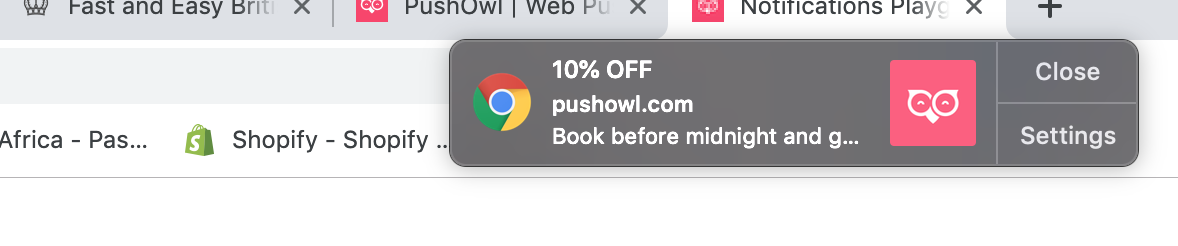
Here’s how it works:

1.Install the app onto your online store. You can even start with a basic package, which is free, and move onto a more advanced package later once you see results for yourself.

2.When users start browsing your store, PushOwl will ask their permission to send web push notifications to their devices. From visitor to subscriber in just one click!

3.Set up automated notifications for anything from discount notifications, flash sales, product promotions and back in stock alerts to simple greetings, festive updates, review request and abandoned cart reminders (the list goes on).

4.Customise your notifications to suit your brand’s own style and voice. You only have a few characters at your disposal so bring out your best content crafting skills and creativity here!

5.Include captivating hero images onto your notification to catch users’ attention and interest even more. Content with compelling images receives 94% more views than ones without pictures.

6.Gain in-depth knowledge of your campaign performance with highly insightful data and analytics. This will reveal which promotions are generating sales, help you uncover market opportunities, and identify areas of revision to help steer you in the right direction for even more successful campaigns in the future.
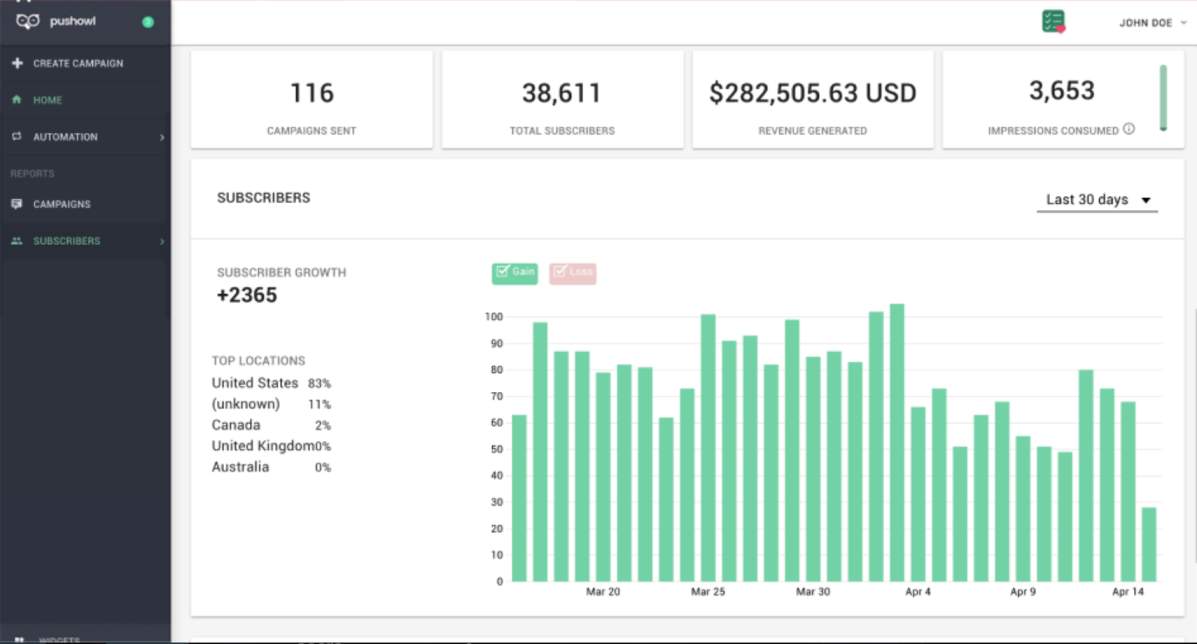
Another exceptional advantage that PushOwl offers is the ability to integrate extended apps and further enhance your notification strategies.

We loved this functionality so much, we even developed an app of our own! Now Back in Stock by Eastside Co allows you to send automated alerts to you customers when their desired items are back in stock. This way you can recapture lost revenue and build a stronger relationship with your consumers through thoughtful communication. Plus, it’s the only app available that lets you send SMS notifications straight to their phones – which we’ve already mentioned has a 98% open-rate. Success you simply can’t refuse!

Be sure to check it out, or reach out to us for expert advice on getting started.

SMS marketing for text messages

SMS marketing may be old-school, but to this day it’s mighty powerful.

Tech Jury is a team of software experts that test and review software and other online products to give the public transparent reviews and answers. They’ve gathered over 35 compelling facts and stats about the success of SMS marketing today, and we’d love to bring some of their findings to your attention:

  • Nearly 6 billion people will be able to send and receive text messages by 2025, and a whopping 61% of the world’s population will have access to mobile internet. This means mobile marketing will continue bringing success in the future. So even with web push notification capabilities, standard text marketing will live on strong.
  • The average American checks their phone approximately 47 times a day and state that they will open a text message within 15 minutes of receiving it. In fact, 90% of SMS are actually read within 3 minutes. That’s quite a lot faster than an email lingering in the dark depths of a spam folder!
  • Just last year there were over 7.9 billion mobile subscriptions across the globe, which helps explain why as many as 23 billion text messages are sent each day worldwide. Yes, each day. That’s insane.
  • On average it takes a person about 90 seconds to read and reply to an SMS message but over 90 minutes to respond to an email – when they eventually get to reading it, that is.

So why these facts specifically?

Well because it serves as a subtle reminder that SMS marketing holds a massive part of the market and if you’re not getting involved, you’re losing out on the potential to reach thousands – or even millions of people as you grow your business.

The reason SMS marketing has such high success rates is simply because of how time-efficient and affordable it is as a marketing channel. Things like event-related promotions and flash sales require instant delivery for lightning-fast reach and interaction. Text messages allow you to do just that with a cost that’s next to nothing.

More so, you get to spend minimal time working on the campaign itself, giving you more freedom to focus on other marketing areas that require manpower and close attention. Much like PushOwl, you can use automated text messaging capabilities to follow up with contacts, set exact delivery times, send text messages triggered by particular behaviours, or even bring customers back to an abandoned cart.
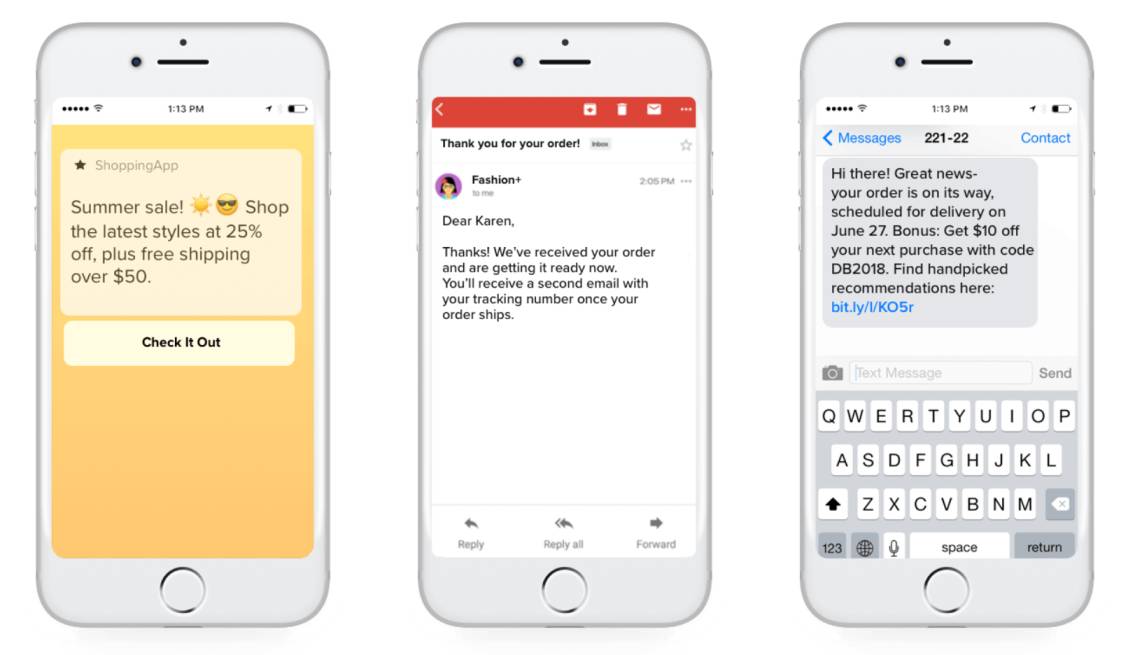
If all this sounds too good to be true, it’s because there is a very fine line between successful SMS marketing and downright annoying spam. To be part of the growing success of it all, there are a few rules you need to follow:

Intent

Never send a marketing SMS without valuable intent. Remember, users can see snippets of an SMS on their screen before opening it. If they can tell by the first few characters that you’re sending out nothing worthwhile, you will damage your open-rate and waste a good opportunity.

Personalisation

Personalise your messages to the best of your ability. Simply using a customer’s name isn’t always good enough – you should also consider elements like location, past activity, recent purchases and other behavioural cues when tailoring your messages.

Length

Keep it as short as possible. You have about 160 characters to work with, but that doesn’t mean you have to use all of them. It can be tricky to make such a short message compelling, so don’t rush the process – rather refine and perfect!

Timing

Getting an SMS from a business in the late hours of the evening – or even first thing in the morning – is highly invasive and can turn a customer off instantly. Consider time zones when setting up your automation and try stick to the general marketing rule of sending out a message between 10:30 and11:30, or 14:30 and 15:30.

Permission

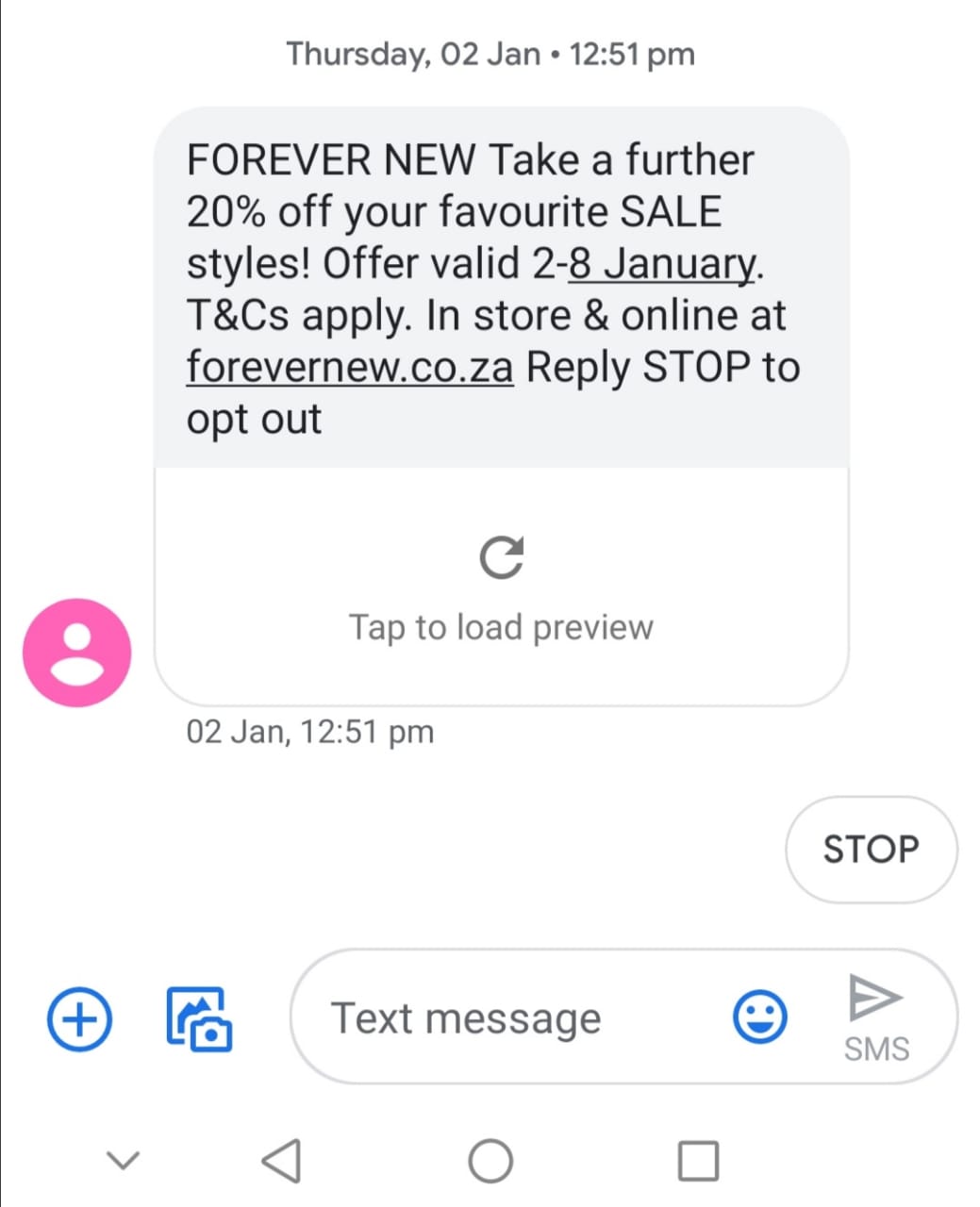
Of course you already know that you can’t send a marketing SMS if the user didn’t opt-in for it. If you do, you’re breaking strict Data Protection and GDPR laws and you never want to do that! You also need to include an opt-out option in every one of your text messages. Don’t worry, opt-out works in your favour because if people choose to opt-out, you at least know that you’re keeping your database clean of uninterested subscribers. This will give you more accurate performance results and reveal where you should be placing more focus.
Conclusion

So above points define how you do more after using SMS marketing for shopify and make full out of it. And we conclude that SMS has a good potential For customer relation.
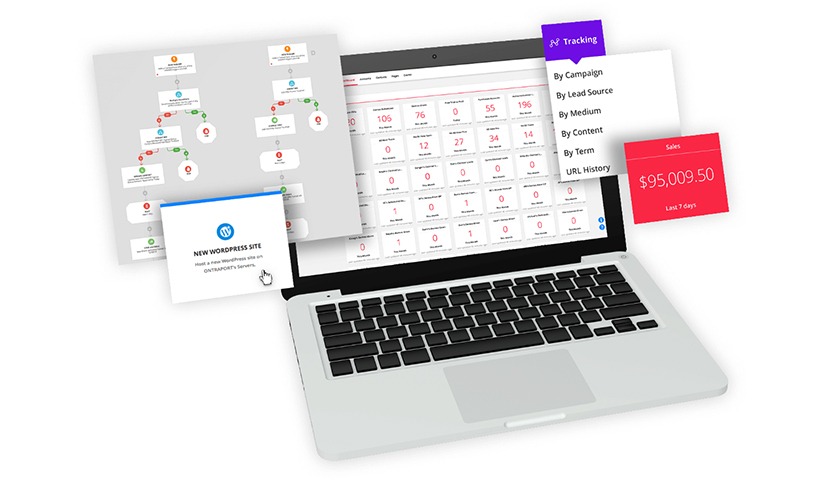
Best Marketing Automation Software for Small Businesses

Products classified in the overall Marketing Automation category are similar in many regards and help companies of all sizes solve their business problems. However, small business features, pricing, setup, and installation differ from businesses of other sizes, which is why we match buyers to the right Small Business Marketing Automation to fit their needs. Compare product ratings based on reviews from enterprise users or connect with one of G2’s buying advisors to find the right solutions within the Small Business Marketing Automation category.

In addition to qualifying for inclusion in the Marketing Automation Software category, to qualify for inclusion in the Small Business Marketing Automation Software category, a product must have at least 10 reviews left by a reviewer from a small business.

Top 8 Marketing Automation Software for Small Businesses

  • HubSpot Marketing Hub
  • ActiveCampaign
  • Mailchimp All-in-One Marketing Platform
  • Klaviyo
  • SharpSpring
  • Omnisend
  • Keap (formerly Infusionsoft)
  • RD Station

Compare Small Business Marketing Automation Software

G2 takes pride in showing unbiased ratings on user satisfaction. G2 does not allow for paid placement in any of our ratings.Sort By:AlphabeticalSatisfactionPopularityG2 ScoreResults: 

HubSpot Marketing Hub

HubSpot is a leading growth platform. Since 2006, we have been on a mission to make the world more inbound. Today, over 68,800 total customers in more than 100 countries use HubSpot’s award-winning software, services, and support to transform the way they attract, engage, and delight customers. Comprised of Marketing Hub, Sales Hub, Service Hub, and a powerful free CRM, HubSpot gives companies the tools they need to Grow Better.

ActiveCampaign

ActiveCampaign’s category-defining Customer Experience Automation Platform helps 100,000+ businesses in 170 countries meaningfully engage with their customers. The platform gives businesses of all sizes access to hundreds of pre-built automations that combine email marketing, marketing automation, CRM, and machine learning for powerful orchestration, segmentation and personalization across social, email, messaging, chat, and text. 300+ integrations. Pricing starts at just $9/month.

Mailchimp

Mailchimp’s all-in-one Marketing Platform helps small businesses market smarter so you can grow faster. As the backbone for your customer relationships, they provide AI-powered, user-friendly tools anyone can use to be successful. Mailchimp puts your audience at the center so you can send marketing emails and automated messages, create targeted ad campaigns, build landing pages, send postcards, facilitate reporting and analytics, and sell online.

Klaviyo

What do sophisticated D2C brands like ColourPop, Huckberry, and Chubbies all have in common? They rely on Klaviyo to supercharge their growth. Klaviyo is a growth marketing platform that helps you deliver more personalized experiences across owned marketing channels like email, SMS, in-app notifications, and web. And the results speak for themselves—brands have made more than $3.7 billion in revenue through Klaviyo in the last year alone.

SharpSpring

SharpSpring is a comprehensive marketing automation platform with robust features, functionality and performance. SharpSpring is one of the most flexible platforms on the market, offering powerful, behavior-based email marketing, native or 3rd party CRM integration, dynamic forms, landing page and blog builders, social media management, universal CMS compatibility, and integration with hundreds of applications. SharpSpring is usually less than 1/3 the cost of the competition.

Omnisend

Omnisend is a powerful omnichannel marketing automation platform built for high-growth ecommerce businesses. With advanced automation workflows, customer segmentation features and a multitude of channels to reach the customer (via email, SMS, push notifications, Facebook Messenger and more), Omnisend is a complete, all-in-one solution for ecommerce marketers who have outgrown the generic email marketing tools.

Keap

Step up to all-in-one sales & marketing software designed for growing service-based businesses, ranging from entrepreneurs and startups to larger teams. Our platform organizes your customer information and daily work in one place, freeing you up from repetitive tasks so you have more time to focus on growing your business and delivering great service.

RD Station

RD Station Marketing is a platform that helps medium and small businesses manage and automate their Digital Marketing strategy. With it, customers drive attract traffic, convert this traffic into business opportunities and drive more sales.

Conclusion

So these marketing automation for eCommerce tools will help you in upgrading your business.

Best Tips to Leverage the Power of SMS Marketing

Not all SMS marketing campaigns are created equal. There are some companies who fully integrate SMS marketing into their business strategy and others who see it as a side project.

According to a survey by ScanLife, 89% of customers use their mobile phones while shopping, and 64% of Americans own a smartphone as of 2015. Given this, which company do you think will have a more successful marketing campaign?

If you’re already on board with SMS marketing, here are some tips and suggestions on how to maximize your success.

1. Create an SMS Marketing Team

Large SMS marketing campaigns aren’t DIY. You’ll need a variety of skilled professionals in order to get the most out of your marketing strategy. One or a few people may fill several of these roles, but you’ll need: an SMS marketing program expert, a retail expert, coordinators for on-location signage, digital creative designers, social media experts, a promotions specialist, an ROI and discount budget analyst, and more.

These areas need to be coordinated, and since the timeline for SMS is getting more and more immediate, the marketing team needs to work very closely and communicate frequently about plans, strategies and execution. The more complete your SMS team, the greater the benefits you’ll reap from effective marketing strategies. 

2. Know Thy Customer

Use a CRM (Customer Relationship Management) app to measure the success of your message.

Analyze purchase history and location-based demographics, so you can send the right messages to the right customers. If you’re a cosmetics line, don’t send an anti-wrinkle cream coupon to a twenty year old for your store in Houston when she lives in Boston.

Segment your clients for targeted promotions. Send bulk messages for general sales and promotions that anyone anywhere could take advantage of.WHILE YOU’RE HERE

3. Write Clear Messages

Get to the point: You have 160 characters to express yourself. Do it in less if you can. Make sure the message is clear and concise, written in plain English. Avoid abbreviations, emoticons, and all caps.

Don’t use open-ended messages. An example of an open-ended message is one that invites clients to a sale but doesn’t say when the sale ends. The client has no idea if it is for a day or a month. By giving a specific date when a sale ends or putting an expiration date on a coupon, clients are more likely to act because you’ve given them enough information and incentive.

4. Use Call-to-Action Buttons

Calls-to-action increase customer engagement with your SMS marketing texts. That’s exactly what you want from them: to be engaged, to value the texts you send, to read them, interact with them, and act on them.

Here are some call-to-action winners:

  • “Show this text.” Asking customers to show the text in order to earn a discount is a clear and effective way to get them to engage in your promotion. Example: “Show this text for 50% off your dinner tonight.”
  • “Click here.” Sometimes you don’t have enough space in your SMS message to include all the information your customer will need. Maybe you’re hosting an event, and you want to add a link to a map or a video about the event or a link to your website where there are more details. In that case, a “Click here” button will provide a link to the necessary details.
  • Text-to-Win. Lots of customers would be interested in having a shot at winning a prize or gift from your company. Asking them to text in order to enter the contest helps increase customers’ engagement. If you’re not offering a sale or hosting an event, Text-to-Win campaigns are an effective way to remind customers of your existence and continue increasing traffic and sales.
  • Text-to-Vote. Engage customers in mobile polling to find out how your company is doing in terms of service, product quality, prices, and more.
  • “Buy now.” This is the perfect CTA button for targeted messages. If you know a customer routinely buys a certain product, you can send a text promoting that product with a “Buy now” button to make it easier for them to make a purchase.

5. Get Your Timing Right

SMS is all about immediacy. It takes people an average of three minutes to open messages. Clients’ responses to sales, promotions, and events promoted on SMS are most effective when they’re last-minute impulses. If you have a store opening event on Friday night, send the message Friday afternoon. If you have a dinner promotion at your restaurant, send it at the end of the workday, not in the morning.

Be careful not to tread on thin ice by sending messages out too early in the morning or too late at night. Acceptable hours are between 8am and 9pm.

Take SMS timing one step further by finding out the best time to send a message to a specific individual based on their past interactions with your texts. This ultra-targeting goes beyond region and demographics and customizes your marketing to optimize results.WHILE YOU’RE HERE

6. Promote Opt-In Across All Media

The best way to get customers to opt-in is to give them the chance to do this at every point of contact:

  • Social Media. Add a “Mobile Number” field to your Facebook page sign up and an “Opt-in” button for them to sign on to your personalized SMS campaigns.
  • Website. Make sure SMS opt-in is a prominent feature on your website.
  • Newsletter. Make SMS opt-in visible on your newsletter.
  • Point-of-sale. Make sure employees are asking if customers want to opt-in for SMS texts for promotions and sales.
  • Snail mail. When you send coupons or promotional mail through the post, make sure instructions for SMS opt-in are printed on it.
  • SMS. You can also send a text asking if they wish to opt in: “Get access to 6 (Company Name) texts per month for SMS-only discounts. Text 1234 to Opt-in.”

[contextly_auto_sidebar]

7. Focus on Your Best Clients

Your best clients are the ones who are loyal, who buy consistently from you, who give you feedback, and who promote your brand to their friends and family. A smart strategy is to identify this circle of customers (influencers) and dedicate extra time and resources to them. They know and love your brand, so use their knowledge to your advantage, and send them more in-depth polling questions than you send to your bulk clients. Also, they’re your company’s VIP, so treat them as such. Reward their dedication with special offers and extra benefits.

Want to read more? Take a look at these case studies on how big brands have used SMS campaigns successfully to promote sales and increase customer satisfaction.

No matter what kind of company you own, you can maximize the benefits of your SMS campaign by dedicating time to crafting effective messages, analyzing your customer demographics, investing in an SMS-specific sales marketing team, and promoting your SMS campaign throughout your company’s media.

Abandoned Cart Recovery SMS Strategy In Shopify

Abandoned cart SMS reminders are text messages that send automatically after an online shopper adds products to their cart but leaves without finishing their checkout. These text messages can be triggered and sent only if you have the customer’s phone number and marketing consent.

Let’s show you the 8 steps to nail your SMS abondent cart for Shopify.
 

Set an abandoned cart SMS reminder sequence

Most of online orders are abandoned by shoppers. The statistics show that around 80% of online purchases are abandoned, which is a significant increase for E-Commerce businesses in the last couple of years.

Online stores are trying to solve their cart abandonment with different marketing tools such as email, Facebook & Instagram retargeting, Display advertising, and more.

In this guide, we’ll show you how to add text messages to your remarketing toolkit and see why they are one of the most powerful retention marketing channels in 2019.
 

“We’re getting an ROI of about 1,000%, 10X on what we were spending on SMS!” – Rafael Cintron, Shopify Dropshipping Expert


SMSBump Abandoned Cart SMS Automation in Shopify


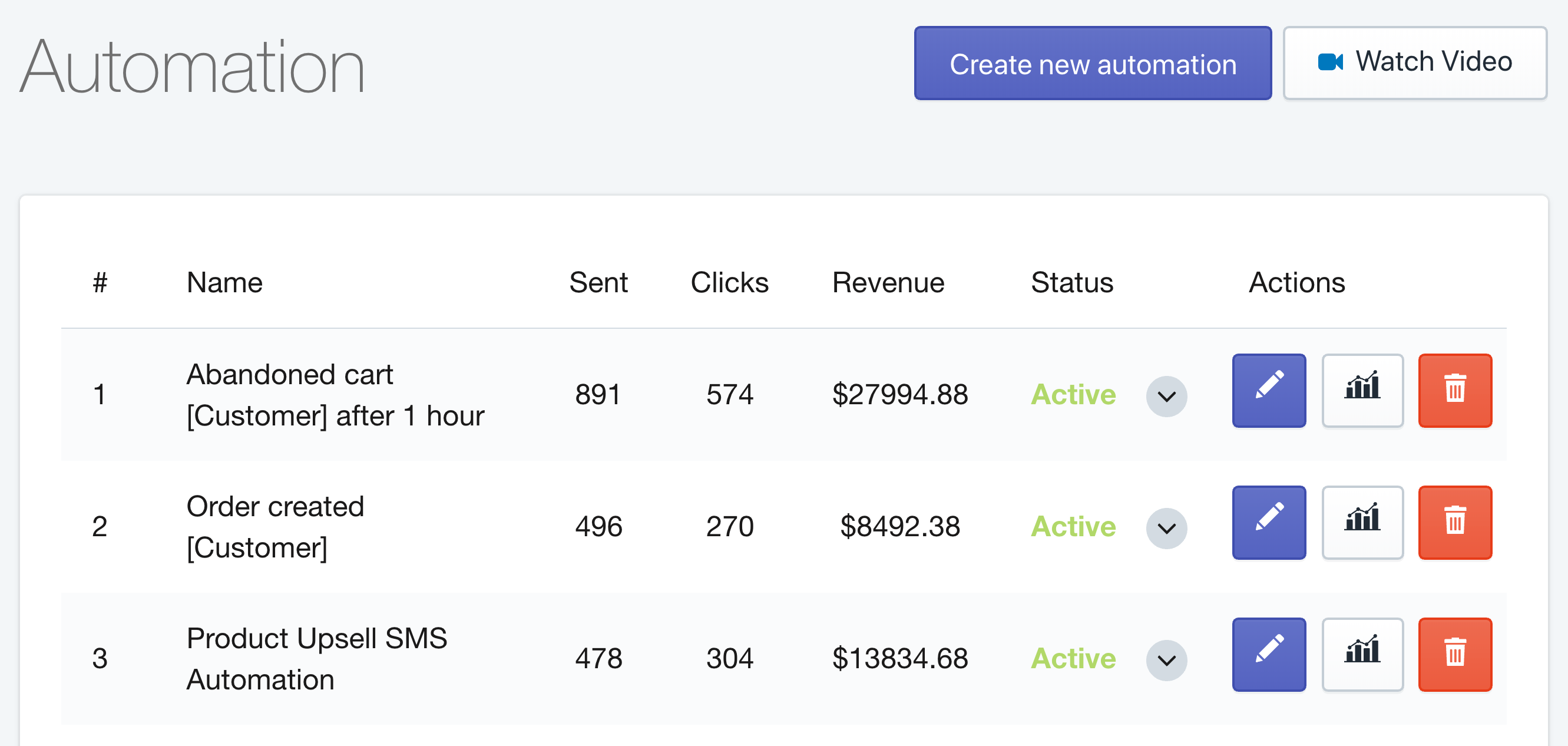
The most effective way to recover abandoned carts using text message automation in Shopify is to build a sequence of SMS reminders that trigger at a specific time interval you can configure.
 

Breakdown of The Perfect Abandoned Cart SMS Reminder

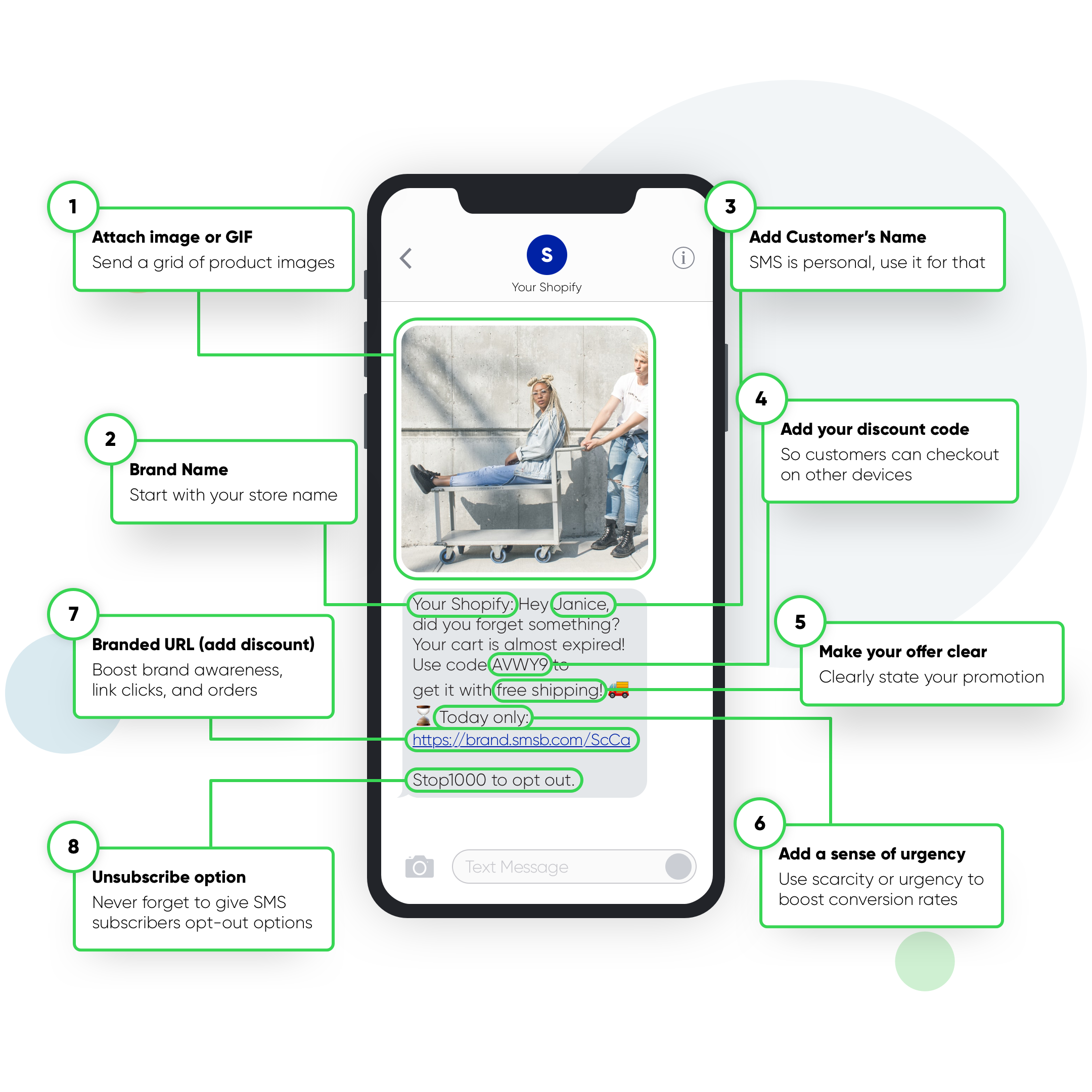
Let’s take a look at the 8 main building blocks of the perfect shopify text message for recovering abandoned carts in Shopify.

8 Steps for Building an Abandoned Cart SMS Reminder Automation for Shopify

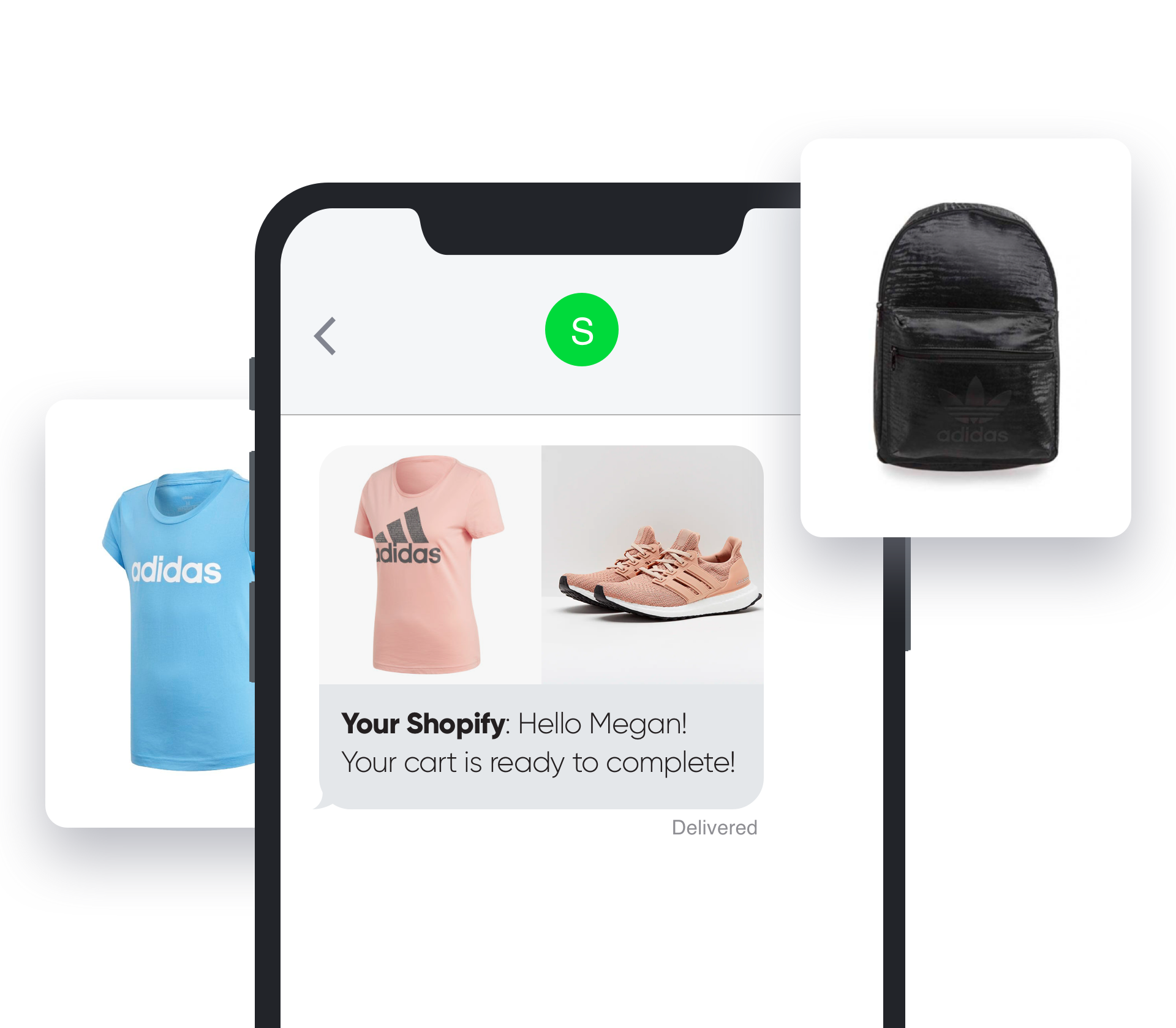
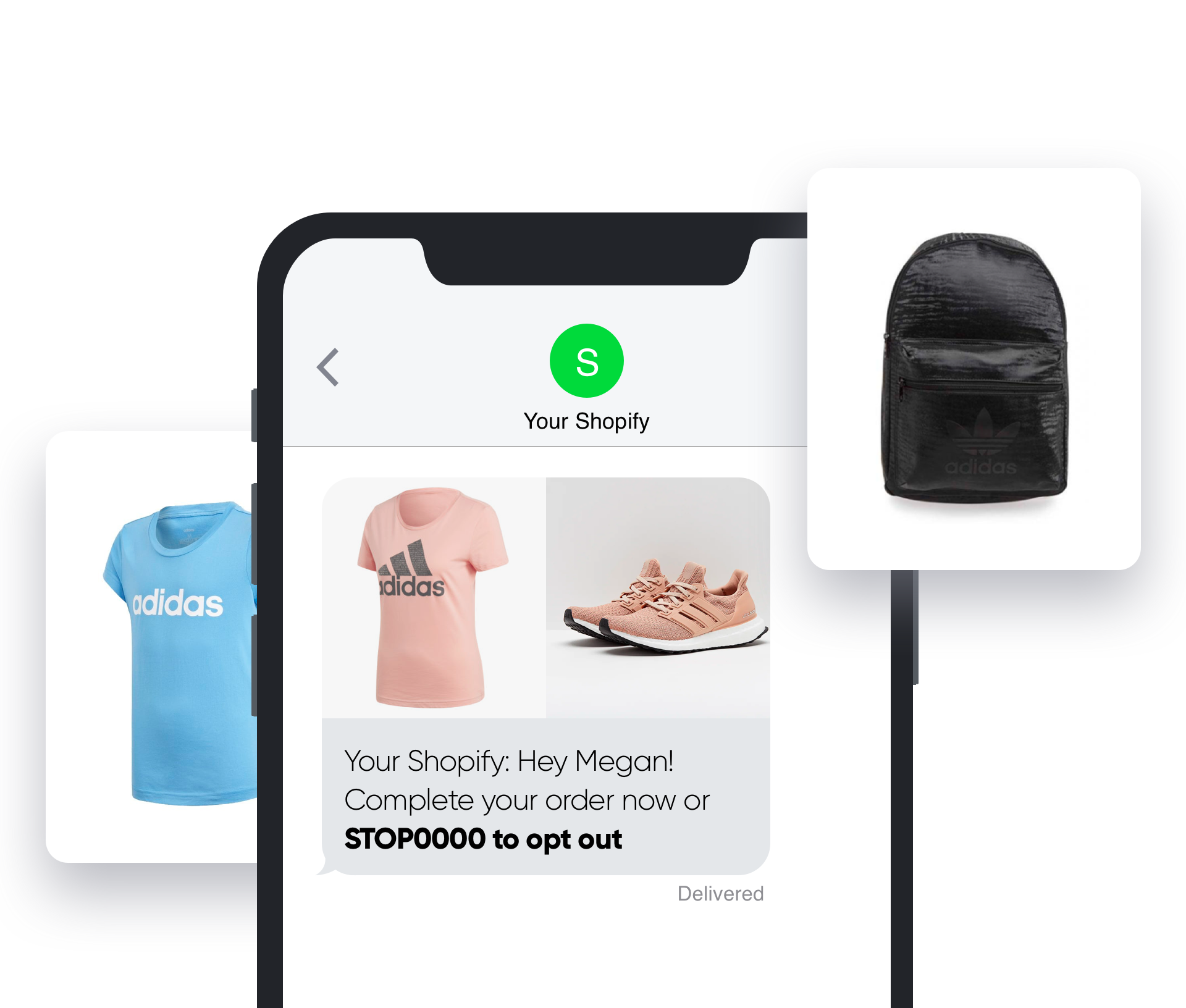
1. Images and GIFs: Increase engagement with visuals in your text message.

2. Brand Name: Get instant brand recognition by starting off with your store’s name.

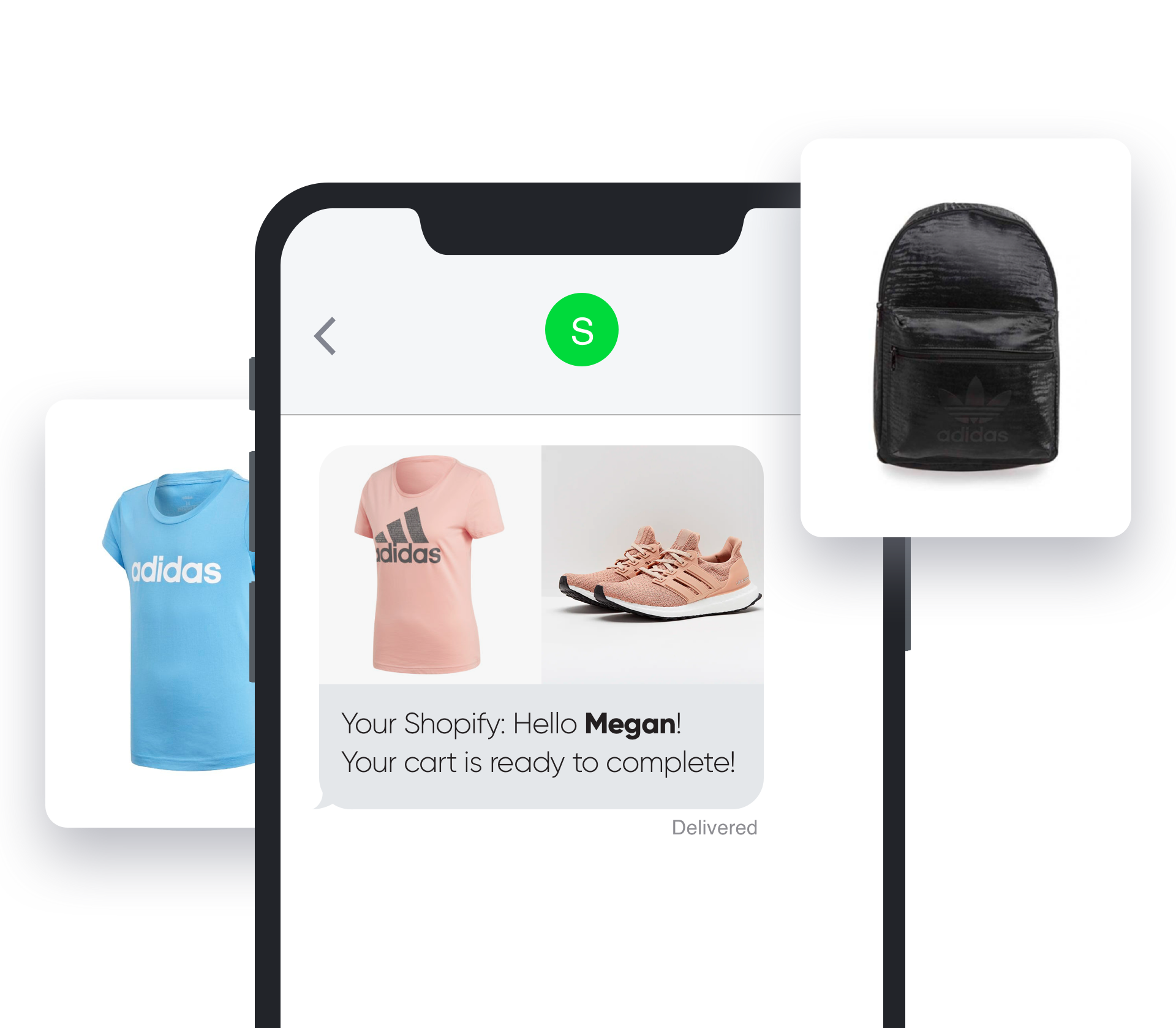
3. Recipient Name: Make your message more personal by adding your customer’s name.

4. Personal Discount Codes: Add the unique discount codes in your texts for convenience.

5. CTA: Attract attention to your offer by making the call-to-action of your promotion clear.

6. Emotional Triggers: Boost conversion rates using the sense of urgency or scarcity.

7. Branded URLs: Link branding improves brand awareness, link clicks and customer trust.

8. Opt-Out: Always add an unsubscribe option for your marketing text messages.
 

1. Images and GIFs (SMS to MMS)

Customers react better to visuals rather than written content. Seeing an image of the product that was almost purchased instantly brings customers back into the shopping state of mind and helps them understand what your message is about.
 

SMSBump MMS Images and GIFs in Abandoned Cart SMS for Shopify

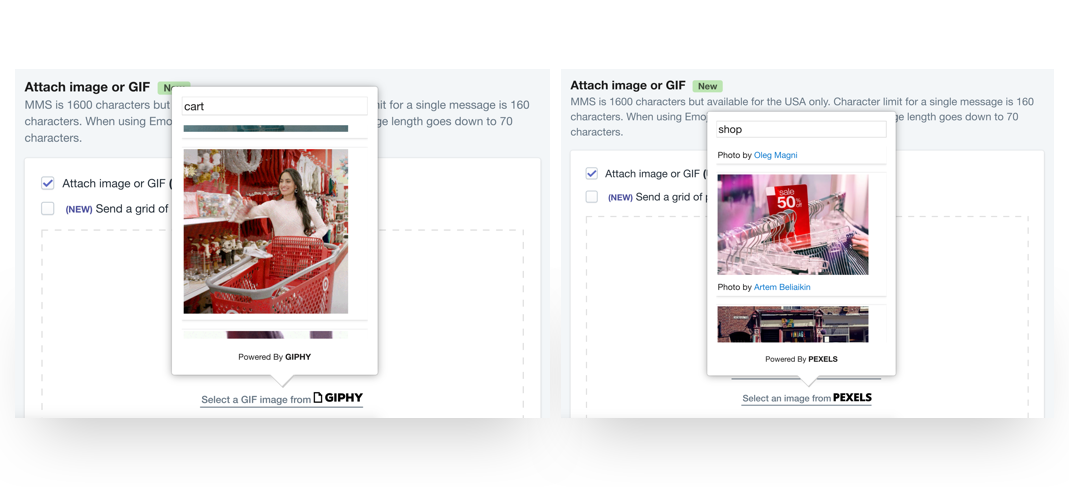
GIPHY and PEXELS

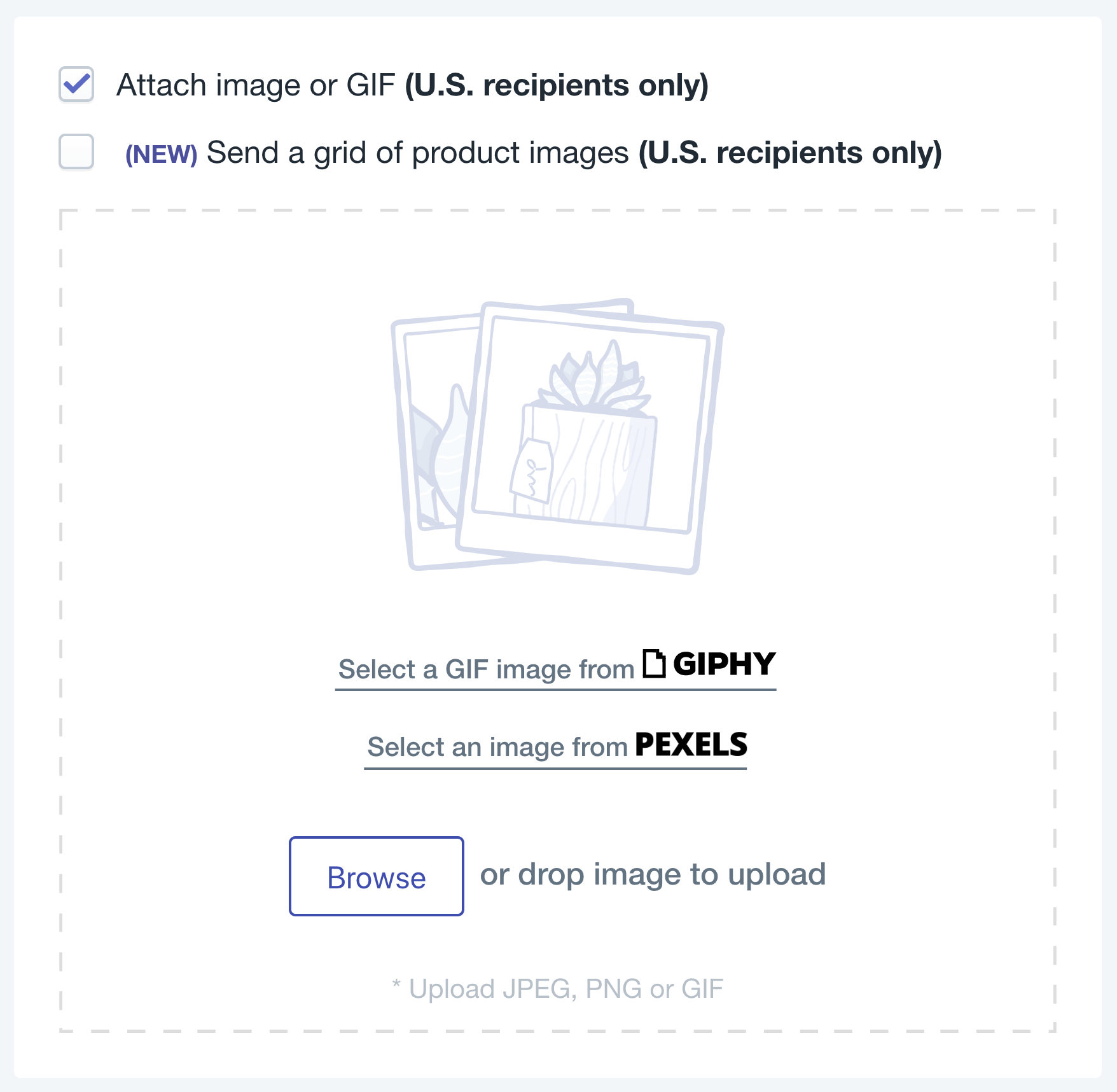
Increase customer engagement rates by using GIFs from the GIPHY integration, or royalty free stock photos from the Pexels integration.

GIPHY Gifs and Pexels Royalty Free Stock Photos for MMS in Shopify

Upload Branded Images

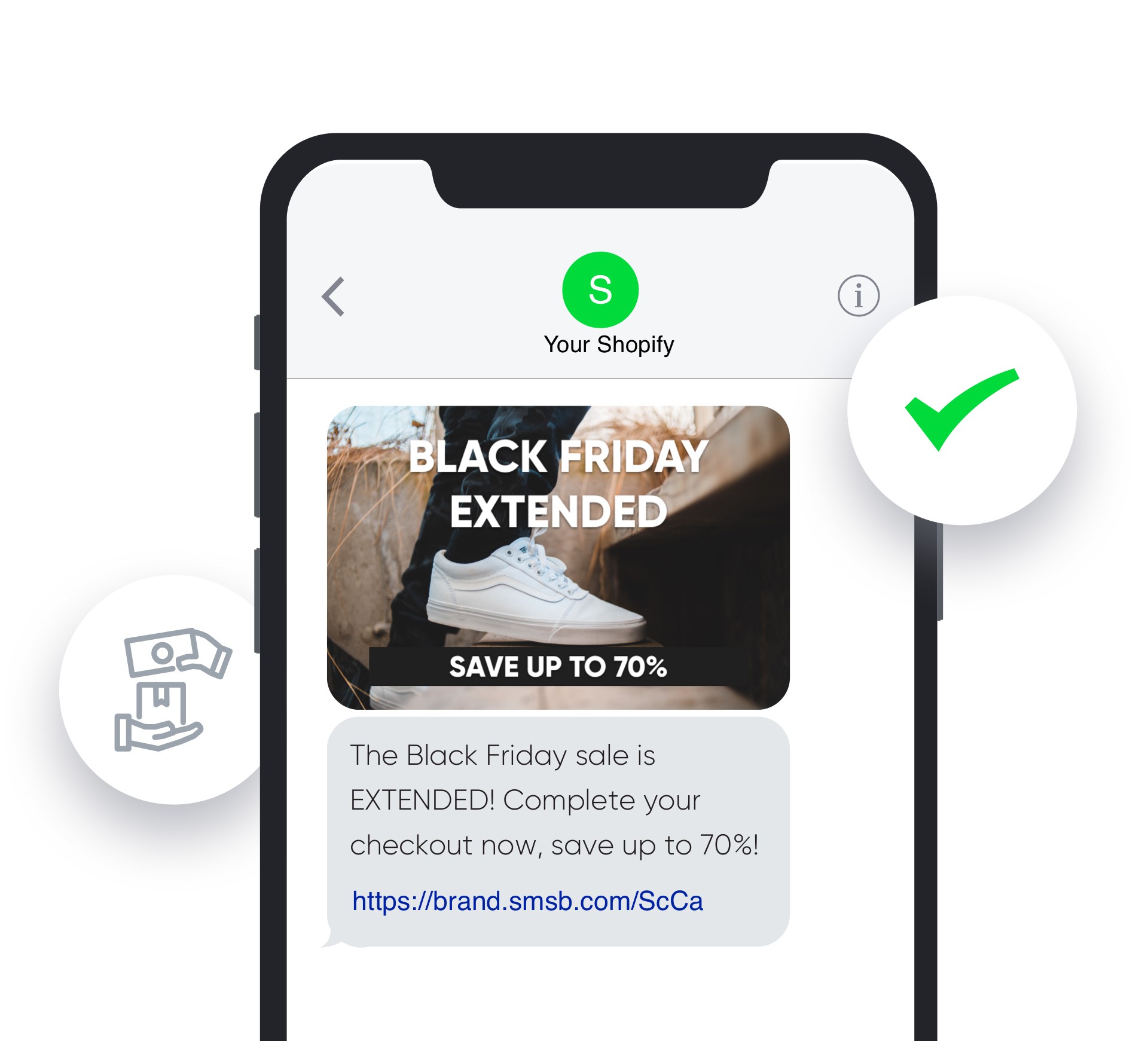
It’s highly recommended to upload your own images so you can create a personalized and branded experience for your SMS subscribers. You can upload PNG, JPG and GIF formats and check how the visuals will look in the preview on the right.

SMSBump Black Friday Abandoned Cart SMS Automation Recovery for Shopify

Turn SMS into MMS to enable visual content that engages customers much more than text-only messages so they can instantly decide to take action.

MMS also boosts the character count of messages from 160 to 1600 so you can write more elaborate texts, explain your value proposition better and make your main call-to-action more prominent.
 

Pro Tip: Shorter messages still tend to perform much better, so avoid trying to reach the 1600 character limit!


Shopify brands use images in text messages to feature eye-catching visuals that boost their engagement rates, clicks, and abandoned checkout recovery rates for better ROI.
 

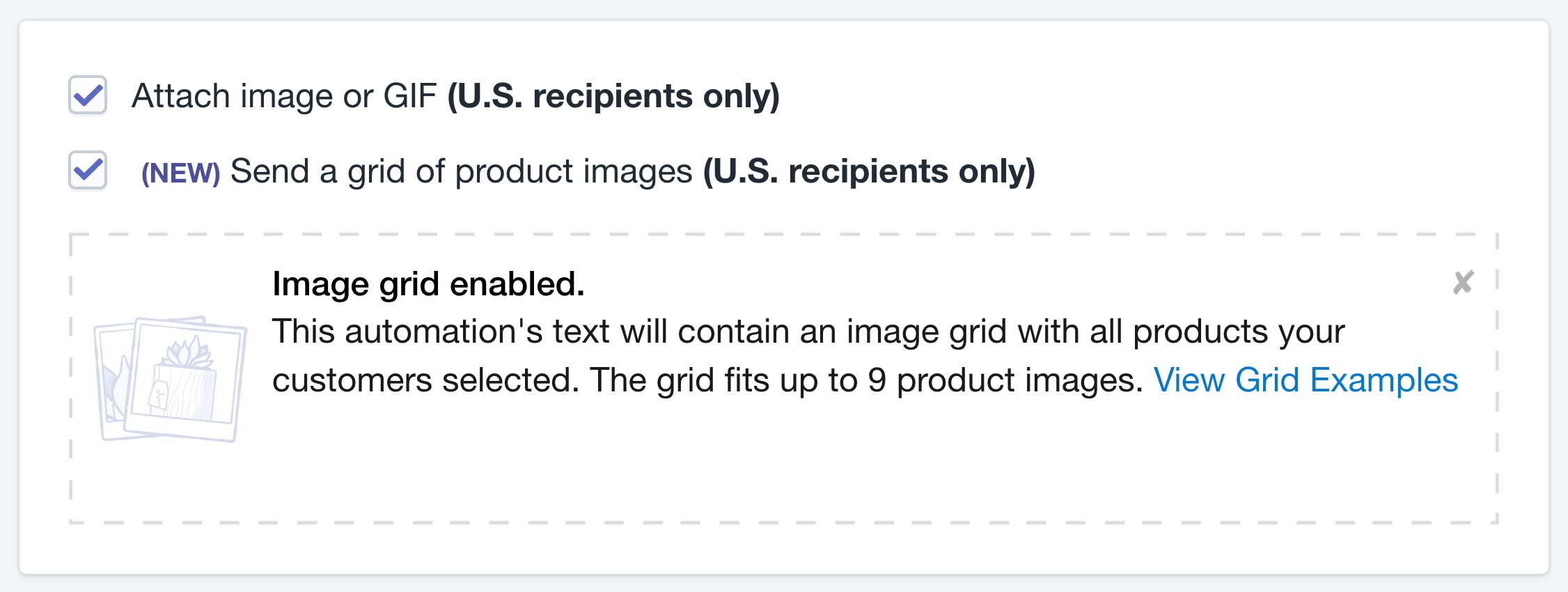
Abandoned Products Image Grid

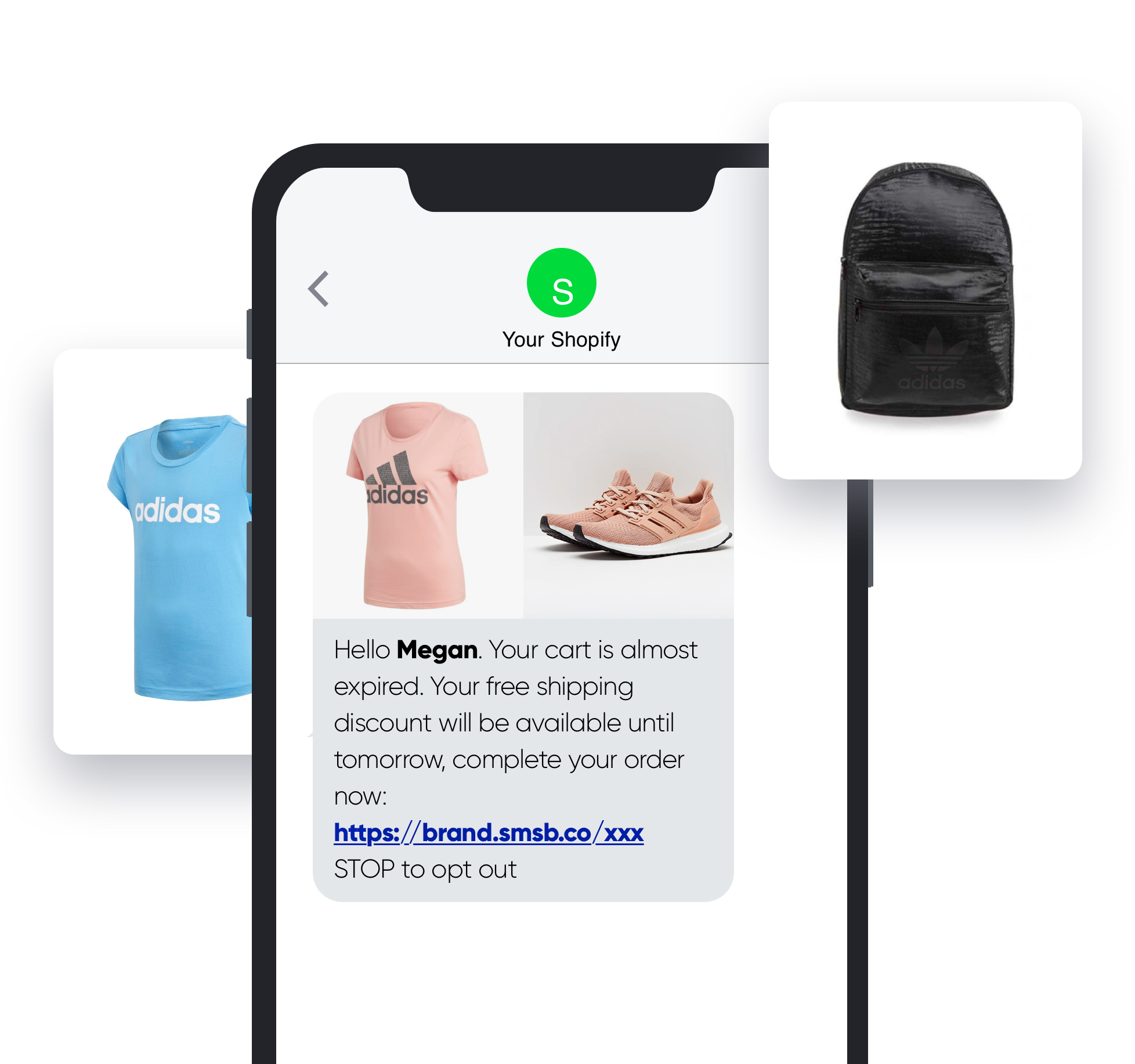
The best way to approach abandoned cart SMS automations is to send the main product images of the items the customer just left in their cart. This is the most highly utilised feature of the abandoned cart SMS automations for Shopify.
 

Abandoned Products Image Grid


Enable the grid to automatically send text messages with up to 9 product images in a single collage. View Grid Examples to see how your product images will be arranged based on the number of items the customer abandoned in their cart.

SMSBump Abandoned Cart SMS Automation Product Image Grid in Shopify

2. Brand Recognition (Store Name)

A text message from an unknown number can be frustrating for recipients. You can solve this using your brand name.

How does this help?

Customers who connect with a brand emotionally have a 3x higher LTV. Don’t skip to add your brand name in all of your marketing channels, including text messages to increase your chances of getting recognized by existing customers faster and easier.

SMSBump Branded Abandoned Cart Recovery SMS Automation for Shopify


Brand recognition is key to increasing your open rates, as well as clicks and orders from text messages.

Your customers need to know the source of a text message instantly, so they can recognize whether they wanted to receive it in the first place. Starting off with your brand helps recipients notice your store name right away so they know what to expect.
 

3. Message Personalization (Customer Name)

Generic marketing messages don’t create a positive customer experience for online customers. That’s why we suggest starting off your text marketing messages by at least mentioning your customer’s first name.

How does this help?

80% of online shoppers are inclined to purchase from a brand if it delivers personalized marketing experiences.

SMSBump Personalized Abandoned Cart SMS Automation for Shopify

Starting the conversation with the person’s name attracts much more attention by the recipient as they recognize this message is designed just for them.

Your customers will be much more likely to open your message and notice your abandoned checkout offer especially designed for them, and it’s more than just another generic, automated marketing message like any other brand would send.
 

4. Personal Discounts (Embedded in URLs)

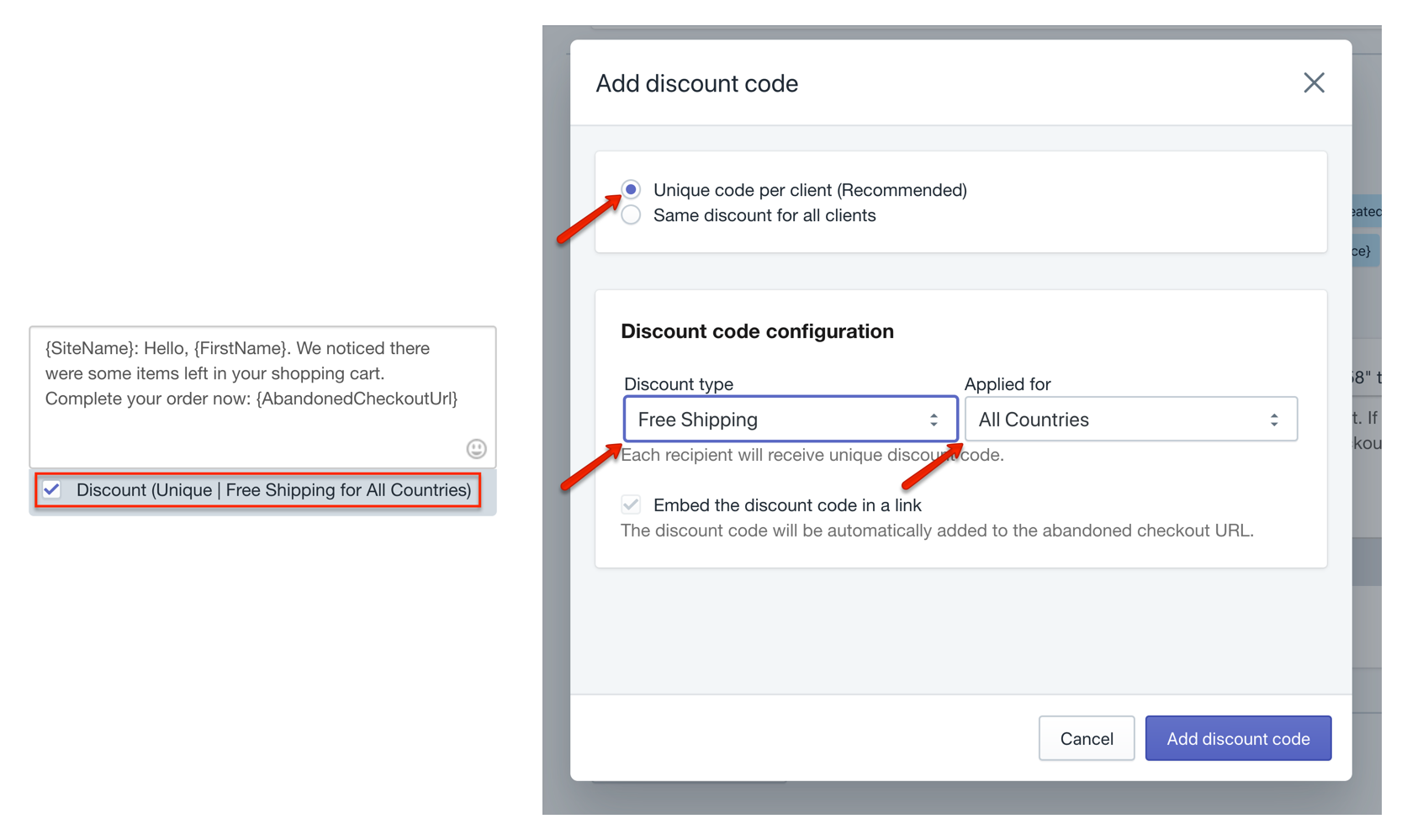
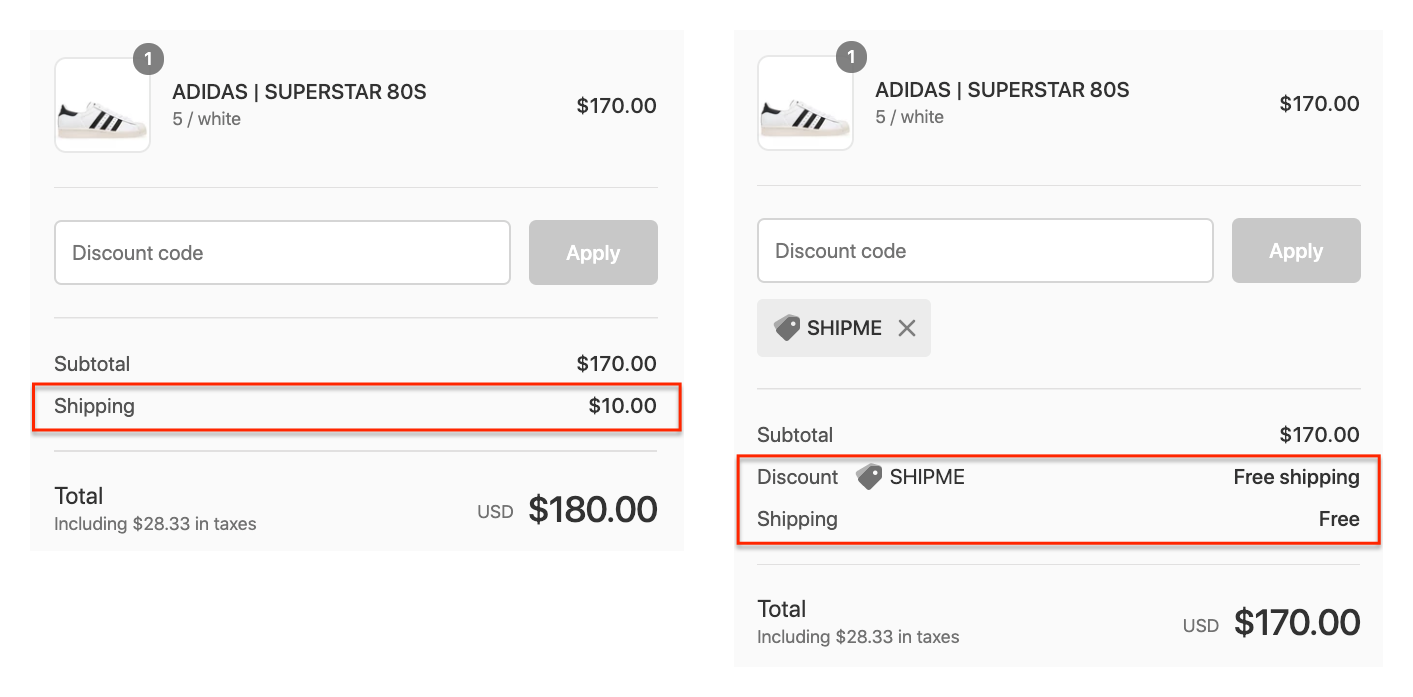
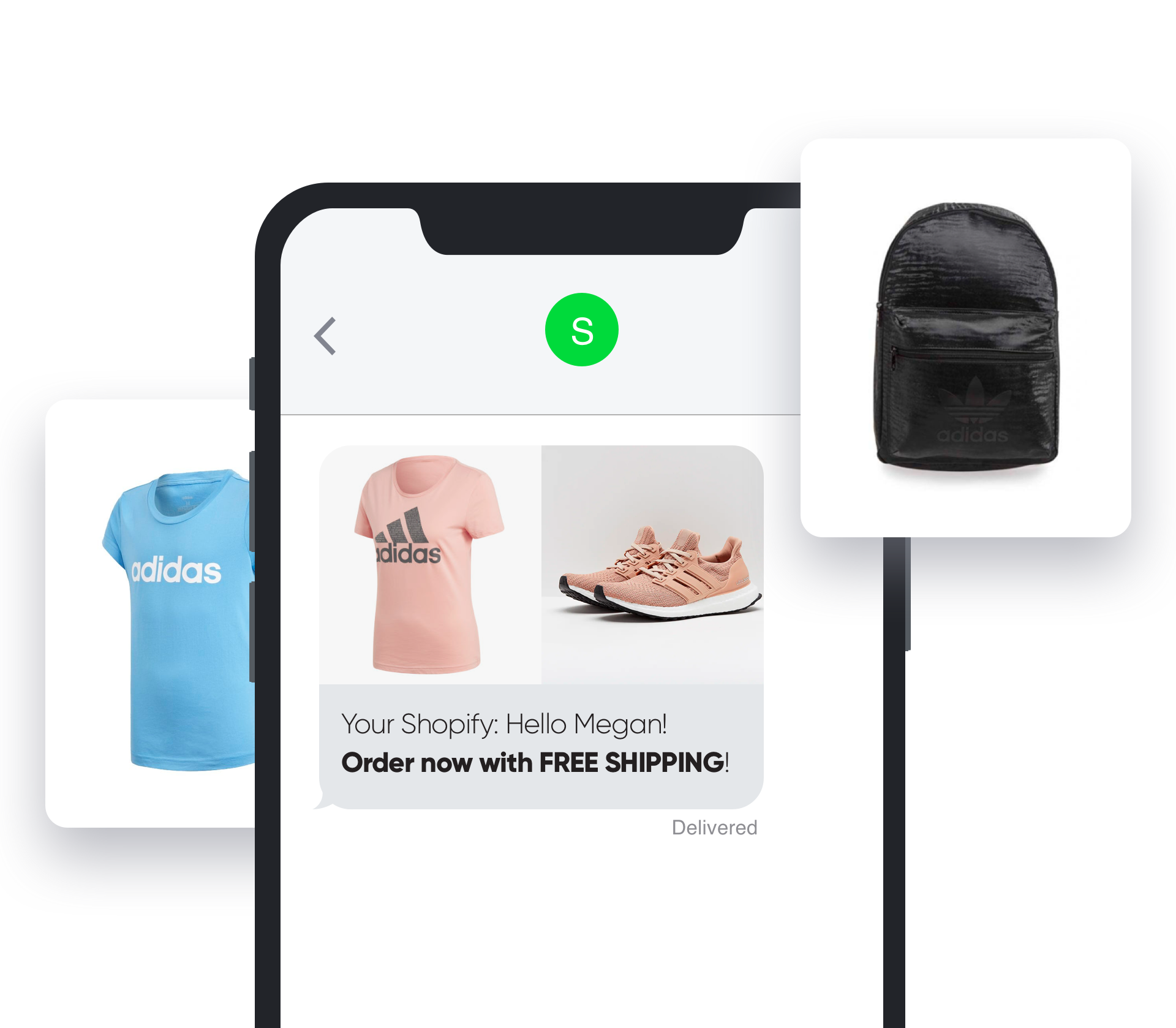
The top reason behind cart abandonment in the first place is unexpected costs and delivery fees when customers reach the final checkout steps. We recommend you approach abandoned cart recovery with a free shipping offer in your first text message.

How does this help?

You’re solving the top reason for customers who abandon carts due to checkout costs they didn’t expect when they started shopping.

SMSBump Abandoned Cart SMS Automation Personal Discounts for Shopify

This means the majority of lost sales has a high chance to get converted with the first text message less than half an hour after the cart is abandoned.
 

Personal Free Shipping Discounts in Abandoned Cart Recovery SMS Automations for Shopify

5. Clear and Visible Offer (Strong CTA)

It’s important to make your main value proposition as clear and actionable as possible so recipients can see your exact offer and what they need to do to take advantage of it right away.

How does this help?

strong call-to-action is a word or phrase that guides customers to take the required action that leads to the main benefit of your promotion. This is the heart of your text message reminder for customers who abandon their carts and helps you get more clicks on your abandoned checkout URLs.

SMSBump Abandoned Cart SMS Recovery CTA in Shopify

After customers view your value proposition and click your link, they are taken straight to the cart they just abandoned.

Once there, they see the free shipping offer and the only thing they need to do is confirm their order. It’s that simple!
 

6. Emotional Incentives (Sense of Urgency & Scarcity)

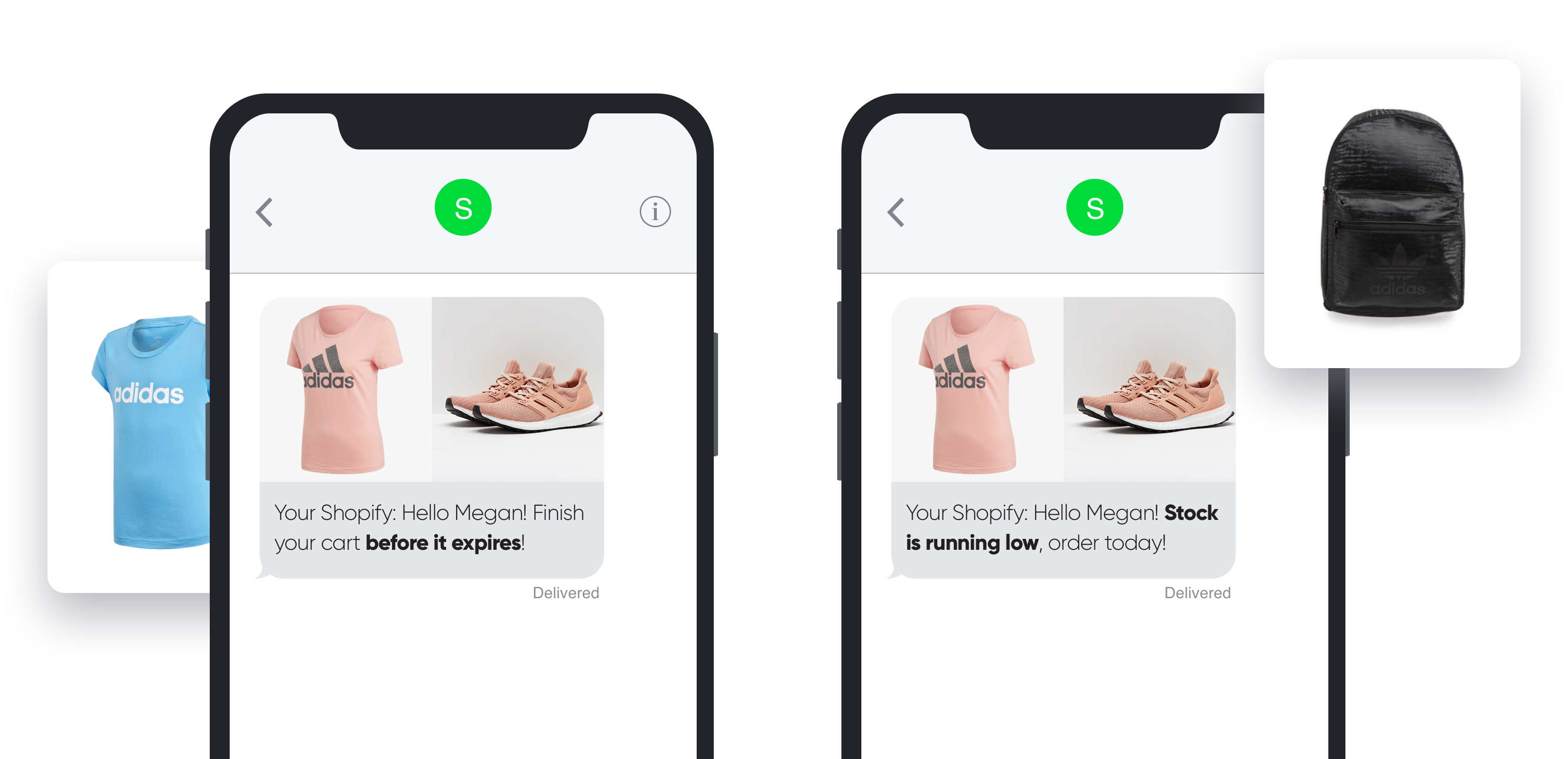
These well-known psychological triggers that promote action can significantly boost the conversion rates of your abandoned cart SMS reminders. We’re talking about the scarcity principle and the sense of urgency.

How does this help?

SMS is all about delivering a message as fast as possible, and the sense of urgency helps boost the need for quick decision making.

This makes the entire process of receiving, reading, and taking action from the text message become a single flow that’s finished in a matter of seconds. Literally.

  • Urgency Examples: “Your cart is expiring!”, “Offer ends today!”
SMSBump Abandoned Cart SMS Reminders Urgency and Scarcity in Shopify

Product scarcity is another great choice for increasing the power of your text message.

This helps drive more clicks and orders by suggesting that the product your customer just added to the cart will soon be out of stock and if they want it – they need to order it now.

  • Scarcity Examples: “Stock running out!”, “Your items are going fast!”
     

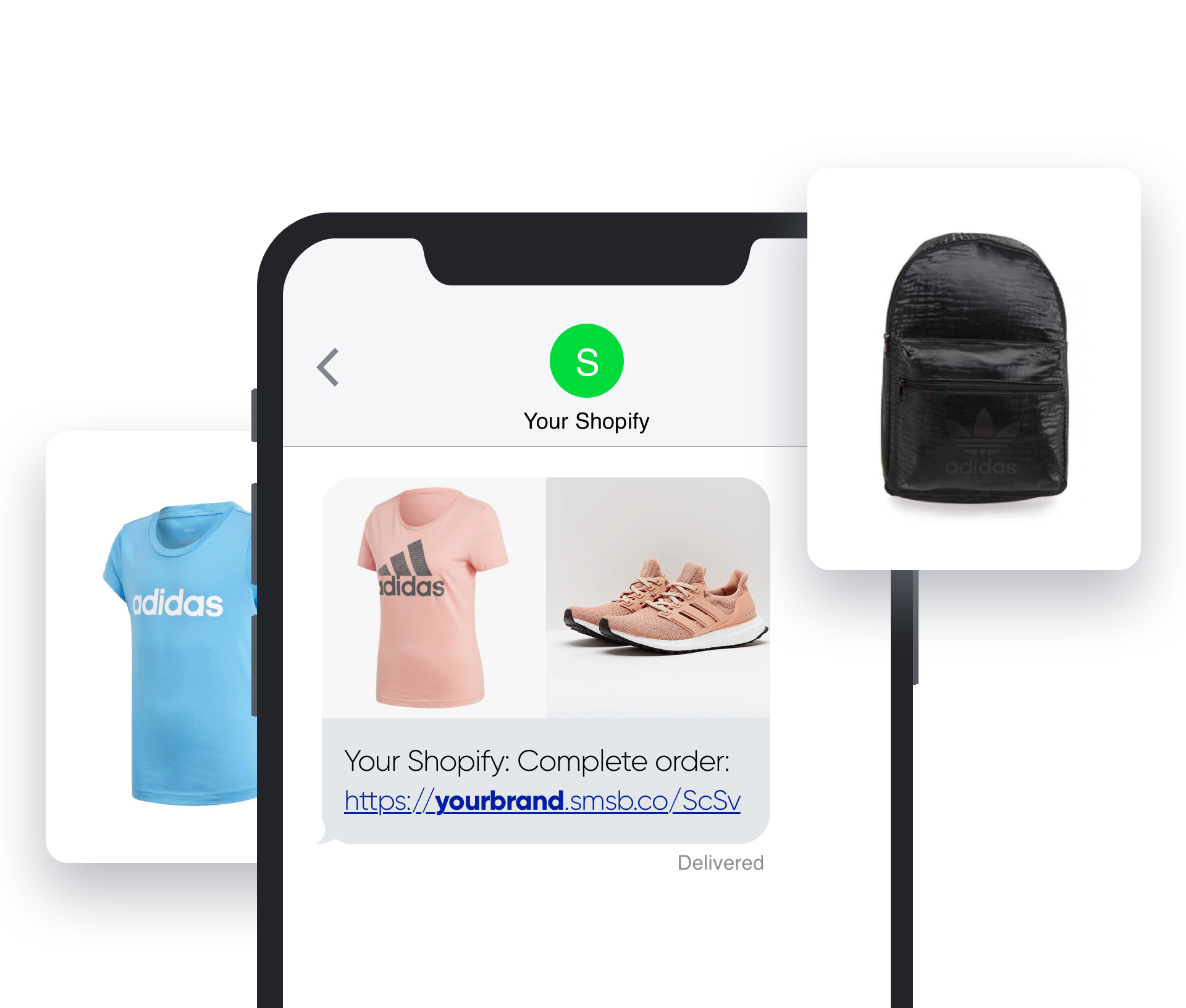
7. Branded Short URLs (Brand Recognition & Link Trust)

Adding your brand name to the shortened SMS URLs gives you another huge boost in brand recognition and link clicks. This doesn’t mean you can skip adding your store name in the beginning, it just helps strengthen your brand presence.

How does this help?

Customers can better recognize your brand by seeing a branded URL coming from your Shopify website.

SMSBump Branded Shortened URLs for Abandoned Cart Recovery SMS Automations in Shopify

This greatly boosts your chances of getting more link clicks because customers will know this is not fraud or a fake link, but it’s coming from a website they know.

You can enable branded short URLs and configure the exact name you want your links to be sent with by configuring your SMSBump settings in Shopify.
 

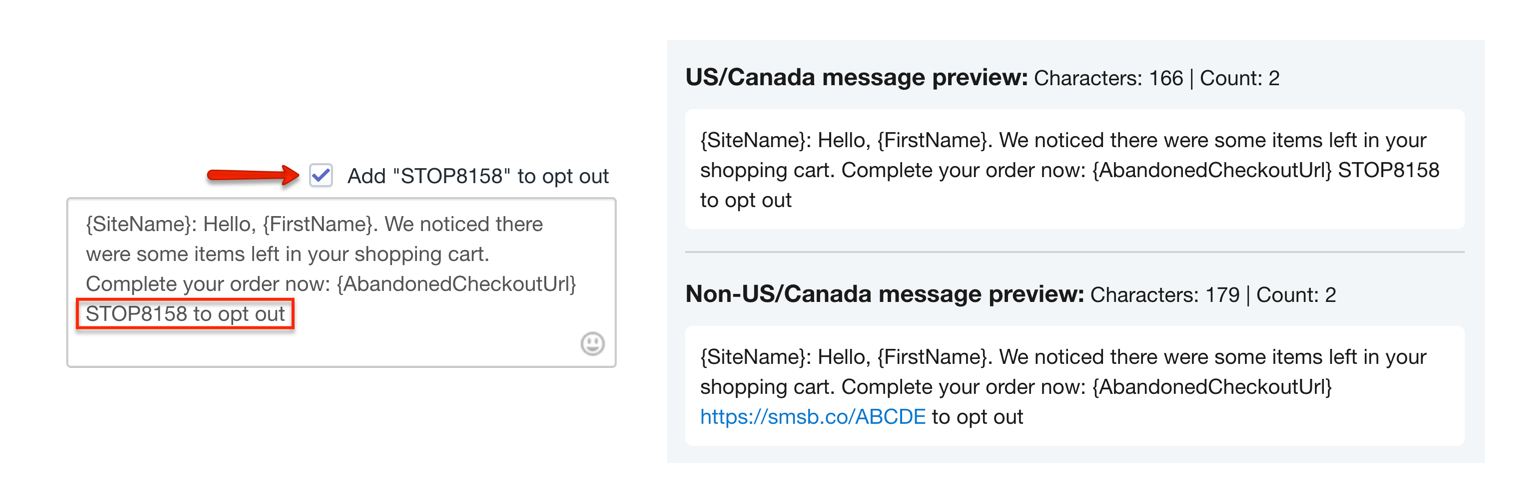
8. Unsubscribe Options (Let Subscribers Opt-Out)

As perfect your SMS reminders can be, you can’t please everyone. You will always have subscribers who don’t want to receive your text messages, and you need to give them an easy option to do it.

Just as in email marketing campaigns, you need to have an unsubscribe link or a STOP keyword that they can reply so you unsubscribe them from your Text Marketing lists in Shopify.

SMSBump Unsubscribe Options and STOP Keywords for Abandoned Cart SMS Automations in Shopify

How does this help?

The unsubscribe options don’t raise your sales, but they help you avoid lawsuits from frustrated customers.

SMSBump Unsubscribe SMS Abandoned Cart Recovery Automation in Shopify

Summary

Text messages are a highly effective way to turn simple abandoned cart recovery SMS reminders into a bigger retention marketing strategy. Let us know how you’re doing with your SMS marketing automation.

Workflow Automation Ideas for Ecommerce Businesses

What Is Workflow Automation?

Workflow automation is a way for businesses to streamline their processes.

The central premise is to identify repetitive tasks or any manual process that could be better handled by software, apps, or tech. You then take those tasks out of your employees’ hands. Rather than wasting valuable staff-hours, you get the same jobs done automatically.

There are processes across all departments of your business that can be automated. From inventory management to email marketing or human resources, ecommerce automation can improve processes across the board.

We’re going to share loads of ideas for how you might join the streamlining party. First, though, let’s talk about precisely why you want to do so.

Why Use Workflow Automation for your Ecommerce Site?

As a small business owner, you need to understand and become an expert in numerous business processes. There are three main ways in which workflow automation can help you to do so.

1. Efficiency.

Many ecommerce tasks are mundane and repetitive. It doesn’t make them any less essential.

What it does mean, however, is that if a human must do them, they’re tremendously time-consuming. Take order management, for instance. That area of your business may require a lot of data entry. You may also need to send dispatch emails to customers and print shipping labels. Order management software can automate the entire process.

Workflow Automation 1

Repetitive tasks create bottlenecks in your operations. Rather than have work progress smoothly, it slows to a crawl as the time-intensive jobs get done. A workflow automation solution can open up those bottlenecks. The mundane tasks get automated and completed in far less time. You’ll then see an uptick in efficiency across your organization.

2. Data and task accuracy.

In ecommerce, lots of data gets generated. Order details, customer information, and stock numbers are just a few examples. To keep things running smoothly, your business must enter and store the data in a variety of systems. Before ecommerce automation, all data had to be inputted and shared by hand.

Where humans are involved, so is human error. Even the most competent and attentive worker will make occasional mistakes. Those simple errors can snowball into significant problems. Incorrect recording of stock, for instance, can see you fail to fulfill vital orders. With workflow automation, such mistakes get taken out of the equation.

With the best automation tools, the chance of negative customer service due to human error can get reduced by as much as 65%.

3. Productivity.

You might feel a little worried that what we’ve described so far is a way to put your staff out of a job. That couldn’t be farther from the truth.

Automation tools let you get the most from workers, and use them as productively as possible. Workflow automation is about superior business process management (BPM), not laying off workers.

When you automate crucial but repetitive processes, staff can focus on other things. They can give their attention to tasks that need intelligence and personal service. Automation gives them more time to design new products. It frees them up to nurture relationships or interact with customers. Your business productivity, therefore, will rise considerably.

Ecommerce Tasks For Workflow Automation

Online retailers have an abundance of choice when it comes to tech to aid automation. This recent retail tech stack report provides an in-depth breakdown. We’re going to help you better understand how to automate repeatable processes or manual tasks. The following are seven business areas to which our workflow automation ideas apply:

  1. Customer experience and support
  2. Marketing
  3. Purchase order approvals
  4. Vendor and supplier onboarding
  5. Order management
  6. Inventory
  7. Sales

Automate Customer Experience and Support

Lots of firms in the ecommerce niche — and in other fields — are looking for ways to stand out from the crowd. Many are turning to customer experience (CX) as a differentiator. Improving interactions through the customer journey is a great way to boost loyalty. Here are five ideas for workflow automation to improve CX.

1. Track and reward your most engaged customers.

For all types of businesses, customer retention is critical.

The probability of selling to an existing customer is much higher than that of selling to a new prospect.

One of the best ways to boost retention is by rewarding customers for their loyalty.

Workflow Automation 2

You can leverage some simple automation to track and reward engaged customers. Smart workflow automation tools let you tag customers based on what they’re buying. You can then set business rules to send targeted marketing to people who reach a certain order value or number of purchases. You might, for example, automatically send a discount code by email to a customer who’s spent over $200.

2. Sync your customers to an email list.

Email marketing is vital to ecommerce businesses. Strategic, targeted email campaigns are an excellent way to generate more sales. Most firms use a dedicated platform for their email marketing. If you do, it’s simple to automate workflows to make the process frictionless.

The best way to automate processes in this way is by syncing an email client with your CRM system. That way, you can ensure you segment your email list as effectively as possible. Take, for instance, a prospect who shows an interest in a particular product. You can get them automatically added to a relevant email list.

Those customers will then get targeted marketing material relevant to their interests. The kind of content will increase the conversion rate from prospect to customer. We’ll talk more about general marketing automation a little later on.

3. Gather feedback after a purchase.

If you’re going to improve CX, you must first understand your customers’ perception of your products. The best way to assess this is by simply  asking them. Seeking customer feedback is how successful brands identify their weaknesses. Only then can they act to improve them.

You can streamline workflows to collect that feedback automatically. Once again, this involves creating automated emails. With a workflow automation tool, you can send follow-up emails. They’ll go out at a specified time after a sale. These automated emails show customers that you value their feedback. Over 40% of customers don’t leave feedback because they don’t believe a business cares.

4. Reach out to negative reviews.

Customers who leave feedback unprompted are more likely to offer negative reviews. It’s human nature to register dissatisfaction more readily than contentment. When your firm does get a negative review, it’s vital that you respond. Doing so shows the complainant and other customers that you care about solving problems.

Workflow management via automation ensures that no negative review will slip through the cracks. Say, for instance, that reviewers give your brand a rating out of five stars. You can establish an automated process that identifies all reviews with two stars or fewer. You can then have the reviews automatically referred to a customer service team member.

5. Tag and segment customers based on buying behavior.

Analyzing and tracking customer behavior will help you tailor CX. A vital element of monitoring customer behavior is segmenting your list. What that means is dividing your patrons by their characteristics. You might segment them by age, gender, or order value, for example.

Workflow Automation 3

Segmentation helps improve your service to different kinds of customers. It’s a process that you can fully automate with intelligent workflow tools. The information required is all in your order management or CRM systems. Automation tools can use it to segment customers in a variety of ways, all without need for staff input.

MAGENTO 2 SMS NOTIFICATION EXTENSION

Speed is what matters in e-Commerce nowadays and most of the time, the quicker speed you can provide your customers, the more satisfy they will become. SMS is one such tool that is able to help you deliver in-time service and instant support that your customer need. Email notification to keep customers updated and interact with your store is a good way, but it still have some disadvantages such as the open rate is low and the emails are very likely to be sent to spam box. Therefore, SMS notification is especially essential to online business, and without it, you risk losing loyal customers due to slow speed of customer support and real-time engagement between the stores and the customers.

Magento 2 SMS Notification is a perfect and comprehensive choice that is able to solve all problems mentioned above and support you in providing short, quick and effective notifications to your customers. By using our Magento 2 SMS extension, your customers can get instant and quick updates on the situation of your Magento stores. Information such as order, shipment, credit memo creations, etc are delivered through SMS, and admin can also keep an eye on possible errors that can happen.

Benefits Of Using Magento 2 SMS Notification For Online Stores

[NEW] Register & Login With Mobile Number

This feature by Magento 2 SMS Notification extension is an outstanding features that you should pay attention to. In case the users can’t seem to remember their registered email address or their password to log in to their customer account, they can make use of their mobile phone number instead. This features, apart from making the process of logging in easier and more convenient, it also helps to increase your store’s mobile registration significantly. The security of the process is also guaranteed through the use of mobile number and secured OTP.

Easily Integrate Various SMS Service API

API stands for Application Programming Interface, which is one brilliant way that can be used to connect with SMS’s Core Messaging Platform. Our Magento 2 SMS Notification are integrated with various SMS Service API, which basically means that the Magento store owners can just choose whichever SMS service they like at SMS Configuration and that’s all for the work. This can happen because there are many SMS service provider company support their product io integrate with extension via API such as Bulk SMS, Twilio, etc. With the list of diverse SMS services in our Magento 2 SMS Integration, you can save time, effort and cost reducing the complication of the process and trying to customize.

In case your desired SMS service is not listed in our Magento 2 SMS Notification, you can still contact us to integrate the SMS service into your system. The rate is $20/hour.

Instantly Verify Customer Mobile Number (OTP)

OTP stands for One-time Password, and it’s also known as one-time PIN. OTP is a kind of password that can be used for only one login session or transaction on a computer or any other smart devices.

If you want to check whether the number that the customer provide is correct or not, customer’s mobile number verification is a necessary and indispensable task. This feature can make the customers to minimize the typo errors as well as to encourage them to believe that they won’t miss any valuable message from your store. OTP can be seen in customers registration, configuration and checkout page easily and clearly, and it is one brilliant way to support your SMS Magento online business.

Specify OTP string type and Length per message

When you agree to use our Magento 2 SMS Notification, you have complete control over OTP verification process of your store. In particular, you can perform these functions:

  • Enable OTP Verification
  • Enable verify mobile number at registration Form
  • Set OTP Format
  • OTP Length
  • OTP Message
  • Set expiration time for OTP code
  • Set period time that allows customer to resend OTP

Powerful Mobile Input Settings

Our Magento 2 SMS Notification also comes with powerful mobile Input settings that will help Magento store owner to set mobile input painlessly and easily without any difficulty. In particularly, this features will allow automatic detection of customer IP address to allow customers to insert their mobile quickly without having to use their mobile country code.

There are 4 total options for mobile input that you can choose from:

  • Initial country
  • Allowed country
  • Specific country
  • Preferred country

Possible to Config SMS Notification to Admin

Magento 2 store admins are able to take complete control over the entire SMS Notification system as well as to configure SMS Notification. Activities on Magento 2 stores such as new customers registration, order, shipping, invoice, credit memo (which can also be sent to customers) are under their hand as they wish. Furthermore, updates on their own store and error detecting can also be performed thanks to this features to solve problem instantly and effectively. The Magento 2 store owners can receive SMS notification to their digital devices in 3 situation below:

  • When a customer registers an account
  • When an order is placed in each of the event
  • When the customers subscribe to newsletter at Contact Us

Ease to Config SMS Notification to Customers

Mobile commerce is becoming more and more common and an increasing number of people are turning to use their smartphone to make online purchase. As a result, receiving updates on order status through mobile phone is attracting positive feedbacks from the customers. This Magento 2 SMS Notification assists the Magento store owners to send notification about the store’s activity to the customers right after they have successfully registered a customer account. Particularly, customer can receive notification when:

  • A new order is placed
  • New invoice is created
  • New shipment is created
  • New Credit Memo is created

Effectively Test SMS Functionality

Error is something that is not expected by any online store and it would be the best if errors can be minimize. Aware of that fact, our Magento 2 SMS Notification are equipped with test function to help Magento store owners to check as well as test their SMS with their own mobile phone number. With this quick and convenient checking, Magento store owner can ensure the correct display of SMS on mobile and simplify their working habit. As a result, they decrease the error rate and improve the professionalism for their store.Manage the SMS log for AdminWith our Magento 2 SMS Integration, Magento 2 store admin can manage their SMS log easily and painlessly. All information such as ID, subject, time of creating, status and all SMS notification activities can be seen clearly in the SMS Log page for easier management. In particularly, the Magento 2 store admin can check any notification they want without having to navigate out of their current page. Moreover, if you want to check whether the SMS notification was sent to the correct customers in the correct time or not, you can make use of the admin table. This table is used to track the SMS Log, check the errors and fix it with SMS Debug.

Instantly SMS Notification Preview Checking

If the test function is one way to check whether the notification appears on admin phone number, the preview function is one different method to check the content of the notification on the admin panel. You can also make use of of preview to take the first look at content interface as well as to view the message.

One advantage of preview is that Magento store owners are able to check the SMS Notification without any requirement for coding or CSS message. Through using this Magento 2 SMS extension, the store admin can detect mistake and make possible change to fix it if possible before sending anything to the customers.

Export SMS to CSV Support

If you are looking for a smart tools that can help you to advance and improve your Magento 2 store in this era of cutting-edge technology development, out Magento 2 SMS Notification will be the perfect choice. With this brilliant tool, you can directly export all of your SMS Notification to CSV without having to spend an enormous amount of time manually copying an enormous number of notifications. Much of your time and effort can be saved with this amazing tool.

Ease to Control SMS with SMS Debug

Magento 2 SMS Notification comes with SMS Debug that will helps you to detect the problem that happens to your SMS Notification system. Since detecting errors is always easier than fixing ones, with our Magento 2 SMS extension, you can save time wandering around undestined trying to find the errors and even cost for fixing the problem. The SMS Debug is extremely accurate, therefore, you can rest assured knowing that controlling issues and fixing errors will be smoothened.

Avoid Spam SMS Effectively with SMS Blacklist

Similarly to spam emails, spam SMS messages are annoying to get rid of and are harmful to any online business. However, by agreeing to choose our Magento 2 SMS Notification, Magento 2 store owners can easily solve this problem. Technically all you have to do is to put the mobile phone number that keeps sending spam SMS to your blacklist if you feel that the situation is getting out of hand. Once such number is on the blacklist, it will never be accepted as a registered number for an customer account and will not be able to receive any notification.

You can also delete the number from your blacklist, it’s likely that you would receive spam SMS again.

Magnificiently Blacklist Management

On Magento 2 SMS Notification, all of the numbers that are in blacklist are managed in an overview grid. When a phone number is listed on this blacklist, the owner of that number will not be able to receive any SMS Notification about the status and situation of the website. Thanks to this Magento 2 SMS Integration, Magento 2 store admin can save the running cost effectively and actively engage with the customers.

Multiple languages – RTL

supportsMultiple languages – RTL supports: The Magento 2 SMS notification by our brilliant Magento 2 Multiple Table Rate Shipping can be of extremely importance to stores that want to go international. Since it supports the languages that are very commonly-used such as English, French, German, etc as well as languages that have the RTL (Right To Left) order such as Hebrew, Persian, Arabic, etc, Magento 2 Table Rate Shipping is the perfect choice wherever you are.100% open sourceThis Magento 2 SMS integration is 100% open source and only license part is encoded by ioncube. Thanks to it, you can improve many factors and elements for your Magento 2 store including Affordability, Flexibility, Sustainability, Security, Reliability, and most importantly Speed. All of these in combination will be able to help you achieve great success and reap off ample benefits.

E commerce Automation In Business

What is eCommerce Automation?

eCommerce automation is the process of using software tools that will complete various tasks for you, rather than needing to do them yourself. While some aspects of business will still require human input, a significant number of eCommerce tasks can be automated quite successfully. Automation works best for small, repetitive daily tasks that are always performed in a consistent way.

How eCommerce Automation Works

eCommerce automation is driven by smart platforms that adjust to the actions, input, or feedback of website users. At the core of these capabilities is artificial intelligence (AI), which can mimic human actions and thought processes to a limited degree — although not nearly so limited as it was in its earlier days. Basic types of automation, such as those listed above, are performed by a simple AI with a list of criteria that triggers certain tasks like sending an email after a pre-set period of time following a customer’s action.

AI is capable of more advanced tasks as well, and some AI can improve and expand upon its own programming via machine learning. Machine learning is a method for improving the “intelligence” of AI by absorbing new information based on interactions with users. This enables the AI to become more efficient with time and to give visitors a more personalized experience.

Ecommerce automation

For example, machine learning can be used to enhance search functions in an online store by using the data provided by customers when they perform searches: the keyword they search for, and the products they click on. From that information, the AI can learn which products in the search results are most likely to be relevant to the keyword that was used. These items will then be moved to the top of search results for that keyword.

Machine learning can allow a website to customize itself for individuals too. You’ve seen this yourself every time you visit a website that displays recommended products. Those products have been chosen by an AI based on what it has learned from you through your interactions with the website.

A customer service chatbot is another form of useful eCommerce AI that relies heavily on machine learning. Chatbots simulate a live chat with a representative of the business. Chatbots aren’t meant to duplicate a conversation with a human, but they can gather information through the customer’s chat responses and use that information in several ways. Chatbots can answer some questions and refer a visitor to the correct department based on their responses if needed. They can also make product recommendations and help the customer find what they’re looking for. Machine learning allows the chatbot to improve its automatic responses and feel more organic — and more “human” — to customers.

Smart search solutions, recommendation engines, and chatbots can all be very helpful in providing a solid customer experience. You can use these features in your online store to streamline your interactions with customers and improve your website’s usability. On the business management side, you can use other types of automation that can benefit you and your business in several ways.

Benefits of eCommerce Automation

Automation provides numerous benefits to your eCommerce business because it allows you to accomplish things you otherwise wouldn’t be able to do. Some tasks can be extremely valuable to your business but just aren’t feasible to perform manually. Many such tasks involve constantly monitoring and collecting information, looking for certain parameters, and then acting upon them by following a certain procedure (e.g. sending an email, flagging orders, adding customers to specific segments). Automation provides a means for the software to handle all this data and proceed accordingly, without you needing to intervene once you’ve set it up.

The most obvious benefit to eCommerce automation is the amount of time it frees up for you. When the menial part of the workload is being handled by the software, you can focus on growing your business and engaging your customers.

benefits of ecommerce automation

Consistency and accuracy are related benefits. Since you’re letting a computer handle these tasks, you can be assured that they’ll be handled in an appropriate and consistent manner. With automation, you only need to set up the tasks according to how you want them to be performed, and then the software takes care of it for you. Contrast this to manual work, in which you’d constantly need to keep track of which procedures to follow and when, always with the possibility of human error.

eCommerce automation allows you to run your business in a more professional way while easing some of the burden. You’ll be able to devote your time where it truly matters, and provide the human touch where it’s needed.

How Can You Automate Your eCommerce Business?

Different types of automation are handled by different software you can use in your eCommerce business, including your shopping cart software itself. 3dcart has grown to include several built-in automation features, specifically developed to meet the needs of eCommerce business owners like you.

Automating Workflows

Workflow marketing automation tools are made to handle the administrative and organizational tasks of your business. These help with day-to-day work such as inventory control, customer management, and refining your marketing strategies.

automating workflow
automation rules

Automation Rules

Automation Rules are a powerful and versatile 3dcart feature. They make it easy to set up automated actions that take place when a customer’s order meets certain conditions. These actions can be applied to orders and customer records in a variety of ways. Here are some examples of what you can do with

  • Add a customer to a specific Customer Group when they purchase a certain product, like a membership card that gets them access to the VIP group with special pricing.
  • Set all orders of a certain status to be flagged with a specific color in the 3dcart order management interface to make them easier to see at a glance.
  • Set all orders from a specific customer group to trigger a certain email autoresponder campaign.
  • Combine multiple automation tasks under a single rule to all be triggered by the same event.
  • Automatically change the order status of any placed order that includes a certain product, uses a certain shipping or payment method, includes products from a specific distributor, and more.
  • Send a specific email campaign to customers who register on your ecommerce website under a certain Customer Group, e.g. “businesses” and “individuals,” so you can easily sell B2B and B2C at the same time.
  • Add a customer to a group based on the total amount of their order, with the capability to define a minimum and maximum range rather than a specific amount — so you can add customers who spend $100-$350 to Group 1 only, and customers who spend $350.01-$500 to Group 2 only.

These are just some of the ways you can use Automation Rules to streamline otherwise time-consuming or confusing work. You (or your employees) won’t need to manually group customers, add them to email campaign lists, comb through orders and manually change status under special circumstances, or any other task you’d otherwise need to do to develop a highly personalized marketing strategy. Instead, you can lay out your Automation Rules to handle the organizational and administrative side of customer segmentation and order management.

SmartCategories

SmartCategories

SmartCategories are dynamically-generated product categories that automatically fill with products that meet certain criteria. SmartCategories are very helpful for collecting products onto a single page for customer convenience, without having to alter your normal category structure or spend the time adding or removing products from extra categories, e.g. for a promotional event.

You can use SmartCategories to let shoppers quickly browse all products that are on sale, or all products with free shipping. SmartCategories can also be used to display your 50 newest products as well as products based on a search keyword.

newsletter smart list

Newsletter SmartLists

Newsletter SmartLists automatically group your customers and mailing list subscribers based on customizable criteria, providing a hassle-free method to designate different customers to receive specifically targeted newsletter campaigns. SmartLists can create dynamic groups based on customer order status, location, purchase date, signup date, location, order amount, and much more. Customers are automatically added and removed from SmartLists according to whether they meet the conditions.

Several preconfigured SmartLists are already available for use in the 3dcart dashboard, so you can immediately utilize the most common or useful methods of splitting up your newsletter recipients. You can also perform some deeper customization by editing the SQL statements that control the SmartLists.

shedule report

Scheduled Exports

3dcart provides a method for you to export a great deal of your online store’s data into a CSV file format, including orders, customers, Reward Points, products, categories, pricing, and more. Some businesses need regular CSV exports for various purposes, whether for accounting, recordkeeping, information backup, inventory ordering, or other reasons. 3dcart makes it simple for you to schedule periodic exports of these CSV files that will be automatically sent to an email address or FTP account of your choice.

When scheduling CSV exports, you can choose the type of data you want to export, specify the filename, designate an email address or FTP server to receive the file, choose how often the file will be exported and saved, and more.

Best SMS Marketing Campaign Optimization

SMS marketing campaigns may seem outdated to some, but they are an invaluable marketing tool for others. Last year, on average 456,000 tweets were sent every minute of the day. A pretty impressive number, no?

But it’s a measly looking figure next to the 15.2 million text messages that were sent every minute. And that doesn’t include app to app messaging!

Though online chat options are undoubtedly affecting this figure, SMS remains an extremely popular way for people around the world to communicate. For marketers, marketing via text blast is quite limited in terms of what can be sent to customers. But these limits make it a walk in the park to put together SMS marketing campaigns and it’s more than worth the effort.

sms marketing campaign
via Giphy

SMS is the most effective direct marketing channel. It has the best engagement rates – and is a lot less annoying than a cold call. The open rate of SMS messages is as high as 99%, according to some reports. This is much higher than email marketing, which has an average open rate of 32%, according to HubSpot. Thanks to a lack of spam filter and the fact that people check their phone more obsessively than their email inbox, companies can yield a great return using SMS marketing campaigns.

And now that most people use smartphones, it is also a great medium for driving people to your website and should be to the fore of digital marketer’s minds.

So without further ado, here are some tips that will help you make the most of your SMS marketing campaigns:

Target your text messages

As most companies don’t send SMS messages to customers as often as they might send emails, it’s important to make your SMS count.

targeted-sms-marketing-campaigns
via Giphy

One of the best ways to do this is to make sure you segment your audience so you can send them targeted messages. This way your texts are more likely to be welcomed by your customer and lead to a conversion.

It’s a good idea to integrate your CRM system with the messaging platform that you’re using. This way, depending on the information you’ve got stored, you can send out messages based on demographics, purchase history or even location.

SMS marketing campaigns by well-known brands like Pizza Hut and Kiehls have had huge success targeting customers based on location. Pizza Hut in the UK set up SMS geofencing to target customers who were within a half-mile radius of one of their locations. According to text message marketing tool, Tatango, this campaign proved more effective in generating sales than the company’s online advertising.

Similarly, cosmetics brand Kiehl’s encouraged customers to sign up to their SMS campaign and sent them offers based on location. 73% of the people who signed up bought something as a result of the messages.Kiehl’s Michigan Ave@KiehlsMagMile

Sign-up for #Kiehls text alerts to redeem exclusive offers. Fun one coming for July 4th! Text KIEHLS to 25787 or visit http://kiehls.shopalerts.com Twitter Ads info and privacySee Kiehl’s Michigan Ave’s other Tweets

Set up triggered messages

You can also target your customers based on their actions – or even their inaction. Use triggered messages to continually interact with your customers.

If they buy a particular item on your website, say a laptop, send them a text suggesting they might like a related item, like a laptop cover. Maybe you could even offer them a discount. Because of the immediacy of SMS, you could even send the text before they’ve left your website.

Triggered messages can be handy for marketing to customers after they make all sorts of actions.

For example, when I initially joined my local gym, I got this friendly welcome text:

sms-marketing-campaign-gym

Not long after, I got another text encouraging me to actually attend the gym:

sms-marketing-campaign-gym

And even more recently, after letting my membership lapse, they’ve started sending me special offers to join once again:

sms-marketing-campaign-gym

Try as they might, even the engaging medium of SMS couldn’t get me to go to the gym. But I did read all the messages and it was a special offer that I received via SMS that initially convinced me to join.

king-of-the-hill-gif
via Giphy

Timing is everything

When my phone buzzes with the arrival of an SMS message, I get around to opening it with much more urgency than say when an email notification pops up on my screen. So while timing isn’t the biggest consideration when sending out emails, it is definitely something to consider carefully for your SMS marketing campaigns. If someone gets a text in the middle of the night, they might actually get up to check it – so make sure to pick a better time for customers!

phone-ringing-waking-up
via Giphy

Toward the end of 2017 Text Marketer, an SMS service provider in the UK, released data showing the most popular time for its retail clients to send out bulk SMS messages. It found that unlike email, the end of the working week proves to be the most popular time to send out messages, with an increase of 44% in the number of campaigns going out on a Friday when compared to the next most popular day. Unlike email, lots of retailers also send out messages at the weekend, particularly in the mornings.

Keeping in mind the immediacy that comes with SMS marketing, it is also a good idea to include offers or deals that are time sensitive. This will encourage people to take action, instead of putting it on the long finger.

Keep it short and to the point

With SMS, it’s important that you get to the point fast. Most messaging services will break your text into chunks if you go beyond 160 characters. Though most modern phones will join the messages together into one coherent message up to 918 characters, you’re better off to keep it brief. People don’t want to receive long, spammy-looking messages and you’ll likely be charged for each chunk too.

Include a Call To Action

call-to-action-sms-marketing-campaigns
via Giphy

Like every other piece of marketing material, it’s important to include a strong Call To Action in your SMS messages. Tell them about a great new offer and them ask the reader to ‘Click here’ or ‘Buy now’.

For example, a short message like: “Get 30% off your next order until Sunday. Buy now: Nike.Sneakers/Sale” would be effective.

Use branded links for SMS marketing campaigns

Most CTAs will include a link to your website, but you won’t want to use a long, ugly link full of UTM parameters, especially when you’re limited to 160 characters. Though it may be tempting to shorten your links, using a generic URL shortener, it’s much better to create a custom short link with your brand’s name on it.

By using a vanity URL in your SMS marketing campaigns, you not only increase your brand visibility and create a tidier text message, but you could see a boost in your click-through rates of up to 39% too.

Branded links get more clicks because they are more trusted than a generic short URL. This is particularly important for SMS marketing campaigns, as people know a text to their phone could be coming from anyone. But once people see that your brand’s name is associated with the link, they’ll feel better about clicking on it, knowing your company wouldn’t be associated with spam or phishing sites.

If you aren’t using branded links in your SMS communications, it really is a missed opportunity for building brand visibility and awareness.

sms-marketing-campaign-example-3

Use URL destination redirects

Rebrandly links have lots of other added benefits. One of the handiest features for SMS marketing campaigns is that you can change the destination URL of your links. So if someone on your marketing team makes a slip and links to the wrong place in your message, it’s easily fixed.

Phew

And if the special offer you sent to your customers has expired, you can also redirect that link to the latest offer. So if anyone shows interest too late, you’ll still have the chance to market to them with a current offer.

Rebrandly can be easily integrated with bulk messengers like TwilioBurst SMSSMSAPI, and Voodoo SMS using Zapier.

Send texts from your brand’s name

When you’re sending out messages to your customers, you don’t want it to come from an anonymous number if you can avoid it. You want people to see your brand’s name. Again, this is about improving brand visibility, as well as securing trust in your SMS message.

Many bulk messaging services will allow you to choose your sender ID, without any additional charges. Though some countries have a pre-registration requirement for setting up sender IDs – you can check out this list from Twilio for more information on this.

Personalize your messages

Personalized experiences can make customers feel valued, appreciated and generally warmer toward your brand. With this comes the increased possibility of a conversion!

There are a number of ways you can personalize your SMS marketing campaigns. The most simple is, as you probably guessed, simply addressing your customers by their name in the text. Like with email, it’s possible to do a mail-merge, so that each contact is greeted by their first name.

personalized-greeting-sms-marketing

If you want to take this to the next level, it is also possible to build customer relationships with two-way SMS, where a direct message is sent specifically to one customer and then a real person or a high-end bot can have a unique conversation with them.

It is also possible to personalize your SMS links. For example, you could follow up a phone call, or any other interaction, by sending someone a personalized quote for your services via a link in SMS.

Track and monitor your results

By using short URLs with UTM parameters built in, you can track which SMS marketing campaigns are getting the most clicks and engagement. This will let you see exactly what’s working for your audience and what isn’t, so you can optimize future campaigns.

You can experiment with different offers, CTAs, sending times and personalizations. You’ll also be able to see exactly what effect your SMS marketing campaigns are having on your ROI.

Many brands are using SMS campaigns for much more than just marketing. Some use it for customer service, like sending password resets, appointment reminders and delivery confirmation. Others use SMS to encourage feedback and the completion of online surveys. When it comes to marketing, these other uses will just make your customers even more receptive to your message.

Further Reading:

This Article is About:

  • SMS marketing campaigns
  • SMS marketing
  • Bulk SMS for marketing
  • Bulk texts for marketers
  • Branded links for SMS
  • Bulk link creation for SMS
  • Custom short links for SMS
  • VAnity URLs for SMS

Introduce Yourself (Example Post)

This is an example post, originally published as part of Blogging University. Enroll in one of our ten programs, and start your blog right.

You’re going to publish a post today. Don’t worry about how your blog looks. Don’t worry if you haven’t given it a name yet, or you’re feeling overwhelmed. Just click the “New Post” button, and tell us why you’re here.

Why do this?

  • Because it gives new readers context. What are you about? Why should they read your blog?
  • Because it will help you focus you own ideas about your blog and what you’d like to do with it.

The post can be short or long, a personal intro to your life or a bloggy mission statement, a manifesto for the future or a simple outline of your the types of things you hope to publish.

To help you get started, here are a few questions:

  • Why are you blogging publicly, rather than keeping a personal journal?
  • What topics do you think you’ll write about?
  • Who would you love to connect with via your blog?
  • If you blog successfully throughout the next year, what would you hope to have accomplished?

You’re not locked into any of this; one of the wonderful things about blogs is how they constantly evolve as we learn, grow, and interact with one another — but it’s good to know where and why you started, and articulating your goals may just give you a few other post ideas.

Can’t think how to get started? Just write the first thing that pops into your head. Anne Lamott, author of a book on writing we love, says that you need to give yourself permission to write a “crappy first draft”. Anne makes a great point — just start writing, and worry about editing it later.

When you’re ready to publish, give your post three to five tags that describe your blog’s focus — writing, photography, fiction, parenting, food, cars, movies, sports, whatever. These tags will help others who care about your topics find you in the Reader. Make sure one of the tags is “zerotohero,” so other new bloggers can find you, too.

Design a site like this with WordPress.com
Get started